
Is your child heading off to college soon? Now is a good time to consider getting them a new Mac, especially if their current computer is old or unreliable, is shared with other family members, or was a school loaner. If you haven’t been keeping up with Apple’s Mac lineup, you might be unsure which model is the best choice.
First, check with the college before making a purchase. Although less common than in the past, some college departments have specific requirements based on the software used by students in their classes. Generally, these requirements focus on processor type, amount of RAM, and storage space. Current Macs should meet or exceed all of these requirements. A more significant issue arises if the college requires a Windows machine; in that case, determine whether the requirement is based on specific Windows-only software or simply a preference by the IT staff to maintain a uniform support environment. Second, see if the college offers educational pricing—most do—to save a few hundred dollars off the prices listed below. Regardless, Apple often has a Back to School offer.
Choose a laptop instead of a desktop Mac. Students lead mobile lives and need to work in various locations on campus, so having to head back to the dorm to use an iMac or Mac mini will be limiting. Plus, they often need to work during breaks, so they need a Mac that’s easy to carry home. A student accustomed to taking notes on an iPad with a keyboard and Apple Pencil might manage to use that alongside a desktop Mac, but most students should opt for laptops.
In the past, deciding on the best model for a given student was more challenging, but Apple’s speedy and power-efficient M-series chips make the decision easier. We see three primary scenarios:
- Most students: Buy Apple’s MacBook Air, the company’s lightest and least expensive laptop. Within the MacBook Air lineup, there are three options. The most affordable is the 13-inch M1 MacBook Air from 2020, which costs $649 and is exclusively available at Walmart. Purchase it only if budget is the primary concern. The other options include the 13-inch or 15-inch M4 MacBook Air models introduced in March 2025. The 13-inch M4 MacBook Air features a 13.6-inch screen, much faster performance than the M1, a memory ceiling of 32 GB, and up to 2 TB of storage, starting at $999. For those interested in a larger display, the 15-inch M4 MacBook Air is a great choice, beginning at $1,199. Otherwise, it’s nearly identical to its smaller sibling.
- Better specs: If performance is more important than price—especially if your student will be working on processor-intensive tasks like video editing—consider the 14-inch MacBook Pro. It features a powerful M4, M4 Pro, or M4 Max chip, and the M4 Pro and M4 Max models can be configured with significantly more memory. While its 14.2-inch screen is physically slightly smaller than that of the 15-inch MacBook Air, it offers a somewhat higher resolution. The price starts at $1,599 but increases quickly with the M4 Pro and M4 Max chips. (There’s also a 16-inch MacBook Pro, which is available only in M4 Pro and M4 Max configurations and exceeds the needs of most students.)
- Windows compatibility: The only downside of the transition to Apple silicon is that it’s more challenging to run Windows using virtualization software like Parallels Desktop (available at half price for students) or VMware Fusion (free for personal use). If Windows compatibility is a bonus but not essential, either of those with the Arm version of Windows 11 should work for most apps. However, if Windows compatibility is crucial, your options are a used Intel-based MacBook Pro or—much as we hate to say it—a PC laptop that runs Windows natively.
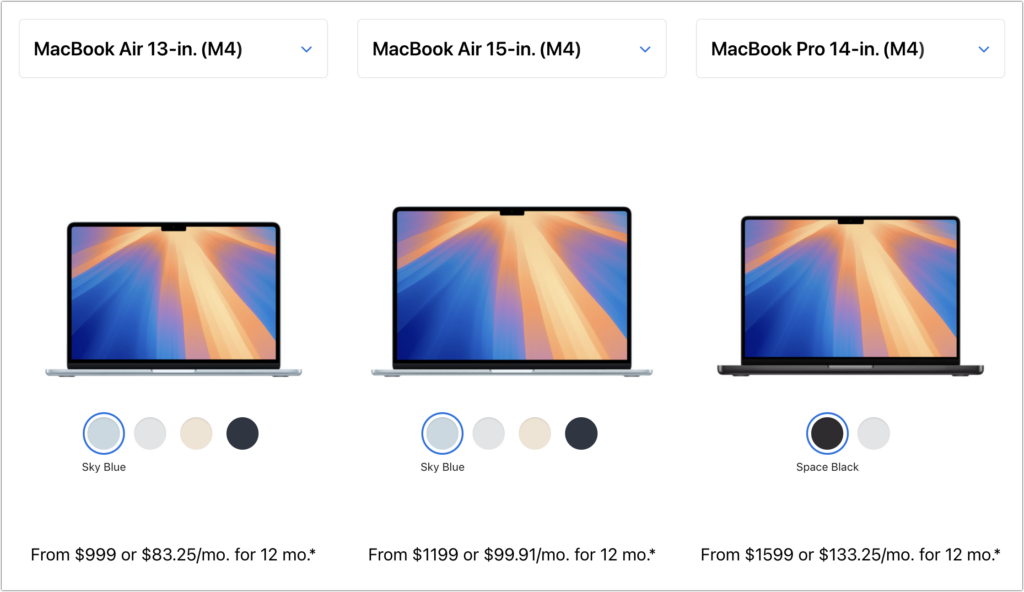
No matter which laptop you choose, you’ll need to select a processor, memory size, and storage capacity:
- Processor: With the 13-inch M1 MacBook Air, you’re limited to the M1 chip with an 8-core CPU and a 7-core GPU. The 13-inch M4 MacBook Air models always come with a 10-core CPU, but you can pay $100 to upgrade from an 8-core GPU to a 10-core GPU. The 15-inch M4 MacBook Air comes standard with a 10-core GPU. Although the performance difference isn’t likely noticeable with everyday apps, it might be worth upgrading for $100, just in case. The 14-inch MacBook Pro offers a choice between the M4, M4 Pro, and M4 Max; the decision ultimately comes down to balancing potential performance needs against increased costs. Few students will need—or even notice—an M4 Pro, and even fewer will need an M4 Max.
- Memory: The 13-inch M1 MacBook Air from Walmart comes with only 8 GB of memory, which is sufficient for most college students. The M4 MacBook Air models start at 16 GB and offer options for 24 or 32 GB. With the 14-inch MacBook Pro, the memory capacity varies with the chip. The M4 chip offers 16, 24, or 32 GB, similar to the MacBook Air. The M4 Pro comes standard with 24 GB, but you can choose to upgrade to 48 GB. The M4 Max has a standard memory spec of 36 GB, with upgrade options to 48, 64, or 128 GB. Students can typically stick with 16 GB or choose 24 GB for more demanding tasks—few will require 32 GB or more.
- Storage: For all MacBook Air models, 256 GB is the minimum storage option, and you can upgrade to 2 TB on all devices sold by Apple. The 14-inch MacBook Pro starts at 512 GB and provides upgrades up to an impressive 8 TB. Choose the storage capacity based on two factors: budget (storage can get expensive quickly) and anticipated usage (audio and particularly video production can consume a lot of space, as can large quantities of photos, but most other uses don’t require as much). Keep in mind that connecting an external Thunderbolt SSD or hard drive is an easy way to offload large files that don’t always need to be readily available. Large files can also be kept in cloud-based storage.
For most students, the best choice for a Mac that is likely to last throughout four years of college is the 13-inch or 15-inch M4 MacBook Air, equipped with a 10-core GPU, 16 GB of memory, and 512 GB of storage. While the 15-inch model has a larger screen, it’s also heavier and takes up more space in a backpack, so consider portability when making your final decision. Be sure to budget for AppleCare+ as well; it’s almost guaranteed that some mishap will occur with a student laptop, and AppleCare+ covers up to two incidents of accidental damage each year.
We recommend talking with your child to learn more about what they think they’ll need—and make sure to compare it to the college’s recommendations—but if you have any questions afterward, feel free to reach out to us.
(Featured image by iStock.com/Zbynek Pospisil)
Social Media: Which Mac is best for a college student in 2025? Our short answer is either the 13-inch or 15-inch M4 MacBook Air. However, students with substantial processing needs (such as audio or video editing) might want to consider the 14-inch MacBook Pro.