
Avoiding DIY misconfigurations that cost businesses later
Avoiding DIY Misconfigurations That Cost Businesses Later
 Picture this: A creative agency owner decides to save money by setting up their team’s new MacBooks themselves. Six months later, they’re facing a security breach, inconsistent user experiences, and hours of lost productivity as employees struggle with devices improperly configured. The “savings” from avoiding professional setup have now cost them thousands in lost revenue and emergency IT fixes.
Avoiding DIY misconfigurations that cost businesses later isn’t just about preventing technical headaches—it’s about protecting your business’s competitive advantage and ensuring your Apple ecosystem actually supports your team’s success rather than hindering it.
Key Takeaways
- DIY device configurations often create security vulnerabilities that expose businesses to costly data breaches and compliance issues
- Inconsistent setups lead to ongoing support tickets that drain productivity and require expensive fixes down the road.
- Proper initial configuration with MDM and standardized processes reduces long-term operational costs by 60-80%
- Professional onboarding workflows eliminate common mistakes, such as improper Apple ID management and missing security protocols.
- Investment in proper setup pays dividends through reduced support needs, improved user productivity, and enhanced security posture.
The Hidden Costs of DIY Apple Device Management
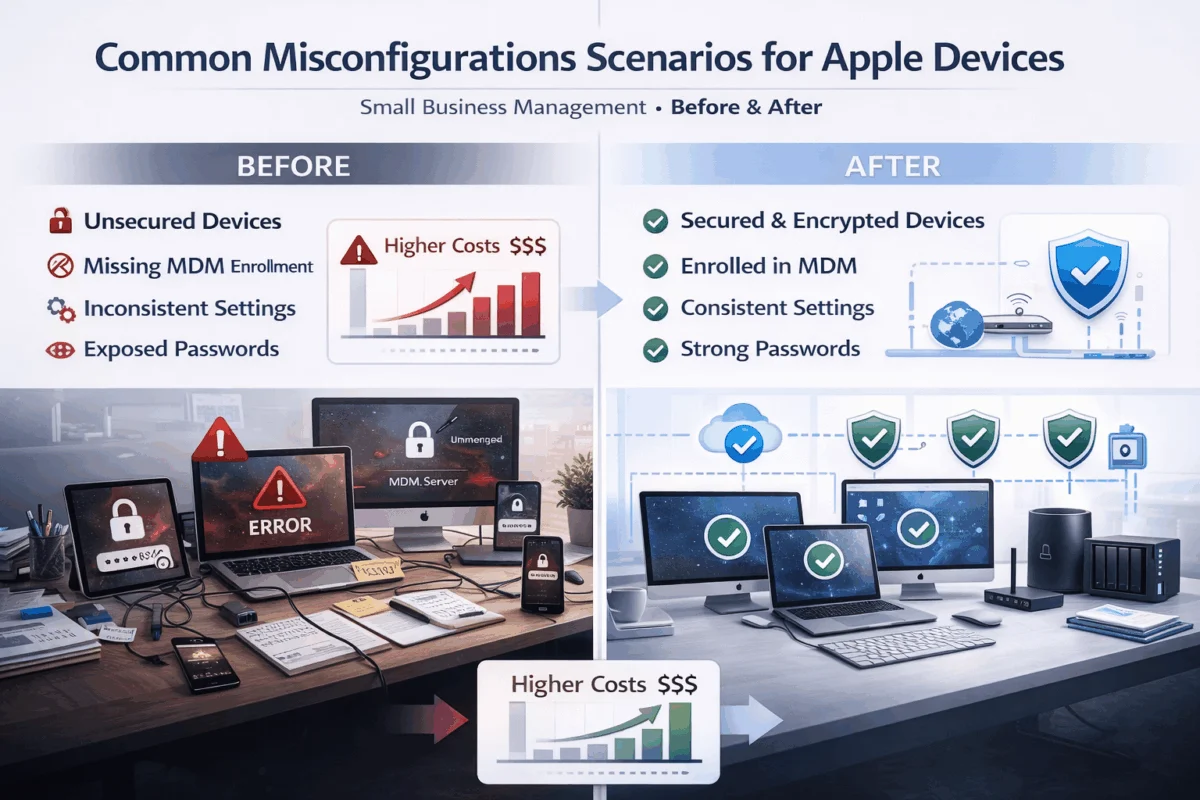 When small business owners and creative agencies first expand their teams, the temptation to handle Mac and iPhone setups in-house seems logical. After all, how hard can it be to unbox a MacBook and create user accounts? The reality reveals itself months later when productivity suffers, and security gaps emerge.
Security Vulnerabilities That Compound Over Time
Avoiding DIY misconfigurations that cost businesses later starts with understanding the security implications of improper device setup. Many companies discover too late that their well-intentioned DIY approach created significant vulnerabilities:
- Shared admin passwords across multiple devices
- Missing FileVault encryption on sensitive business data
- Unmanaged software installations that bypass security protocols
- Inconsistent backup configurations leave critical data unprotected
These security gaps don’t just create immediate risks—they establish patterns that become increasingly expensive to remediate. Learn about essential security measures that protect your business from costly breaches.
The Productivity Drain of Inconsistent Configurations
Each DIY setup becomes a unique snowflake, creating ongoing support challenges that drain resources:
| Common DIY Issue | Immediate Impact | Long-term Cost |
|---|---|---|
| Inconsistent app installations | Confusion, training delays | Ongoing support tickets |
| Missing standardization | Varied user experiences | Reduced team efficiency |
| Poor documentation | Knowledge gaps | Repeated setup mistakes |
| Ad-hoc security settings | Compliance concerns | Potential audit failures |
Real-World Examples of Costly Mistakes
A photography studio recently contacted MacWorks 360 after their DIY approach led to disaster. Their photographer’s MacBook Pro crashed during a wedding shoot, and they discovered their backup strategy had never been adequately implemented. The cost of data recovery services, client compensation, and reputation damage far exceeded what a professional setup would have cost initially.
Similarly, a design agency found that its inconsistent software licensing approach had put it at risk for compliance violations. Rectifying the licensing issues and implementing proper asset management required significant time and financial investment.
Building Bulletproof Onboarding Systems
Avoiding DIY misconfigurations that cost businesses later requires establishing systematic approaches that ensure consistency and security from day one. Professional onboarding systems eliminate guesswork and create repeatable processes that scale with your company.
The Foundation: Proper Apple ID and Device Management
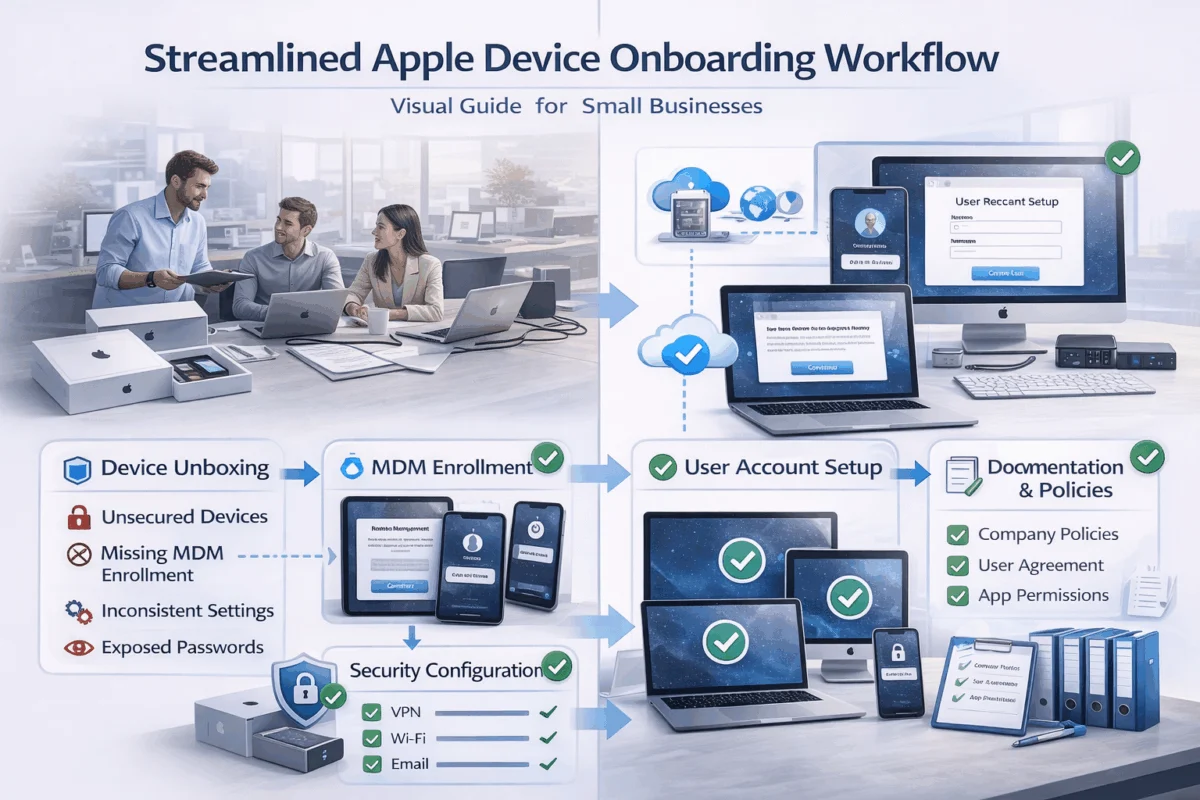
Effective onboarding begins with strategic Apple ID management and device enrollment protocols:
Apple ID Strategy
- Create business-managed Apple IDs separate from personal accounts
- Implement two-factor authentication across all business accounts
- Establish clear ownership and recovery procedures
- Document account relationships and access levels
Device Enrollment Best Practices
- Utilize Apple Business Manager for automated device enrollment
- Configure Mobile Device Management (MDM) before the first user login
- Establish baseline security configurations
- Create standardized app deployment workflows
Streamlined Mac Setup for Maximum Productivity
Professional Mac onboarding eliminates the trial-and-error approach that characterizes DIY setups:
- Pre-deployment Configuration
- Install essential business applications
- Configure security settings and FileVault encryption
- Establish network and printer connections
- Set up backup and sync protocols
- User Account Creation
- Create standard user accounts (not admin)
- Configure appropriate access permissions
- Establish password policies and keychain settings
- Set up iCloud integration with business parameters
- Documentation and Training
- Provide setup documentation specific to your environment
- Create quick-reference guides for everyday tasks
- Establish support procedures and escalation paths
- Schedule follow-up check-ins for new users
iPhone and iPad Integration Strategies
Mobile device integration requires careful consideration of security and productivity balance:
iPhone Configuration Essentials
- Configure corporate email and calendar access
- Install necessary business applications
- Set up VPN and security certificates
- Establish backup and device location protocols
Understanding common iPhone issues and solutions helps prevent support tickets before they occur.
iPad Workflow Optimization
- Configure shared iPad setups for collaborative environments
- Establish app restrictions and content filtering
- Set up Apple Pencil and accessory pairings
- Create user-specific workspace configurations
Creating Repeatable Processes
The key to avoiding DIY misconfigurations that cost businesses later lies in developing processes that anyone on your team can follow:
Standardization Checklist
- Device naming conventions and asset tracking
- Software installation and licensing procedures
- Security configuration verification steps
- User training and handoff protocols
- Documentation updates and version control
Quality Assurance Workflows
- Implement configuration verification checklists.
- Establish testing procedures for new setups.
- Create feedback loops for process improvement.
- Document common issues and resolution steps.
Preventing Common Configuration Pitfalls
Understanding where DIY approaches typically fail helps businesses make informed decisions about their Apple device management strategy. These pitfalls often seem minor initially but compound into significant operational challenges.
Network and Connectivity Missteps
Many businesses underestimate the complexity of properly configuring network access across their Apple ecosystem:
Common Network Configuration Errors
- Inconsistent Wi-Fi profile management across devices
- Missing VPN configurations for remote work scenarios
- Improper certificate management for secure connections
- Lack of network monitoring and troubleshooting procedures
Professional setup ensures that network configurations support both current needs and future scalability. Staying current with system updates prevents technical debt that compounds over time.
Software Management and Licensing Chaos
DIY software management often creates compliance and efficiency challenges:
- Inconsistent software versions across team members
- Missing volume licensing that could reduce costs
- Unauthorized installations that create security vulnerabilities
- Poor update management leading to compatibility issues
Data Protection and Backup Failures
Perhaps the most costly DIY mistake involves inadequate data protection strategies:
Critical Backup Configuration Elements
- Automated Time Machine backups to network storage
- iCloud backup strategies for mobile devices
- Business-grade cloud storage integration
- Regular backup verification and recovery testing
The consequences of backup failures extend far beyond data loss—they include business interruption, damage to client relationships, and potential legal liability.
Access Control and Permission Problems
DIY setups frequently create security vulnerabilities through improper access management:
- Excessive admin privileges that increase security risks
- Shared accounts that eliminate accountability
- Missing access reviews that allow privilege creep
- Inadequate offboarding procedures that leave security gaps
The ROI of Professional Configuration
Investing in professional Apple device configuration delivers measurable returns by reducing support costs, improving productivity, and enhancing the security posture. Understanding these benefits helps justify the initial investment.
Quantifiable Cost Savings
Professional configuration typically delivers:
- 60-80% reduction in ongoing support tickets
- 40-50% faster new employee onboarding
- 90% fewer security-related incidents
- Significant savings on software licensing through proper volume agreements
Productivity Multipliers
Properly configured devices enable teams to focus on their core work rather than technical troubleshooting:
Productivity Benefits
- Consistent user experiences across all devices
- Reduced learning curves for new team members
- Elimination of configuration-related downtime
- Streamlined collaboration and file sharing
Enhanced Security Posture
Professional configuration establishes security foundations that protect business assets:
- Comprehensive encryption and access controls
- Regular security updates and patch management
- Incident response procedures and monitoring
- Compliance with industry security standards
Implementing proper digital security practices creates lasting protection for your business operations.
Working with Apple IT Specialists
 Avoiding DIY misconfigurations that cost businesses later often means partnering with specialists who understand the unique needs of Mac-based businesses. The right consulting relationship provides both immediate setup expertise and long-term strategic guidance.
Choosing the Right IT Partner
Effective Apple IT consulting goes beyond basic technical support:
Key Qualities to Seek
- Deep Apple ecosystem expertise spanning Mac, iPhone, and iPad
- Understanding of creative and small business workflows
- Proactive approach to problem prevention
- Educational support that empowers your team
- Flexible service models that grow with your business
MacWorks 360’s approach exemplifies this philosophy, offering boutique IT consulting that combines technical expertise with educational value. Their 20+ years of expertise in Apple environments enable them to craft solutions that prevent problems rather than fix them.
Service Models That Scale
Professional Apple IT support should adapt to your business needs:
Flexible Support Options
- Project-based setup for initial device deployment
- Managed services for ongoing maintenance and support
- Consulting engagements for strategic planning
- Emergency support for critical issues
Building Long-term Technology Partnerships
The most successful businesses view Apple IT support as a strategic partnership rather than a transactional service. This approach enables:
- Proactive risk management that prevents costly downtime
- Strategic technology planning aligned with business goals
- Continuous optimization of existing systems
- Knowledge transfer that builds internal capabilities
Conclusion
Avoiding DIY misconfigurations that cost businesses later requires recognizing that proper Apple device setup is an investment in your business’s operational efficiency and security posture. While the initial cost of professional configuration might seem significant, the long-term savings in reduced support needs, improved productivity, and enhanced security far outweigh the upfront investment.
The path forward involves three critical steps:
- Assess your current configuration to identify potential vulnerabilities and inefficiencies
- Develop standardized processes for device onboarding and management
- Partner with Apple specialists who can provide both immediate solutions and long-term strategic guidance
Don’t let well-intentioned DIY efforts become tomorrow’s expensive problems. Professional Apple device configuration delivers peace of mind through technology solutions that enable your team to focus on what they do best—growing your business.
Ready to eliminate configuration headaches and build a robust Apple ecosystem? Contact MacWorks 360 to discuss how customized Mac infrastructure optimization can transform your technology from a source of frustration into a competitive advantage. Their proven architect & design approach ensures your Apple devices support your business goals rather than hindering them.
References
[1] Apple Business Manager Documentation – Device Enrollment and Management Best Practices
[2] National Institute of Standards and Technology – Small Business Cybersecurity Guidelines
[3] Ponemon Institute – Cost of Data Breach Report 2025
[4] Apple Security Research – Mobile Device Management Security Framework

Want this Mac Security implemented for you?
MacWorks 360 hardens, monitors, and backs up Mac fleets across New Jersey. We build policies, deploy tools, and prove restores—so your team stays safe and focused.
Contact us · Managed IT for Mac · Apple IT Support
Based in Springfield, NJ—serving Summit, Millburn, Short Hills, Chatham, Montclair, and beyond.