
Best Practices for Automated Backups (Including Offsite/Cloud): Your Complete Guide to Data Protection

When a creative agency’s central server crashed at 3 AM on a Friday, destroying months of client work and threatening to derail multiple campaigns, the difference between business continuity and catastrophic loss came down to one thing: their automated backup strategy. In today’s digital landscape, implementing best practices for computerized backups (including offsite/cloud) isn’t just recommended—it’s essential for survival.
Data loss strikes when you least expect it. Whether it’s a failed macOS update, corrupted storage drive, or accidental file deletion, the consequences can be devastating for small businesses, creative professionals, and Mac-dependent operations. The good news? With proper automated backup strategies, these disasters become minor inconveniences rather than business-ending events.
Key Takeaways
• The 3-2-1 rule forms the foundation of reliable backup strategies: three copies of data, two different storage types, one offsite location
• Automated scheduling eliminates human error and ensures consistent data protection without manual intervention
• Cloud and offsite backups provide critical redundancy that protects against local disasters, theft, and hardware failures
• Mac-specific tools like Time Machine work seamlessly with third-party solutions for comprehensive protection
• Regular testing and monitoring ensure your backup systems work when you need them most
Understanding the Critical Need for Automated Backup Systems
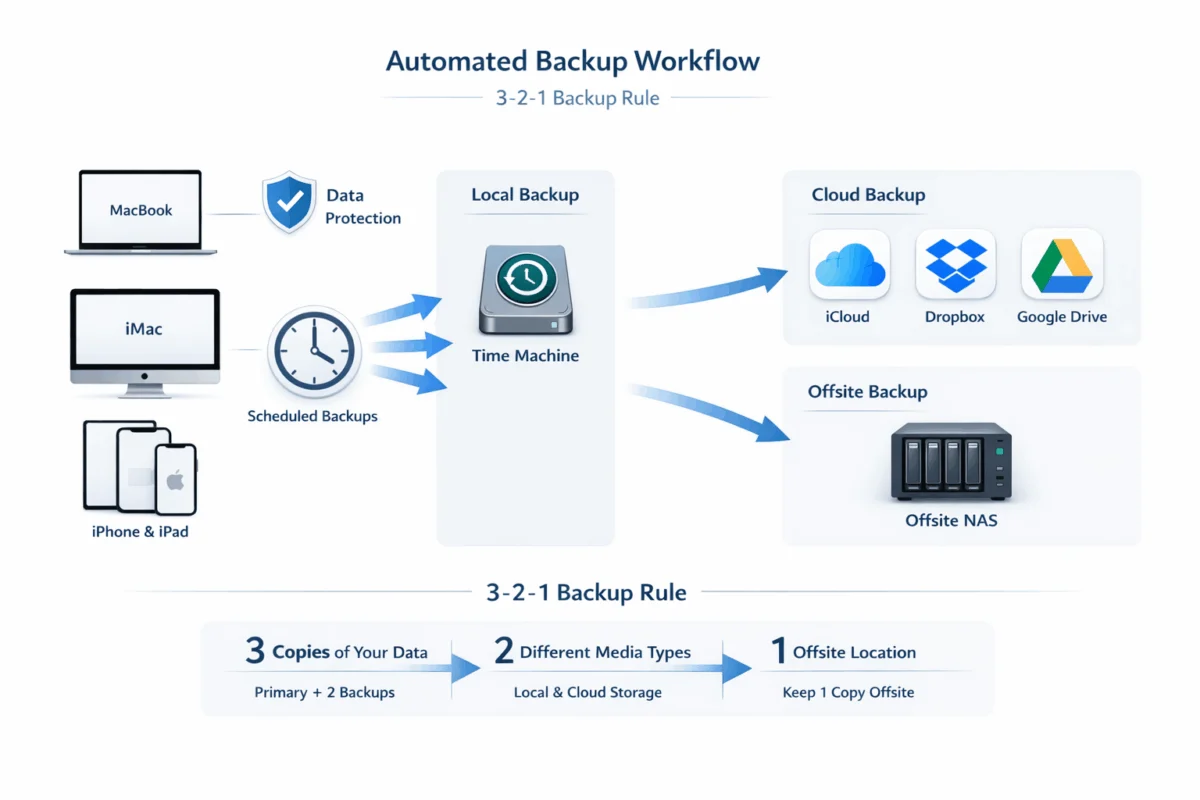
The statistics surrounding data loss are sobering. According to recent studies, 60% of small businesses that lose data shut down within six months[1]. For Mac users and creative professionals who handle large files, client work, and intellectual property, the stakes are even higher.
Common Causes of Mac Data Loss
Mac systems, while generally reliable, face several vulnerability points:
Hardware Failures: SSDs and traditional hard drives have finite lifespans. Even Apple’s high-quality components can fail unexpectedly, taking irreplaceable data with them.
Software Corruption: macOS updates occasionally go wrong, corrupting system files or user data. Third-party applications can also cause file system damage.
Human Error: Accidental deletions, overwrites, or formatting mistakes happen to even the most careful users.
Theft and Physical Damage: Portable devices like MacBooks and iPads are particularly vulnerable to theft, drops, and liquid damage.
Ransomware and Malware: While Macs are less targeted than PCs, they’re not immune to malicious attacks that can encrypt or destroy data.
The Cost of Inadequate Protection
Beyond the noticeable financial impact, data loss affects:
- Client relationships and professional reputation
- Productivity during recovery attempts
- Competitive advantage through lost intellectual property
- Regulatory compliance for businesses handling sensitive data
- Peace of mind for business owners and creative professionals
Understanding these risks makes it clear why proactive risk management through automated backups isn’t optional—it’s a business necessity.
Essential Components of Best Practices for Automated Backups (Including Offsite/Cloud)
The 3-2-1 Backup Rule: Your Foundation
The industry-standard 3-2-1 rule provides the framework for comprehensive data protection:
- 3 copies of important data (original plus two backups)
- 2 different storage media types (local drive, cloud storage, external drive)
- 1 copy stored offsite (cloud service, remote location, or offsite storage facility)
This approach ensures that multiple failure points must occur simultaneously to cause complete data loss—a statistically unlikely scenario.
Automation: Eliminating Human Error
Manual backups fail because people forget, postpone, or skip them entirely. Automated systems remove human inconsistency from the equation by:
- Scheduling regular backups during off-hours
- Monitoring backup completion and alerting on failures
- Handling incremental updates to minimize time and bandwidth
- Managing storage space through intelligent retention policies
Local Backup Solutions for Mac Users
Time Machine remains the gold standard for Mac local backups:
Seamless macOS integration with minimal setup required
Hourly incremental backups with intelligent space management
Easy file restoration through an intuitive interface
Complete system recovery capabilities for disaster scenarios
Best practices for Time Machine setup:
- Use a dedicated external drive at least twice your Mac’s storage capacity
- Enable automatic backups in System Preferences
- Exclude unnecessary files (downloads, cache files) to optimize space
- Test restoration periodically to ensure functionality
Cloud and Offsite Backup Strategies
Cloud storage provides the offsite component crucial for complete protection. Leading options for Mac users include:
iCloud: Native integration with seamless sync across Apple devices
Backblaze: Unlimited computer backup with strong Mac support
Carbonite: Business-focused with advanced security features
Google Drive/Dropbox: File sync with versioning capabilities
Network Attached Storage (NAS) Solutions
For businesses and power users, NAS devices offer enterprise-level features:
- RAID configurations for hardware redundancy
- Remote access for offsite backup functionality
- Multiple device support for team environments
- Advanced scheduling and monitoring capabilities
Professional IT consultants often recommend NAS solutions for creative studios and small businesses that need customized Mac infrastructure optimization beyond consumer-grade options.
Implementation Strategies: Best Practices for Automated Backups (Including Offsite/Cloud)
Phase 1: Assessment and Planning
Before implementing any backup solution, conduct a thorough data audit:
Identify Critical Data:
- Client files and project assets
- Financial records and business documents
- Creative assets (fonts, templates, presets)
- Application settings and configurations
- Email archives and communication history
Determine Recovery Requirements:
- Recovery Time Objective (RTO): How quickly you need data restored
- Recovery Point Objective (RPO): How much data loss is acceptable
- Business impact of various data loss scenarios
Phase 2: Multi-Layered Backup Architecture
Implement overlapping backup layers for maximum protection:
Layer 1: Real-Time Sync
- iCloud Drive for documents and desktop
- Creative Cloud sync for Adobe assets
- Dropbox or Google Drive for collaboration files
Layer 2: Local Automated Backups
- Time Machine to external drive
- Carbon Copy Cloner for bootable backups
- Scheduled disk imaging for complete system snapshots
Layer 3: Offsite/Cloud Backup
- Continuous cloud backup service (Backblaze, Carbonite)
- Periodic offsite drive rotation
- Cloud storage with versioning (Google Drive, Dropbox Business)
Phase 3: Monitoring and Maintenance
Automated systems require ongoing oversight to ensure reliability:
Regular Health Checks:
- Weekly backup completion verification
- Monthly restoration testing
- Quarterly storage capacity review
- Annual strategy assessment and updates
Alert Configuration:
- Email notifications for backup failures
- Dashboard monitoring for cloud sync status
- Storage space warnings before capacity limits
The importance of this systematic approach becomes clear when considering that technical debt accumulates when backup systems aren’t properly maintained.
Advanced Backup Strategies for Creative Professionals and Small Businesses
Handling Large Media Files
Creative professionals working with video, photography, and design files face unique backup challenges:
Tiered Storage Approach:
- Active projects: High-speed local storage with real-time cloud sync
- Recent work: Standard backup rotation with weekly cloud uploads
- Archive projects: Cold storage solutions with annual verification
Bandwidth Optimization:
- Schedule large uploads during off-peak hours
- Use incremental backup tools that only sync changes
- Implement local caching for frequently accessed cloud files
Version Control and File History
Beyond basic backup, version control protects against:
- Accidental overwrites of essential files
- Corruption that isn’t immediately noticed
- Need to revert to previous project iterations
Recommended approaches:
- Git-based systems for code and text files
- Adobe Creative Cloud versioning for design assets
- Time Machine’s built-in version history
- Cloud storage with extended version retention
Business Continuity Planning
Comprehensive backup strategies support broader business continuity:
Documentation Requirements:
- Backup procedure documentation
- Recovery process step-by-step guides
- Contact information for IT support and vendors
- Inventory of backup hardware and software licenses
Staff Training:
- Basic restoration procedures for common scenarios
- Escalation protocols for significant data loss events
- Regular drills to test business continuity plans
Security Considerations
Modern backup strategies must address cybersecurity threats:
Encryption Standards:
- AES-256 encryption for all backup data
- End-to-end encryption for cloud storage
- Encrypted local drives using FileVault
Access Controls:
- Multi-factor authentication for cloud backup accounts
- Limited administrative access to backup systems
- Regular audit of user permissions and access logs
This security-first approach aligns with broader digital security improvements that protect against evolving threats.
Troubleshooting and Recovery Procedures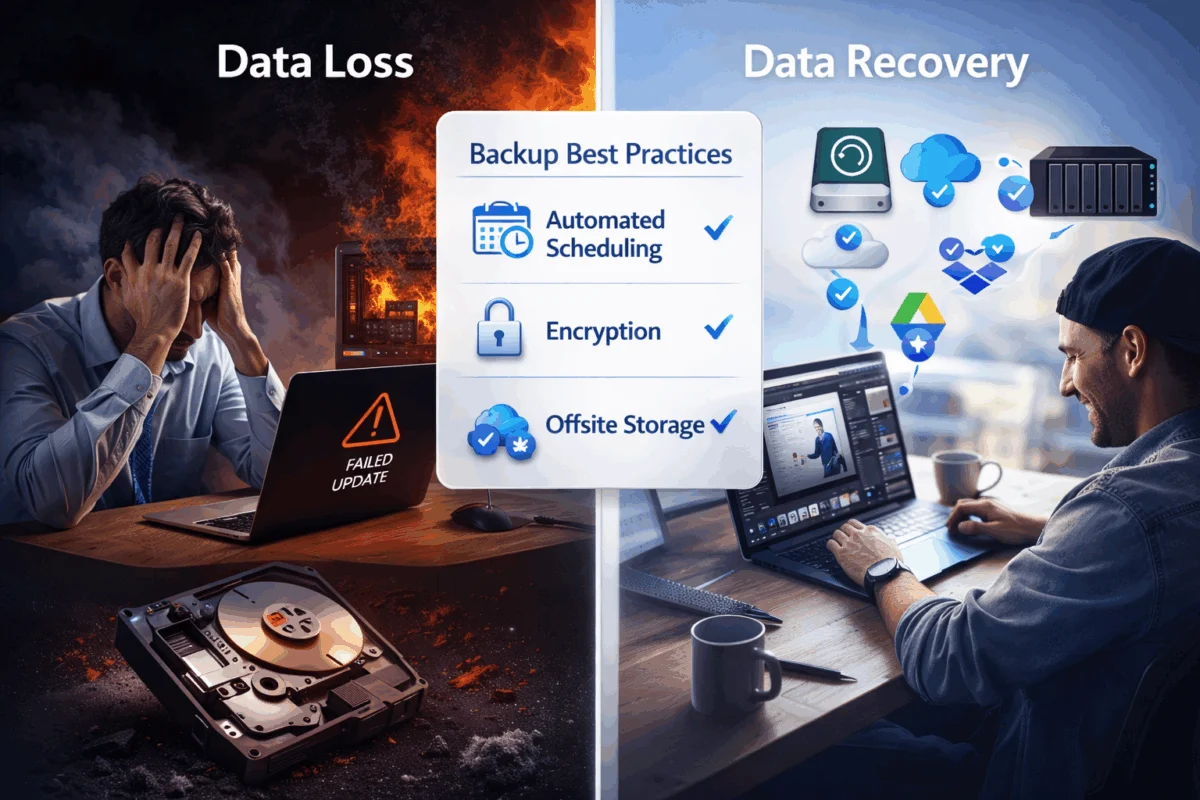
Common Backup Failures and Solutions
Even well-designed systems encounter issues. Common problems include:
Time Machine Errors:
- Solution: Reset Time Machine preferences, verify disk permissions, and exclude problematic files
- Prevention: Regular disk utility checks, adequate free space maintenance
Cloud Sync Failures:
- Solution: Check internet connectivity, verify account status, restart sync applications
- Prevention: Bandwidth monitoring, automatic retry configuration
Storage Capacity Issues:
- Solution: Implement retention policies, archive old backups, and upgrade storage capacity
- Prevention: Automated alerts, regular capacity planning reviews
Data Recovery Best Practices
When data loss occurs, proper recovery procedures minimize damage:
Immediate Steps:
- Stop using the affected device to prevent overwriting deleted data
- Assess the scope of data loss and identify recovery priorities
- Check backup systems for the most recent recoverable versions
- Document the incident for future prevention efforts
Recovery Hierarchy:
- Time Machine restoration for recent file versions
- Cloud sync recovery for synchronized files
- Professional data recovery for hardware failures
- Offsite backup restoration for catastrophic loss
When to Seek Professional Help
Specific scenarios require expert intervention:
- Hardware failures with clicking or grinding noises
- Corrupted file systems that prevent normal boot
- Ransomware infections requiring forensic analysis
- Complex business environments need custom solutions
Professional IT consultants bring specialized tools and experience that can mean the difference between successful recovery and permanent loss. This is where Mac IT support and Apple consulting expertise become invaluable.
Cost-Benefit Analysis and ROI of Comprehensive Backup Systems
Investment Breakdown
Understanding the actual cost of backup systems helps justify the investment:
Initial Setup Costs:
- External drives: $100-500 per device
- Cloud storage subscriptions: $50-200 annually per user
- NAS systems: $500-2000 for small business setups
- Professional consultation: $150-300 per hour
Ongoing Operational Costs:
- Cloud storage fees (typically $5-15 per month per user)
- Hardware replacement cycles (every 3-5 years)
- Monitoring and maintenance time
- Software licensing and updates
Return on Investment
The ROI becomes clear when compared to data loss scenarios:
Single Incident Costs:
- Professional data recovery: $500-3000 per device
- Lost productivity: $50-200 per hour per affected employee
- Client relationship damage: Often immeasurable
- Regulatory fines: $1000-50,000+ depending on industry
Business Continuity Value:
- Reduced downtime during hardware failures
- Faster recovery from accidental deletions
- Protection of intellectual property and client work
- Enhanced professional credibility and client trust
“The cost of prevention is always less than the cost of recovery. A comprehensive backup strategy isn’t an expense—it’s insurance for your digital life.”
Scalability Considerations
Backup strategies should grow with your business:
Startup Phase: Basic Time Machine + cloud storage ($10-30/month)
Growth Phase: NAS + business cloud services ($100-300/month)
Established Business: Enterprise backup with redundancy ($500-1500/month)
This scalable approach ensures that long-term consulting relationships can evolve backup strategies as businesses mature.
Conclusion
Implementing best practices for automated backups (including offsite/cloud backups) is one of the most critical investments any Mac user, creative professional, or small business can make. The combination of local Time Machine backups, cloud storage synchronization, and offsite backup services creates a robust defense against the inevitable reality of data loss.
The key to success lies in automation, redundancy, and regular testing. By following the 3-2-1 rule, implementing proper monitoring, and maintaining your backup systems, you transform potential disasters into minor inconveniences. The peace of mind that comes from knowing your data is protected allows you to focus on what matters most—growing your business and serving your clients.
Your Next Steps
- Audit your current backup situation and identify gaps in coverage
- Implement Time Machine if you haven’t already, with a dedicated external drive
- Choose and configure a cloud backup service that meets your capacity and budget requirements
- Set up monitoring and alerts to ensure your backup systems remain functional
- Test your recovery procedures with non-critical files to verify everything works
- Document your backup strategy and train team members on basic recovery procedures
- Schedule regular reviews to keep your backup strategy current with your evolving needs
Remember, the best backup system is the one that runs automatically, protects comprehensively, and restores reliably when you need it most. Don’t wait for disaster to strike—start building your defense today.
References
[1] National Archives & Records Administration. “Statistics on Small Business Data Loss.” 2024.

Want this Mac Security implemented for you?
MacWorks 360 hardens, monitors, and backs up Mac fleets across New Jersey. We build policies, deploy tools, and prove restores—so your team stays safe and focused.
Contact us · Managed IT for Mac · Apple IT Support.
Based in Springfield, NJ—serving Summit, Millburn, Short Hills, Chatham, Montclair, and beyond.