
Creating standardized user profiles with security controls
Creating Standardized User Profiles with Security Controls: A Complete Guide for Mac-First Businesses

Managing a fleet of Mac devices without proper standardization is like conducting an orchestra where every musician plays from a different sheet of music. The result? Chaos, security vulnerabilities, and countless hours spent troubleshooting individual setups. Creating standardized user profiles with security controls transforms this discord into harmony, enabling your creative team to focus on what they do best while maintaining robust security and operational efficiency.
For small businesses and creative agencies running Mac, iPhone, and iPad fleets, implementing standardized user profiles isn’t just about consistency—it’s about survival in an increasingly complex digital landscape. When every new hire requires hours of manual setup and every device presents unique security challenges, productivity suffers, and vulnerabilities multiply.
Key Takeaways
• Streamlined onboarding reduces new employee setup time from hours to minutes while ensuring consistent security standards across all devices
• Centralized profile management eliminates configuration drift and maintains security compliance without requiring dedicated IT staff
• Automated deployment through Apple’s device management tools enables zero-touch setup for Mac, iPhone, and iPad devices
• Role-based access controls protect sensitive creative assets while providing appropriate permissions for different team members
• Documentation and training protocols ensure repeatable processes that scale with business growth
Understanding Standardized User Profiles for Mac Environments
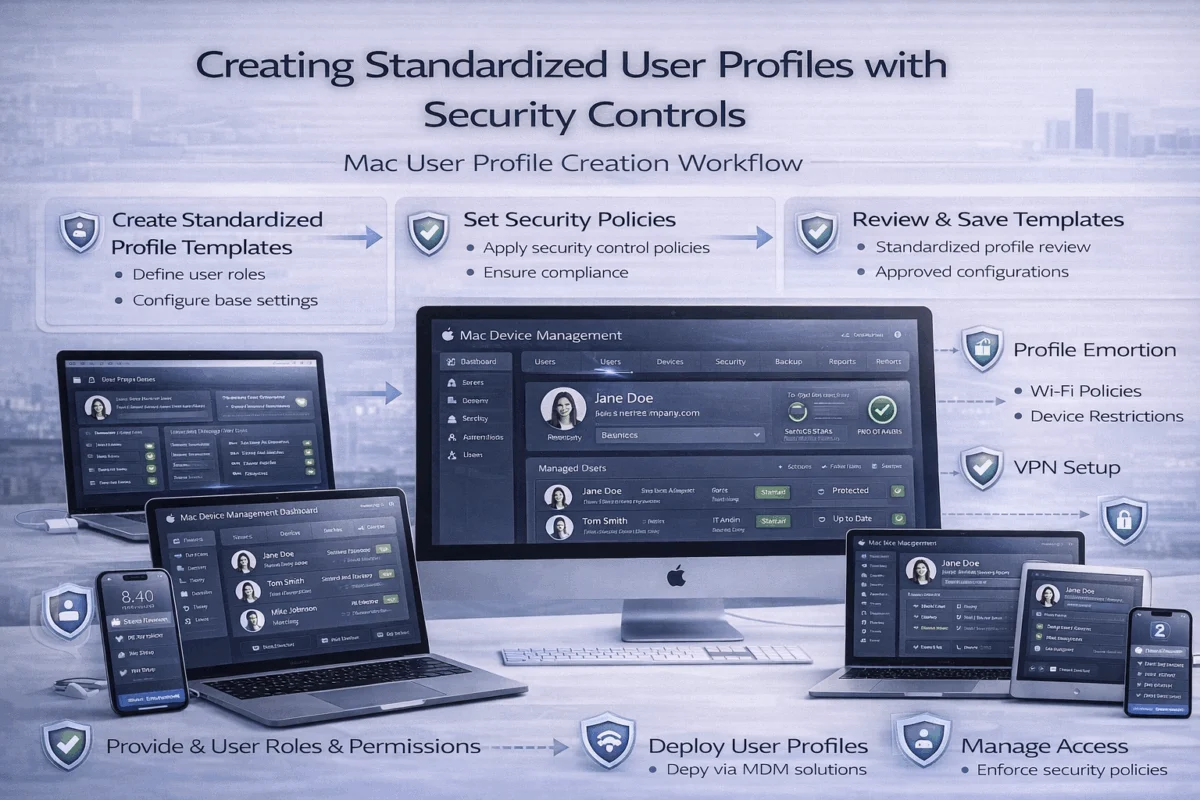 Standardized user profiles serve as the foundation for secure, efficient Mac fleet management. These profiles define user permissions, application access, security settings, and system configurations that apply consistently across all devices in your organization. Rather than manually configuring each Mac, iPhone, or iPad, standardized profiles enable automated deployment of pre-defined settings that align with your business requirements and security policies.
What Makes a Profile “Standardized”?
A standardized profile encompasses several key components:
- User account settings with appropriate administrative privileges
- Application installation and update policies that ensure software consistency
- Security configurations, including FileVault encryption, firewall settings, and password requirements
- Network access controls that define which resources users can access
- Device restrictions that prevent unauthorized modifications or installations
For creative professionals working with sensitive client data, these profiles become especially critical. A photographer’s profile might include automatic backup configurations for Capture One libraries, while a video editor’s profile ensures proper codec installation and storage optimization settings.
The Security Foundation
Security controls within user profiles address multiple threat vectors simultaneously. Modern security approaches require layered protection that begins with properly configured user accounts.
Essential Security Elements:
- Multi-factor authentication integration with Apple ID and third-party services
- Encrypted storage requirements for local and cloud-based files
- Application whitelisting to prevent unauthorized software installation
- Network segmentation rules that limit access to sensitive resources
- Audit logging that tracks user activities and system changes
Creating standardized user profiles with security controls requires understanding how these elements interact within the Apple ecosystem. Unlike Windows environments, where Group Policy dominates, Mac management relies on configuration profiles delivered through Mobile Device Management (MDM) solutions.
Building Your Standardized Profile Framework
Developing effective user profiles begins with understanding your organization’s unique requirements. Creative agencies face different challenges than traditional businesses, requiring profiles that balance security with the flexibility needed for innovative work.
Role-Based Profile Design
Creative Professional Profiles
Creative teams require specialized configurations that support demanding workflows while maintaining security. A video editor’s profile differs significantly from that of a graphic designer, even within the same organization.
Video Editor Profile Components:
- High-performance system settings for Final Cut Pro and DaVinci Resolve
- Automated proxy media management and storage optimization
- Color calibration profiles for accurate display output
- Secure client project folder structures with appropriate permissions
Graphic Designer Profile Components:
- Adobe Creative Suite optimization settings
- Font management and licensing compliance tools
- Print driver configurations and color management
- Client asset protection through watermarking and access controls
Administrative and Support Profiles
Administrative staff require different access levels and security controls compared to creative professionals. These profiles emphasize data protection and workflow efficiency over creative tool optimization.
Technical Implementation Strategy
Creating standardized user profiles with security controls involves several technical layers that work together seamlessly. The implementation process requires careful planning to avoid disrupting existing workflows while introducing enhanced security measures.
Profile Deployment Methods:
- Zero-Touch Enrollment through Apple Business Manager
- Manual enrollment for existing devices
- User-initiated enrollment for BYOD scenarios
- Automated re-enrollment for device refresh cycles
Each deployment method offers specific advantages depending on your organization’s size and technical capabilities. Apple’s device management improvements have simplified many traditionally complex processes.
Configuration Management Best Practices
Version Control for Profiles
Maintaining multiple profile versions enables testing and rollback, which are essential for business continuity. Development, staging, and production environments ensure changes don’t disrupt active workflows.
Testing Protocols:
- Sandbox testing with non-production devices
- Pilot group deployment with select team members
- Gradual rollout across the entire organization
- Performance monitoring to identify optimization opportunities
Documentation Requirements:
Comprehensive documentation ensures consistent implementation and troubleshooting. This includes profile specifications, deployment procedures, and user training materials that enable self-service support.
Streamlined Onboarding and Device Management
Effective onboarding transforms the new employee experience from frustrating to seamless. When creating standardized user profiles with security controls, the onboarding process becomes a strategic advantage that demonstrates organizational professionalism while protecting valuable assets.
Zero-Touch Device Setup
Modern Mac deployment eliminates manual configuration through intelligent automation. New employees receive devices that configure themselves based on their assigned role and security requirements.
Automated Configuration Elements:
- Apple ID creation with organizational domain integration
- Application installation based on role-specific requirements
- Security policy enforcement without user intervention
- Network configuration for seamless connectivity
- Backup and sync settings that protect work from day one
This automation reduces IT support tickets by up to 70% while ensuring consistent security standards across all devices. Creative professionals can begin productive work immediately rather than wait for the technical setup to be completed.
Managed Apple ID Integration
Apple Business Manager enables sophisticated identity management that integrates with existing systems while maintaining Apple ecosystem benefits. Proper password management becomes seamless when integrated with standardized profiles.
Identity Management Benefits:
- Single sign-on integration with creative applications
- Centralized license management for software subscriptions
- Automatic app distribution based on user roles
- Secure credential storage across all Apple devices
Common Onboarding Mistakes and Prevention
Mistake #1: Inconsistent Security Settings
Many organizations apply different security standards to different devices, creating vulnerabilities and user confusion. Standardized profiles eliminate this inconsistency by enforcing uniform security policies across device types and user roles.
Prevention Strategy:
- Define security baselines that apply to all devices
- Create role-specific additions rather than completely different profiles
- Regular auditing to ensure compliance maintenance
Mistake #2: Overwhelming New Users
Complex security requirements can frustrate new employees and reduce productivity. Effective security implementation balances protection with usability.
Prevention Strategy:
- Gradual security feature introduction during onboarding
- Clear explanations of security requirements and benefits
- Self-service resources for common questions and issues
Mistake #3: Inadequate Documentation
Poor documentation leads to inconsistent implementations and increased support requests. Comprehensive guides enable both IT staff and end users to understand and maintain standardized configurations.
Prevention Strategy:
- Step-by-step setup guides with screenshots
- Video tutorials for complex procedures
- Regular documentation updates reflecting system changes
Building Repeatable Processes
Successful standardization requires processes that scale with organizational growth. Creating standardized user profiles with security controls becomes more valuable as team size increases and complexity grows.
Process Documentation Framework:
- Initial device preparation procedures and checklists
- Profile assignment based on role and security requirements
- User training materials and self-service resources
- Ongoing maintenance schedules and responsibilities
- Troubleshooting guides for common issues and solutions
Quality Assurance Measures:
- Regular profile testing on fresh devices
- User feedback collection and analysis
- Performance metrics tracking
- Continuous improvement implementation
These processes ensure that onboarding remains efficient and secure as your organization evolves. Staying current with technology prevents technical debt that complicates future standardization efforts.
Reducing Support Tickets and Boosting Productivity
 Standardized user profiles dramatically reduce support requests while improving overall team productivity. When everyone operates within consistent parameters, troubleshooting becomes predictable and solutions scale across multiple users experiencing similar issues.
Proactive Problem Prevention
Common Support Issues Eliminated:
- Software installation conflicts resolved through standardized application sets
- Permission problems are prevented by role-based access controls
- Network connectivity issues addressed through automated configuration
- Security compliance questions answered by built-in policy enforcement
- Backup failures are prevented through automated sync settings
Creative professionals lose valuable time when technical issues interrupt their workflow. Proper device management ensures technology supports creativity rather than hindering it.
Productivity Enhancement Strategies
Workflow Optimization:
Standardized profiles enable workflow optimization that benefits entire teams. When everyone uses consistent tools and configurations, collaboration becomes seamless, and knowledge sharing becomes more efficient.
- Shared project templates that work identically across all devices
- Consistent keyboard shortcuts and application settings
- Standardized file organization that enables easy collaboration
- Automatic software updates that maintain feature compatibility
Performance Monitoring:
Regular performance analysis identifies optimization opportunities and prevents problems before they impact productivity. Standardized configurations make performance comparison meaningful and actionable.
Metrics to Track:
- Application launch times and responsiveness
- File sync speeds and reliability
- Security incident frequency and resolution time
- User satisfaction scores and feedback trends
- Support ticket volume and resolution efficiency
Long-Term Maintenance and Optimization
Creating standardized user profiles with security controls requires ongoing attention to remain effective. Technology evolves, security threats change, and business requirements grow more sophisticated over time.
Maintenance Schedule:
- Monthly security patch deployment and testing
- Quarterly profile review and optimization
- Semi-annual comprehensive security audits
- Annual complete profile redesign consideration
Continuous Improvement Process:
- Data collection from user feedback and system metrics
- Analysis of trends and improvement opportunities
- Testing of proposed changes in controlled environments
- Implementation of approved improvements
- Monitoring of results and user impact
This systematic approach ensures that standardized profiles continue providing value as your organization grows and the technology landscape evolves. Regular security assessments maintain protection against emerging threats while preserving operational efficiency.
Conclusion
Creating standardized user profiles with security controls transforms Mac fleet management from a constant challenge into a strategic advantage. By implementing consistent configurations across all devices, organizations reduce support overhead while enhancing security and productivity. The investment in proper standardization pays dividends through reduced onboarding time, fewer support tickets, and improved team collaboration.
Success requires careful planning, thorough testing, and ongoing maintenance, but the benefits far outweigh the initial effort. Creative professionals can focus on their core work while IT teams gain peace of mind through proactive security and simplified management.
Next Steps:
- Audit your current device configurations to identify inconsistencies and security gaps
- Define role-based requirements for different team members and security needs
- Implement pilot testing with a small group before organization-wide deployment
- Develop comprehensive documentation for ongoing maintenance and troubleshooting
- Establish monitoring processes to ensure continued effectiveness and optimization
The path to standardized user profiles begins with understanding your organization’s unique requirements and building solutions that scale with growth. With proper implementation, creating standardized user profiles with security controls becomes the foundation for efficient, secure, and productive Mac fleet management that supports your team’s creative success.
References
[1] Apple Business Manager documentation and best practices
[2] Mac fleet management industry standards and benchmarks
[3] Creative workflow optimization research and case studies
[4] Cybersecurity framework guidelines for small businesses
[5] Apple device management technical specifications

Want this Mac Security implemented for you?
MacWorks 360 hardens, monitors, and backs up Mac fleets across New Jersey. We build policies, deploy tools, and prove restores—so your team stays safe and focused.
Contact us · Managed IT for Mac · Apple IT Support
Based in Springfield, NJ—serving Summit, Millburn, Short Hills, Chatham, Montclair, and beyond.