
Last updated: September 28, 2026
Quick answer
Mac IT support for photographers is specialized technical management for Apple hardware, storage, and creative software used in professional photography workflows. It covers tethering reliability, Lightroom and Capture One performance, NAS-based storage, backup, and Mac fleet management. For NJ photographers and studios, MacWorks 360 provides this support on-site and remotely across northern and central New Jersey and the Jersey Shore.
Key takeaways
- Mac IT support for photographers focuses on RAW file handling, tethering stability, storage architecture, and backup, not generic help desk tickets.
- A single commercial shoot can generate 50GB or more of RAW data, which makes storage speed and backup strategy a business requirement, not a convenience.
- Lightroom Classic and Capture One Pro performance problems usually trace back to catalog location, preview settings, or NAS configuration, not the Mac itself.
- A tested 3-2-1 backup strategy (local, redundant local, encrypted cloud) is the standard for protecting irreplaceable client files.
- Freelancers and small studios both need Mac support, but the scope differs: freelancers need reliable backups and fast troubleshooting, while studios need fleet management and networking.
- Managed Mac support plans typically bundle monitoring, updates, backup verification, and priority response into a flat monthly fee.
- MacWorks 360 serves commercial, portrait, wedding, event, and real estate photographers throughout NJ.
What is Mac IT support for photographers?
Mac IT support for photographers is IT management built specifically around Apple hardware and photography software, rather than generic desktop support. It addresses the technical demands unique to image-heavy workflows: large file transfers, tethered shooting, catalog performance, and client-file protection.
Generic IT providers often treat a photography studio like any small office. That approach misses the details that matter:
- RAW files run 50 to 100MB each, and a full shoot can exceed 50GB.
- Tethering setups depend on USB configuration and macOS power management, not just cable quality.
- Lightroom Classic and Capture One Pro catalogs behave differently depending on where they’re stored and how they generate previews.
- Client file loss (a wedding, a commercial campaign) isn’t a minor inconvenience. It can end a business relationship or trigger legal exposure.
Mac IT support for photographers solves these problems at the workflow level, not just the hardware level.
Common Mac problems photographers face
Photographers run into a predictable set of Mac issues tied directly to how image-heavy workflows stress hardware and storage. The three most common are slow editing performance, accidental file deletion, and external drive failures.
Why is your Mac running slow during photo edits?
A slow Mac during Lightroom or Photoshop work is almost always caused by catalog location, preview cache size, or insufficient free disk space rather than a failing machine. Common culprits include:
- Lightroom catalogs stored on a slow or over-full internal drive
- Smart Previews or 1:1 previews left uncapped, consuming tens of gigabytes
- Startup disk usage above 85 to 90 percent, which slows macOS system operations
- Background sync services (cloud backup, Creative Cloud sync) competing for bandwidth during active editing
Example: A wedding photographer running Lightroom Classic on a Mac with 20GB of free space may see the beach ball spinning during culling. Freeing space and relocating the catalog to a fast external SSD typically resolves it within a day.
How to recover deleted photos on a Mac
Recovering deleted photos on a Mac depends on how recently you deleted the files and where they were stored. Recovery options, in order of likelihood of success:
- Check the Trash first (files sometimes sit there unnoticed for weeks).
- Restore from Time Machine if backups were running at the time of deletion.
- Use a cloud backup snapshot (Backblaze, iCloud, or a managed backup service) if local recovery fails.
- Run data recovery software on the affected drive immediately, and stop writing new data to it, since every new file reduces your odds of recovery.
If files were on a NAS or external drive rather than the Mac’s internal storage, recovery success depends heavily on whether the drive uses RAID and whether a backup snapshot exists. This is one of the strongest arguments for a tested backup routine rather than relying on recovery after the fact.
External hard drive issues and fixes
External drive problems for photographers usually show up as slow transfer speeds, drives not mounting, or drives disconnecting mid-transfer during large RAW ingests. Common fixes include:
- Reformatting to APFS or exFAT depending on cross-platform needs
- Replacing worn USB-C or Thunderbolt cables (a frequent, overlooked cause of drops)
- Checking for firmware updates on NAS and RAID enclosures
- Verifying power delivery on bus-powered drives during high-throughput transfers
Mac IT support for Lightroom and Adobe Creative Cloud
Lightroom Classic, Photoshop, and Capture One Pro performance depends on how the Mac, storage, and network are configured together, not just the app settings. Support for these tools typically includes:
- Optimizing catalog location (local SSD vs. NAS) based on studio workflow
- Configuring Creative Cloud sync to avoid competing with active editing sessions
- Managing licensing across multiple Macs used by assistants or retouchers
- Troubleshooting plugin conflicts and GPU acceleration settings
For studios using Adobe Creative Cloud across several workstations, license management and consistent configuration reduce the “it worked on my Mac but not on my assistant’s” problem that costs hours during deadline weeks. Reference sheets like Photoshop keyboard command guides can also speed up retouching once you resolve the underlying performance issues.
Mac vs PC support for photo editing: which is right for your studio?
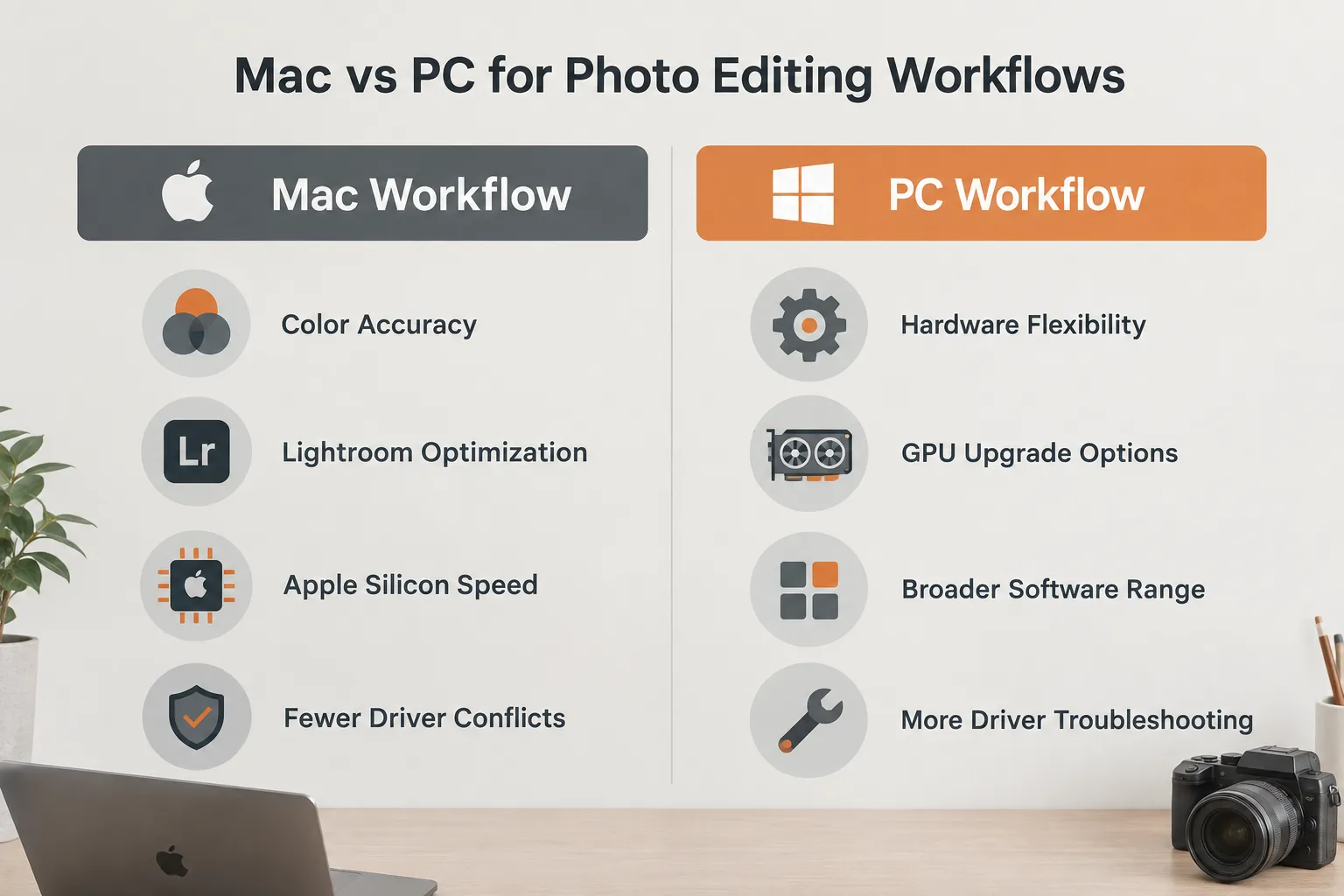
Mac is the standard platform for most professional photography studios because of color consistency, Apple Silicon performance, and tighter integration with Lightroom and Capture One. PC remains a viable choice for studios that prioritize hardware flexibility and GPU upgrade paths, especially for heavy video or 3D work.
| Factor | Mac | PC |
|---|---|---|
| Color accuracy out of the box | Strong, consistent across displays | Varies by monitor and calibration |
| Lightroom/Capture One optimization | Built for Apple Silicon performance | Requires more manual tuning |
| Hardware upgrade flexibility | Limited, mostly external storage/GPU | High, component-level upgrades |
| Driver and compatibility issues | Fewer, tighter hardware/software control | More frequent, wider hardware variety |
| Studio-wide fleet management | Simplified with Apple device management tools | Requires separate imaging/management tools |
Decision rule: choose Mac if the studio runs Lightroom Classic or Capture One as the primary tool and values consistent color and simpler fleet management. Choose PC if the studio does heavy 3D rendering or needs frequent GPU swaps for evolving video pipelines.
Mac IT support for backup and photo storage solutions
Photo storage support for photographers centers on building a NAS and backup architecture that matches how the studio actually shoots and delivers files. This includes:
- Designing NAS drive configuration and folder structure around ingestion and delivery workflow
- Setting network speeds (10GbE where volume justifies it) to prevent bottlenecks during multi-user access
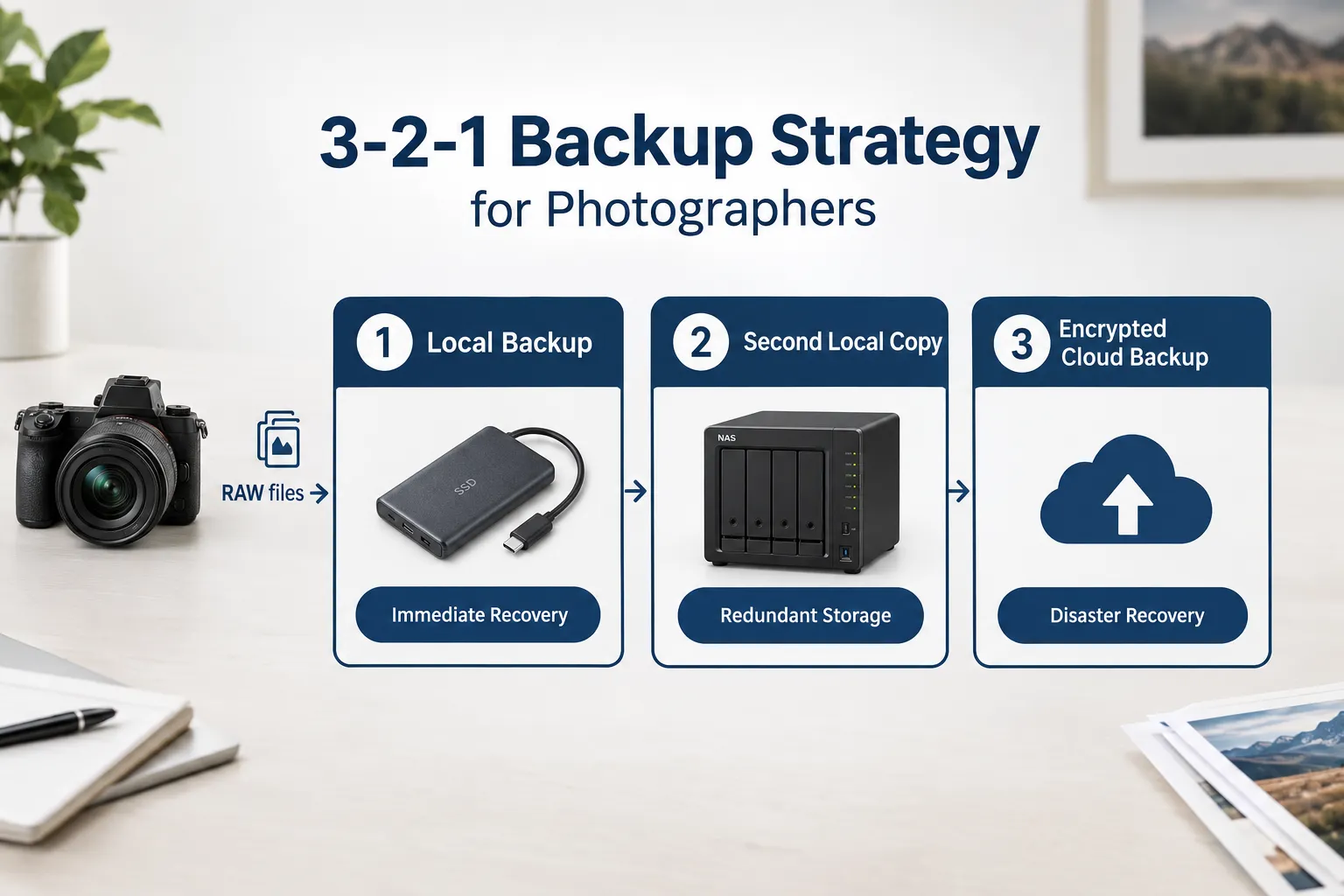
- Implementing a 3-2-1 backup strategy: local backup, a second local copy, and encrypted cloud backup for disaster recovery
- Automating and monitoring backups so failures get caught before a drive fails, not after
Common mistake: relying on a single external drive as the only backup. A drive failure, theft, or fire destroys the only copy. The 3-2-1 model exists specifically to prevent that single point of failure.
Mac IT support for networking multiple computers in a studio
Studios with more than one Mac (owner, assistant, retoucher) need a shared network setup so catalogs, storage, and printers work consistently across machines. This typically involves:
- Configuring shared Lightroom catalogs or smart preview workflows for multi-user access
- Setting up VPN or secure remote access for retouchers working off-site
- Standardizing Mac configuration across the fleet so a new hire’s machine behaves like everyone else’s
- Managing shared printers, color calibration tools, and scanning stations on the same network
Mac IT support for photographers who do video work too
Photographers who shoot hybrid stills and video need storage and workflow support tuned for both large RAW photo batches and large video files, since video project files and RAW footage strain storage and backup systems differently than stills alone. Considerations include:
- Faster storage tiers (NVMe or 10GbE NAS) to handle 4K/6K footage alongside RAW stills
- Separate backup scheduling for video projects, which are often larger and edited over longer timelines
- Proxy workflow configuration in Premiere Pro or Final Cut Pro to keep editing responsive on shared storage
Do you need Mac IT support if you’re a freelance photographer?
Freelance photographers benefit from Mac IT support mainly around backup reliability and fast troubleshooting, even without a full studio network. A single missed backup or a corrupted catalog can wipe out a client delivery deadline just as easily for a solo shooter as for a five-person studio.
Freelancers should prioritize:
- A tested backup routine (not just “I have an external drive somewhere”)
- Fast response when tethering or Lightroom breaks mid-shoot week
- Occasional consulting for new Mac setup or software licensing questions
Studios need the same fundamentals plus fleet management, networking, and multi-user access control.
How much does Mac IT support cost for photography studios?
Mac IT support pricing for photography studios varies by scope: project-based work (a NAS setup or backup implementation) is typically a one-time cost, while ongoing managed support runs as a flat monthly fee based on the number of Macs, storage volume, and response-time requirements. Exact pricing depends on the provider and the studio’s specific setup, so a scoping consultation is the accurate way to get a number. Booking a consultation is the fastest way to get a real quote based on fleet size and workflow.
Managed Mac support plans for photography businesses in NJ
Managed Mac support plans for photography businesses typically bundle monitoring, patching, backup verification, and priority troubleshooting into one predictable monthly service, rather than billing hourly for every issue. A well-structured plan for a photography business usually includes:
- Proactive monitoring of NAS health, backup completion, and storage capacity
- Scheduled macOS and software updates that avoid breaking active projects mid-shoot
- Zero-touch deployment for new Macs assigned to assistants or retouchers
- Priority response windows built around shoot schedules, not standard 9-to-5 office hours
Best Mac IT support services near me in New Jersey
The best Mac IT support option for a NJ photographer is a provider with direct, verifiable experience in photography workflows, not just general Apple device support. MacWorks 360 works with commercial, portrait, wedding, event, and real estate photographers across:
- Northern NJ: Springfield, Morristown, Madison, Summit, Chatham, Millburn, Livingston, Montclair, Parsippany, Westfield
- Central NJ: New Brunswick, Edison, Princeton, Somerville, Bridgewater, Freehold
- Jersey Shore: Red Bank, Asbury Park, Long Branch, Toms River, Point Pleasant, Belmar, Manasquan
- NYC: Manhattan and Brooklyn, remote and on-site by arrangement
Photography-specific workflow experience (tethering, Lightroom catalog optimization, NAS architecture for RAW files) is the differentiator worth checking before hiring.
Cybersecurity and client data protection
Client photo libraries often contain contracts, faces of minors (family and school portrait sessions), and commercial campaign assets under NDA, which makes endpoint security and access control a real business requirement, not an afterthought. Basic protections every studio should have:
- Two-factor authentication on all cloud storage and Creative Cloud accounts, especially given how frequently large-scale password breaches expose reused credentials
- Encrypted local and cloud backups
- Staff training on recognizing phishing attempts targeting client invoices or file-delivery links, a pattern covered in guides to identifying phishing emails
New studio setup and technology consulting
Opening a new photography studio in New Jersey requires planning network design, workstation provisioning, NAS setup, tethering stations, and software licensing together, rather than assembling them piecemeal after move-in. A proper build-out typically covers:
- Network cabling and Wi-Fi coverage sized for the space and equipment load
- Workstation configuration for editing bays, matched to the software stack in use
- Tethering station wiring and power planning for shoot rooms
- Software licensing setup across the full team from day one
FAQ
What does Mac IT support for photographers actually include?
It includes storage architecture, backup implementation, tethering configuration, Mac fleet management, Lightroom and Capture One performance tuning, and cybersecurity for client files.
Is Mac IT support different from regular IT support?
Yes. Regular IT support handles general office computers and networks. Mac-specific photography support addresses RAW file volume, tethering stability, and creative software performance that generic providers often overlook.
How often should a photography studio back up files?
Backups should run automatically, ideally in real time or daily, following a 3-2-1 model: a local backup, a second local copy, and an encrypted cloud backup, verified regularly rather than assumed to work.
Can a slow NAS be fixed without buying new hardware?
Often, yes. Slow NAS performance is frequently caused by network configuration, folder structure, or access protocol settings rather than the drives themselves.
Do freelance photographers need the same support as studios?
No. Freelancers mainly need reliable backup and fast troubleshooting. Studios additionally need fleet management, networking, and multi-user access control.
What causes tethering to drop during a shoot?
Tethering drops usually trace back to USB hub quality, macOS power management settings, or cable length and quality, not the camera itself.
Should video-shooting photographers use different storage than stills-only photographers?
Yes. Hybrid shooters generally need faster storage tiers and separate backup scheduling because video files are larger and edited over longer project timelines.
How do I get started with Mac IT support in New Jersey?
Start with a scoping consultation to review current hardware, storage, and workflow before committing to a support plan.
Ready to stop troubleshooting instead of shooting?
MacWorks 360 works with photographers and photography studios across northern and central New Jersey and the Jersey Shore to fix tethering, storage, backup, and Mac performance problems before they cost a client relationship. Book a free 15-minute consultation to review the current setup and get a straight answer on what needs fixing first.