
Last updated: September 28, 2026
Quick answer
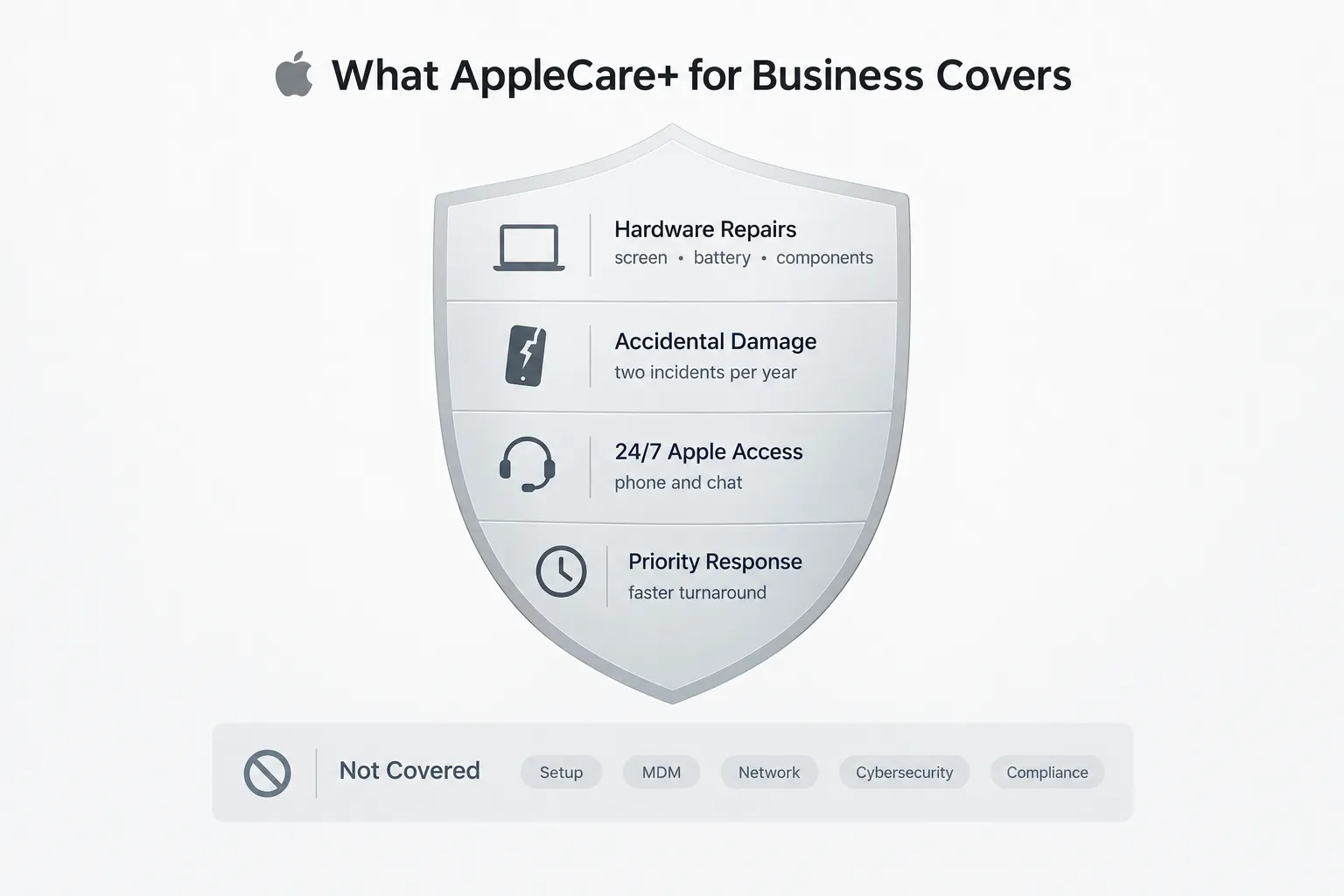
AppleCare+ for Business covers hardware repairs, accidental damage, and Apple’s technical phone line. Managed IT support covers everything else: device deployment, cybersecurity, user management, and day-to-day help desk needs. Most Mac-based businesses in New Jersey with five or more employees need both, not just one.
Key takeaways
- AppleCare+ for Business is a hardware protection plan built into Apple’s business ecosystem, not an IT support service.
- It covers up to two accidental damage incidents per device, per year, plus 24/7 access to Apple’s technical line.
- It does not cover device setup, MDM policy enforcement, network configuration, cybersecurity monitoring, or compliance requirements.
- Managed IT support (an MSP) manages the operational layer: deployment, patching, security, backups, and help desk.
- Solo operators with no compliance obligations may only need AppleCare+.
- Teams of five or more Mac users, remote staff, or businesses handling client data typically need managed IT support.
- The two services are complementary. Apple handles the device. An MSP handles the surrounding environment.
- Response times, coverage windows, and pricing tiers vary by plan, so compare contract terms before assuming overlap.
What is AppleCare+ for Business and how does it work?
AppleCare+ for Business is Apple’s extended hardware warranty and support plan for company-owned devices. It works alongside Apple Business Manager to extend coverage on Macs, iPads, and iPhones purchased for business use.
The plan replaces or supplements Apple’s standard one-year limited warranty. Once a device is enrolled, it gets:
- Extended hardware coverage beyond the standard warranty period
- Access to Apple’s professional support tiers, depending on the plan level
- A direct line to Apple technicians for troubleshooting hardware issues
It’s designed for organizations that want predictable repair costs and faster turnaround than a standard consumer warranty offers. It is not designed to manage the device fleet, secure the network, or support employees day to day.
What’s the difference between AppleCare+ for Business and managed IT support?
AppleCare+ for Business protects the physical device. Managed IT support manages the entire technology environment the device operates in, including security, users, networks, and software.
Think of it in layers:
- Hardware layer: screens, batteries, logic boards, physical damage. This is AppleCare+’s job.
- Operational layer: deployment, onboarding, patching, backups, VPN, endpoint security, help desk. This is the managed IT provider’s job.
A business can have a fully repaired MacBook and still be exposed to a phishing attack, a misconfigured VPN, or a missed patch. AppleCare+ has no visibility into any of that. According to TechTarget’s comparison of AppleCare Professional support tiers, Apple’s plans focus on device reliability and technical assistance, not operational IT management.
How much does AppleCare+ for Business cost compared to managed IT support?
AppleCare+ for Business typically runs a flat monthly rate per device, while managed IT support is priced per user or per device based on the scope of services included, which usually costs more because it covers a broader range of work.
- AppleCare+ for Business: often structured as a per-device or per-user monthly fee, scaled by plan tier.
- Managed IT support: priced per user or per device per month, based on scope (help desk hours, security monitoring depth, backup frequency, compliance work).
The cost difference reflects the difference in scope. AppleCare+ is a narrow, hardware-focused product. Managed IT support is an ongoing service relationship covering security, uptime, and operational continuity. Businesses comparing the two side by side should compare what’s actually included, not just the sticker price. A breakdown of enterprise AppleCare plan value notes that value depends heavily on device volume and how often hardware failures actually occur in a given fleet.
Does AppleCare+ for Business cover accidental damage and device replacement?
Yes. AppleCare+ for Business includes accidental damage coverage, typically capped at two incidents per device per year, and it can result in device replacement if a unit is beyond repair.
- Accidental damage: screen cracks, spills, drops—usually two incidents per year per device, subject to a service fee.
- Device replacement: if a Mac or iPad cannot be economically repaired, Apple may replace it under the plan terms.
- Component failures: battery degradation, logic board issues, and similar hardware faults are generally covered outside accidental-damage limits.
Common mistake: assuming accidental damage coverage means unlimited replacements. Most plans cap covered incidents per year and charge a service fee per claim. Businesses with high device turnover (creative agencies with field shoots, for example) should read the incident cap carefully before assuming full protection.
Can you get 24/7 support with AppleCare+ for Business, and how fast is the response?
Yes, AppleCare+ for Business includes 24/7 phone and chat access to Apple’s technical support team, with response speed depending on the plan tier purchased.
- Standard AppleCare+ for Business: 24/7 access to Apple’s general business support line.
- Higher enterprise tiers, such as those detailed in Apple’s enterprise support offerings, can include faster escalation paths and dedicated account handling for larger device fleets.
24/7 availability applies to reaching a support agent, not necessarily to same-day repair or replacement. A hardware issue reported at 2 a.m. still needs diagnosis, and if a physical repair is required, that depends on service location and part availability. Businesses that need guaranteed fast turnaround for mission-critical hardware should ask Apple directly about repair SLAs, not just phone availability.
What’s not covered by AppleCare+ for Business?
AppleCare+ for Business only covers the hardware layer. It does not cover setup, security, networking, or software support, which is the gap managed IT support is built to fill.
Specifically excluded:
- Device setup, configuration, or deployment
- User onboarding and offboarding workflows
- MDM policy enforcement
- Network configuration, VPN setup, or firewall management
- Cybersecurity monitoring, threat detection, or incident response
- Email, cloud storage, or third-party application issues
- Compliance requirements such as HIPAA or SOC 2
This is what catches business owners off guard. A TechTarget guide on choosing an AppleCare plan for enterprise notes that even the highest-tier AppleCare plans focus on hardware reliability and diagnostic support, not fleet-wide security or compliance management. For businesses handling client data, that gap matters. Data breach exposure and password security risks don’t fall under any AppleCare plan.
Is AppleCare+ for Business worth it for small businesses?
AppleCare+ for Business is worth it for small businesses with a handful of devices and no existing IT management contract, especially when hardware repair costs would otherwise be unpredictable. It’s less valuable as a standalone solution once a business has five or more employees or handles sensitive data.
Choose AppleCare+ for Business if:
- The Business is a sole proprietor or very small team with simple IT needs
- A managed IT provider already handles the operational layer
- The main concern is hardware repair cost, with no compliance obligations
Choose managed IT support if:
- Five or more employees use Macs regularly
- Onboarding, offboarding, or device deployment needs to be consistent
- The team works remotely or needs secure VPN access
- The Business handles sensitive client data
- Proactive security monitoring matters more than reactive repairs
When should a business choose managed IT support instead of AppleCare+?
A business should choose managed IT support when its needs go beyond hardware, such as security monitoring, compliance, device deployment, or ongoing help desk support for a growing team.
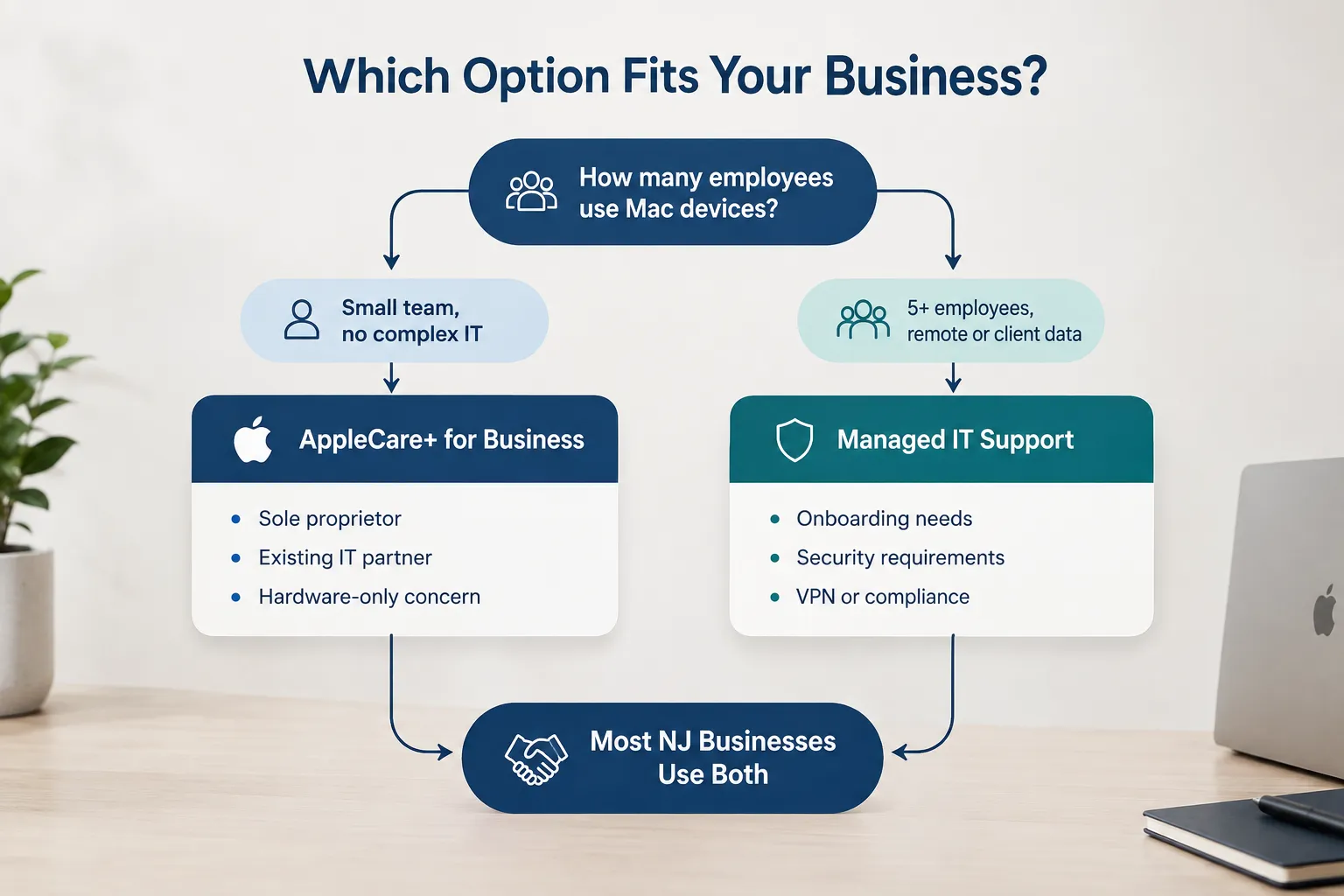
Growing creative agencies, design studios, and photography businesses across New Jersey often hit this point once they add a fourth or fifth Mac user. At that stage, inconsistent onboarding, unmanaged patching, and lack of endpoint monitoring become real operational risks, not hypothetical ones. Businesses in regulated fields, or those simply handling client contracts and financial data, benefit from a dedicated Apple business support partner that manages security and compliance continuously rather than reactively.
What happens if a device breaks outside the warranty period?
If a device breaks outside its AppleCare+ coverage window, repair costs fall entirely on the Business, often at full out-of-warranty rates, which is why extended coverage or a managed IT provider’s hardware coordination matters for older fleets.
- Without AppleCare+: repairs are billed at standard out-of-warranty rates, which can be significant for logic board or display issues.
- With AppleCare+: repairs and eligible replacements are covered under the plan terms, as long as the device is still within the coverage window.
- With managed IT support: the provider can coordinate the repair process, manage loaner devices, and keep the Business running during the repair, even if AppleCare+ has lapsed.
Can managed IT support handle non-Apple devices too?
Yes. Managed IT support providers typically manage mixed environments, including Windows machines, printers, network hardware, and cloud services, alongside Apple devices. AppleCare+ for Business, by contrast, only covers Apple hardware.
This matters for agencies and studios running a mix of Mac workstations, PC-based accounting software, and networked printers or servers. A managed IT provider can unify support across all of it under one contract, while AppleCare+ stays limited to the Apple devices enrolled under the plan.
What’s included in a managed IT support contract?
A managed IT support contract typically includes device deployment, security monitoring, help desk access, backup management, and network administration, structured as an ongoing monthly service rather than a one-time repair plan.
Common inclusions:
- Zero-touch Mac deployment and configuration
- Employee onboarding and offboarding workflows
- Patch management across the device fleet
- Endpoint detection and response (EDR), hardening, and threat monitoring
- Network and VPN configuration
- Help desk support for software and connectivity issues
- Backup and recovery planning
Businesses evaluating a contract should also check how the provider handles AI-related data privacy and compliance obligations, since more agencies now use AI tools that touch client data.
Is AppleCare+ for Business better suited for Mac or iPad deployments?
AppleCare+ for Business applies equally to Mac and iPad fleets, but it’s often more valuable for iPad deployments in field-heavy or client-facing roles, where accidental damage is more common.
- Mac deployments: benefit most from the extended component coverage (batteries, logic boards) since laptops see heavier daily use.
- iPad deployments: benefit most from accidental damage coverage, since tablets are more frequently dropped or used outside the office (client meetings, photo shoots, on-site work).
AppleCare+ for Business vs. managed IT support: side-by-side
| Feature | AppleCare+ for Business | Managed IT Support (MacWorks 360) |
|---|---|---|
| Hardware repairs | Yes | Coordinated for you |
| Accidental damage | Yes (2x/year) | Coordinated for you |
| 24/7 Apple support | Yes | Yes |
| Device setup and deployment | No | Yes |
| User onboarding/offboarding | No | Yes |
| MDM and policy management | No | Yes |
| Network and VPN setup | No | Yes |
| Cybersecurity monitoring | No | Yes |
| Proactive monitoring | No | Yes |
| Help desk for software issues | No | Yes |
| Backup and recovery | No | Yes |
The best answer for most NJ businesses: both, working together
AppleCare+ for Business and managed IT support are complementary services, not competing ones. Apple protects the hardware. A managed IT provider protects the security, the users, and the network around that hardware.
MacWorks 360 works with AppleCare+ for Business regularly, helping clients coordinate repairs and manage claims while keeping the operational layer, security, backups, and help desk running smoothly. Learn more about how the two fit together for Apple-based business support in New Jersey.
Why creative businesses in New Jersey trust MacWorks 360
MacWorks 360 specializes in Mac-based businesses across northern and central New Jersey and the Jersey Shore, including creative agencies and design studios in Morristown and Madison, and photography studios and print shops from Springfield to Red Bank. Clients aren’t just buying repair coordination or a help desk line. They’re buying back the hours they’d otherwise spend troubleshooting instead of running their Business. Read more about MacWorks 360’s Apple-focused IT approach.
FAQ
Does AppleCare+ for Business replace the need for an IT provider?
No. It covers hardware repairs and Apple’s support line only. It doesn’t manage security, deployment, networking, or user support.
Can a business use both AppleCare+ and a managed IT provider at the same time?
Yes. Most Mac-based businesses use AppleCare+ for hardware protection and a managed IT provider for everything else, including security and day-to-day support.
How many accidental damage incidents does AppleCare+ for Business cover?
Typically, it covers up to two incidents per device, per year, subject to a service fee, depending on the specific plan purchased.
Is AppleCare+ for Business the same as a standard Apple warranty?
No. It extends coverage beyond the standard one-year limited warranty and adds accidental damage protection and priority support access.
What size business needs managed IT support instead of just AppleCare+?
Businesses with five or more Mac users, remote staff, client data handling, or compliance requirements generally need managed IT support.
Does managed IT support include hardware repair coordination?
Yes. A managed IT provider can coordinate AppleCare+ claims and repairs so the Business doesn’t have to manage the process directly.
Can AppleCare+ for Business help with compliance requirements like HIPAA or SOC 2?
No. Compliance falls outside AppleCare+’s scope entirely and requires a managed IT provider or compliance specialist.
Is there a cost advantage to bundling AppleCare+ with a managed IT contract?
Costs are typically billed separately since they’re different products, but a managed IT provider can help optimize which AppleCare+ tier makes sense for the device fleet, avoiding overpaying for unused coverage.
References
- AppleCare Professional, Enterprise Support
- AppleCare
- Apple at Work
- Enterprise, Business, Apple
- Intro to Apple Business Essentials
- Evaluating the AppleCare Professional Support options, TechTarget
- Deciding which AppleCare plan is best for the enterprise, TechTarget
- Is AppleCare+ worth it for enterprise organizations?, TechTarget
Ready to find out what your Business actually needs? Book a free 15-minute consultation with Richard and get a straight answer, no pressure.