
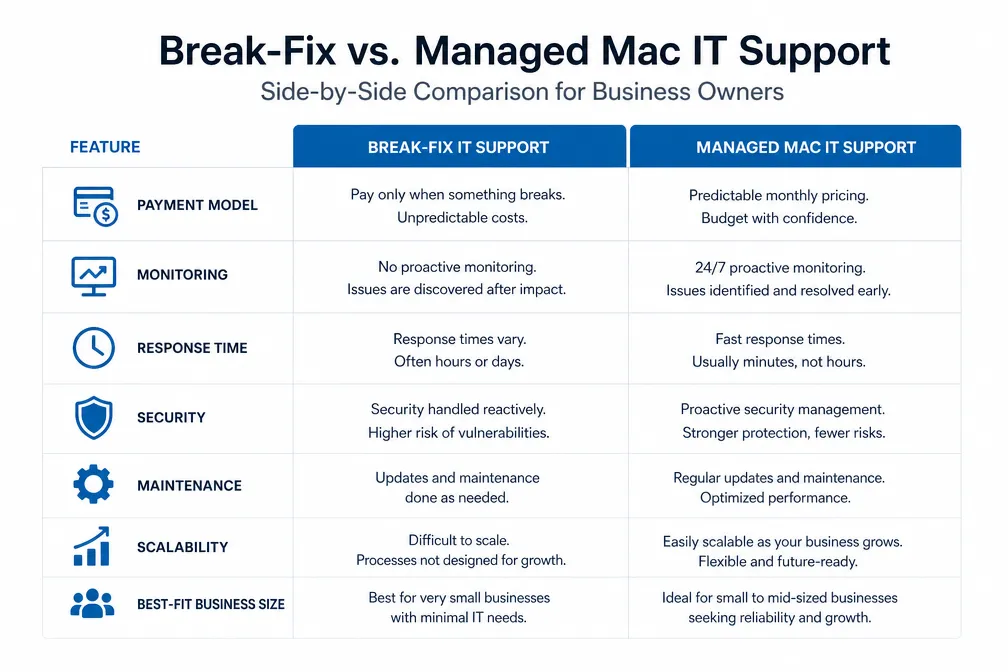
Quick Answer: Break-fix support is a reasonable choice for very small, low-risk Mac environments where technology problems cause inconvenience rather than business disruption. Managed Mac IT is generally the better fit when a business depends on its Apple devices for daily revenue, manages multiple users or devices, needs predictable monthly IT costs, or cannot comfortably absorb recurring downtime. The right model depends on how critical your Macs are to operations, not just how many devices you own.
Key Takeaways
- Break-fix support is reactive and pay-as-needed. You pay only when something breaks, with no ongoing contract.
- Managed Mac IT is proactive. A provider monitors, maintains, and supports your Apple environment for a fixed monthly fee.
- Break-fix costs appear lower upfront but become unpredictable during incidents, especially when downtime, lost productivity, and emergency service premiums are factored in.
- Managed IT services for Mac-based businesses often make the most financial sense around 10 or more employees, but smaller teams may benefit sooner when Macs support mission-critical workflows or downtime is costly.
- Neither model eliminates all downtime or security risk. Managed IT reduces both through prevention, but it is not a guarantee.
- The quality of a managed Mac IT provider matters as much as the model itself. General IT firms that “also support Macs” are not the same as Mac-specialist providers.
- A practical decision checklist and FAQ are included below to help you evaluate your specific situation.
What Is the Difference Between Break-Fix and Managed Services?
Break-fix IT support is a transactional model: a business calls for help when something stops working, pays an hourly rate for the repair, and has no ongoing relationship with the provider between incidents. Managed IT services, by contrast, involve a continuous relationship where the provider monitors systems, performs preventive maintenance, and supports users for a fixed monthly fee.
For Mac-based businesses in New Jersey, the practical difference comes down to posture. Break-fix is reactive by design. Managed Mac IT is proactive by design. Both can keep your Apple devices running, but they do so in fundamentally different ways and carry very different cost and risk profiles depending on your business size and technology dependence.
Break-fix in practice:
- A business contacts a provider when a Mac crashes, a server fails, or an Apple device stops functioning.
- The technician diagnoses and repairs the problem, then invoices for time spent.
- No monitoring, no scheduled maintenance, and no strategic guidance occurs between calls.
- The business is responsible for software updates, security patches, and general upkeep on its own.
Managed Mac IT in practice:
- Monitoring tools run continuously across Macs, servers, iOS devices, and network systems.
- The provider applies updates, patches, and maintenance during planned windows.
- A Mac help desk handles day-to-day user questions and issues.
- Strategic consultations help plan technology decisions, device refreshes, and security improvements.
- One predictable monthly fee covers all of the above.
As NinjaOne notes in its comparison of break-fix and managed services, the core distinction is that managed services shift IT support from a cost incurred after failure to an investment made in preventing failure.
Break-Fix vs Managed Services: Side-by-Side Comparison
| Factor | Break-Fix Support | Managed Mac IT |
|---|---|---|
| Payment model | Per-incident, hourly billing | Fixed monthly fee |
| Response expectations | Variable, no guaranteed SLA | Priority response, defined service levels |
| Monitoring | None between incidents | Continuous, 24/7 across all devices |
| Maintenance | As-needed or self-managed | Scheduled, proactive, provider-managed |
| Security responsibility | Business handles patches and updates | Provider manages patching and monitoring |
| Budgeting | Unpredictable, spikes during incidents | Predictable, consistent monthly cost |
| Scalability | Works for very small, simple setups | Scales with team growth and device count |
| Strategic guidance | Not included | Regular technology planning included |
| Best-fit business | 1-5 employees, low Mac dependency | 5+ employees with mission-critical workflows, or 10+ otherwise |
When Should You Use Break-Fix Support?
Break-fix support is still a reasonable choice for a narrow set of businesses. Specifically, it works when technology problems are infrequent, low-stakes, and unlikely to cause significant revenue loss or workflow disruption.
Break-fix is a practical fit when:
- The business has 1 to 5 employees and uses Macs primarily for email, documents, and web browsing.
- A technology outage causes inconvenience but not financial harm. Work can pause for a few hours without serious consequences.
- The business has no sensitive client data, no compliance requirements, and no time-sensitive deliverables.
- IT problems occur rarely, perhaps once or twice a year, and are typically minor.
- Budget constraints make a monthly managed services commitment genuinely difficult to sustain.
A solo consultant who uses a single MacBook for client communication and document drafting is a reasonable break-fix candidate. If the laptop needs a repair, the work pauses temporarily, but no client data is at risk, and no deadline is missed.
Common mistake: Many businesses choose break-fix because it appears cheaper, without accounting for what a single significant incident actually costs when lost billable time, emergency service premiums, and data recovery are included. Kaseya’s analysis of the break-fix model points out that the apparent simplicity of break-fix often masks its true total cost for businesses that depend on technology to generate revenue.
What Are the Signs a Business Has Outgrown Break-Fix Support?
Several operational signals indicate that break-fix support is no longer adequate. When any of the following apply, the cost and risk profile of reactive IT begins to work against the business.
Operational signals that break-fix is no longer sufficient:
- Team size has grown past 5 to 10 employees. More users mean more support requests, more devices to maintain, and a higher probability that a single incident affects multiple people simultaneously.
- Downtime now has a direct dollar cost. If an hour of system unavailability means missed billable work, delayed client deliverables, or lost revenue, the unpredictability of break-fix becomes a financial liability.
- Security incidents have occurred or are a realistic concern. Without proactive patch management, Apple devices accumulate unpatched vulnerabilities over time. CISA regularly publishes advisories on actively exploited vulnerabilities in macOS and iOS, and delayed patching is one of the most common contributing factors to successful attacks. Keeping up with those advisories requires ongoing attention, not just reactive repairs. For more on the scope of credential and data exposure risks, see this overview of recent large-scale data breaches.
- The same problems recur repeatedly. If a business calls for break-fix support for similar issues every few months, the root cause is not being addressed. Managed IT identifies and resolves underlying problems rather than repeatedly patching symptoms.
- Compliance or data handling obligations exist. Healthcare, legal, financial, and other regulated industries have specific requirements around data security and system documentation that break-fix arrangements are not structured to support.
- A new employee onboarding process is needed. As teams grow, consistent Apple device onboarding becomes important for security and productivity. Break-fix providers are not set up to manage this systematically.
Is Break-Fix Cheaper Than Managed Services?
Break-fix appears less expensive on the surface because there is no monthly fee during quiet periods. Whether it is actually cheaper depends entirely on how often problems occur and how much downtime costs the business.
For a business where technology rarely fails, and downtime has minimal financial impact, break-fix can genuinely cost less over a year. For a business where Macs are central to revenue generation, the math often reverses quickly.
What drives the true cost of break-fix:
- Hourly rates for Mac IT support vary by provider and region. Emergency calls outside business hours typically carry premium rates significantly above standard pricing.
- Extended downtime multiplies costs. A design team that cannot access project files for several hours loses not just those hours but may also miss client deadlines, creating downstream schedule disruptions.
- Security incidents are expensive. A ransomware attack or data breach involves not just recovery costs but potential legal fees, client notification obligations, and reputational damage. Inconsistent patching under a break-fix model increases exposure to these events.
- Deferred maintenance accumulates. Small unresolved issues compound over time. A Mac running an outdated operating system, misconfigured network settings, or a failing drive that goes undetected will eventually require more expensive intervention than routine maintenance would have.
The honest comparison: For a very small, low-dependency business, break-fix is often genuinely cheaper. For a 15-person creative agency or professional services firm where Macs are the primary production tool, managed IT services for Mac-based businesses typically deliver lower total cost of ownership when downtime and prevention are factored in. ITSco’s breakdown of break-fix vs managed services frames this well: the question is not which model has a lower sticker price, but which model produces lower total technology cost given the business’s actual risk profile.
Why Choose Managed Services Over Break-Fix?
Managed IT services make sense when a business needs consistent performance, predictable costs, and someone actively watching its systems rather than waiting to be called. The core advantages are prevention, predictability, and priority.
Prevention: Continuous monitoring catches problems before they cause downtime. A failing drive, a misconfigured security setting, or an overdue software update are identified and addressed before they become incidents. This is the fundamental value proposition of managed IT for Mac environments specifically.
Predictability: A fixed monthly fee allows accurate IT budget forecasting. There are no surprise invoices after a bad month of hardware failures, and no temptation to delay calling for help because of hourly billing concerns.
Priority: Managed clients typically receive faster response than break-fix callers because the ongoing relationship creates a defined service commitment. When an issue does occur, a managed client is not competing with unknown callers for the next available technician.
Strategic guidance: A managed Mac IT provider becomes familiar with the business’s workflows, team size, and technology stack. That context makes technology planning conversations more useful. Decisions about macOS upgrades, hardware refreshes, backup architecture, and security tooling benefit from a provider who understands the specific environment rather than seeing it for the first time during an emergency.
What Are the Problems and Limitations of Break-Fix Support?
Break-fix has real structural limitations that become more significant as a business grows. Understanding these honestly helps avoid choosing the model for the wrong reasons.
The core limitations of break-fix:
- No monitoring means no early warning. Problems that monitoring tools would catch in early stages go undetected until they cause visible failures. By that point, what could have been a brief maintenance task may have become a data recovery situation.
- Response time is unpredictable. Without a service agreement, a break-fix provider prioritizes managed clients first. A business calling without a contract may wait hours or longer during busy periods, which is precisely when other businesses are also experiencing problems.
- Security patching is self-managed. Apple releases macOS and iOS security updates regularly. Under a break-fix model, applying those updates is the business’s responsibility. In practice, updates are often delayed or skipped, leaving known vulnerabilities unaddressed. Good digital security habits require consistent attention, not just reactive responses.
- No strategic input. Break-fix relationships are transactional. The provider fixes what is broken and leaves it. There is no ongoing conversation about whether the current technology setup is serving the business well or what changes would improve reliability and performance.
- Costs are unpredictable. A single major incident can cost more than several months of managed service fees. Budget planning is difficult when IT expenses fluctuate based on failure events.
Function-4’s comparison of managed IT vs break-fix notes that the break-fix model creates a misaligned incentive: providers earn more when more things break, which is the opposite of what a business needs from an IT partner.
Break-Fix Response Time vs Managed Services: What to Expect
Response time is one of the most practical differences between the two models, and it matters most during the moments when a business is already under stress from a technology failure.
Under break-fix, response time depends on the provider’s availability at the time of the call. There is no contractual commitment. During periods of high demand, such as after widespread software updates or regional weather events that affect hardware, wait times can extend significantly. A business without a service agreement is, by definition, a lower priority than clients who pay for ongoing support.
Under a managed IT services agreement, response expectations are typically defined in a service level agreement (SLA). The SLA specifies how quickly the provider will acknowledge a request and begin working on it, depending on issue severity. This does not guarantee instant resolution of every problem, but it does provide a defined commitment that break-fix arrangements cannot offer.
Practical implication: For a business where a two-hour wait for IT support during a server failure is acceptable, break-fix response variability may not be a dealbreaker. For a business where a two-hour outage means significant financial loss or a missed client deadline, a defined SLA is not optional.
Can You Use Both Break-Fix and Managed Services Together?
Some businesses use a hybrid approach, maintaining a managed services agreement for core infrastructure monitoring and maintenance while using break-fix or project-based support for specialized tasks outside the managed scope. This is a legitimate arrangement in some contexts.
However, for most small and mid-sized Mac-based businesses, a hybrid model adds complexity without proportional benefit. If the managed services agreement is well-scoped, it should cover the situations where fast, reliable support matters most. Break-fix supplements make more sense for one-time projects, specialized software support, or situations where the managed provider does not cover a specific technology.
When a hybrid might make sense:
- A business has a managed agreement for its Mac infrastructure but needs occasional support for a Windows-based peripheral system the managed provider does not cover.
- A project-based technology upgrade falls outside the scope of the standard managed services agreement.
- A business is transitioning from break-fix to managed IT and wants overlap during the handoff period.
When a hybrid adds unnecessary complexity:
- The business is trying to reduce managed services costs by keeping some support on a break-fix basis. This often results in gaps in coverage and slower response for the unmanaged components.
- The business has not clearly defined which systems are covered by which model, creating confusion during incidents.
Managed Services Hidden Costs Compared to Break-Fix
Managed IT services are not without their own cost considerations. Presenting these honestly is important for a genuine comparison.
Legitimate cost factors in managed IT:
- Monthly fee during quiet periods. The fixed fee applies whether the business has zero support requests or many in a given month. During periods of stable technology performance, the fee may feel like an expense without immediate visible return.
- Onboarding time and knowledge transfer. Starting a managed services relationship requires the provider to learn the business’s environment, document existing systems, and install monitoring tools. This initial investment of time and attention is real, even if it pays off over the long term.
- Scope boundaries. Managed services agreements define what is and is not covered. Work that falls outside the defined scope may be billed separately. Businesses should read scope definitions carefully before signing.
- Provider quality varies significantly. A managed services agreement with a provider who lacks genuine Apple expertise delivers less value than the same agreement with a Mac specialist. General IT firms that support Macs as a secondary offering may not have the depth of knowledge to optimize an Apple environment effectively.
What managed IT does not do:
- It does not eliminate all downtime. Hardware fails, software has bugs, and internet outages are outside any provider’s control.
- It does not eliminate all security risk. Proactive patch management and monitoring reduce risk substantially, but no IT arrangement provides complete protection.
- It does not replace internal judgment. Technology decisions still require input from business leadership. A good managed IT partner informs those decisions; it does not make them unilaterally.
Endurance IT’s analysis of managed services vs break-fix costs makes a useful point: the value of managed IT is most visible in what does not happen, which makes it harder to measure than break-fix costs that appear on invoices.
Is Break-Fix Still Worth It in 2026?
Break-fix is still a viable model for the right business, but the category of businesses for which it is genuinely appropriate has narrowed. As Mac environments have grown more complex, security requirements have increased, and remote work has distributed devices across more locations, the case for purely reactive IT support has weakened for most businesses with more than a handful of employees.
The model remains worth considering for:
- Solo operators or very small teams with simple, low-risk Mac setups.
- Businesses with strong internal technical expertise that can handle routine maintenance independently.
- Situations where technology is a minor operational tool rather than a core business dependency.
For businesses that have grown past these conditions, the ChannelPro Network’s 2025 overview of managed vs break-fix models notes that the managed services model has become the standard for businesses that treat technology as infrastructure rather than an occasional expense.
Managed Services vs Break-Fix for Small Business: Which Fits Best?
For small Mac-based businesses in New Jersey, the decision often comes down to a single question: what does an hour of downtime actually cost?
If the honest answer is “not much,” break-fix is a reasonable starting point. If the honest answer is “a lot,” the math tends to favor managed IT even at smaller team sizes.
A practical framework by business profile:
| Business Profile | Likely Better Fit |
|---|---|
| 1-5 employees, Macs used for basic productivity | Break-fix |
| 5-10 employees, mixed Mac dependency | Evaluate based on downtime cost and incident history |
| 10+ employees, Macs central to revenue | Managed Mac IT |
| Creative agency, media production, design studio | Managed Mac IT |
| Healthcare, legal, or financial services | Managed Mac IT (compliance requirements apply) |
| Growing business adding employees regularly | Managed Mac IT (scalability matters) |
What to Ask Before Choosing a Managed Mac IT Provider
Not all managed IT providers are equally equipped to support Apple environments. Before signing an agreement, ask these questions directly.
Questions to ask a prospective managed Mac IT provider:
- What percentage of your client base uses Macs as their primary platform? A provider whose business is primarily Windows-focused may not have the depth of Apple ecosystem knowledge needed to manage macOS, iOS, and Apple-specific software effectively.
- How do you handle macOS and iOS updates across a client’s device fleet? The answer should describe a defined process for testing, scheduling, and deploying updates, not a general statement about keeping systems current.
- What does your monitoring cover, and how are alerts handled? Ask specifically which metrics are monitored, what triggers an alert, and what the response process looks like when an alert fires outside business hours.
- What is included in the monthly fee, and what is billed separately? Scope clarity prevents billing surprises. Ask for a written description of what is and is not covered.
- How do you handle Apple device onboarding for new employees? A provider with a defined Apple device onboarding process demonstrates that they have thought through the full lifecycle of device management, not just break-fix repairs.
- What is your response time commitment, and is it documented in the agreement? A verbal assurance of fast response is not the same as a written SLA with defined response windows by issue severity.
- Can you provide references from Mac-based businesses of similar size? Direct references from comparable clients are the most reliable signal of real-world service quality.
Decision Checklist: Break-Fix or Managed Mac IT?
Work through these questions to identify which model fits the current business situation.
Choose break-fix if most of these apply:
- The business has fewer than 5 employees.
- Macs are used for basic tasks: email, documents, web browsing.
- A technology outage lasting several hours would cause inconvenience but not financial harm.
- No sensitive client data is stored on Mac devices or servers.
- IT problems occur rarely and have been minor when they do occur.
- The team has enough internal technical comfort to handle routine maintenance.
- A monthly managed services fee is genuinely not feasible given current budget constraints.
Choose managed Mac IT if most of these apply:
- The business has 5 or more employees when Macs support mission-critical work, or 10 or more in lower-dependency environments.
- Macs are the primary production tool for billable work.
- An hour of downtime has a measurable dollar cost.
- The same technology problems have recurred more than once.
- Security, compliance, or data handling obligations exist.
- The team has no internal IT expertise and relies entirely on outside support.
- The business is growing and adding employees or devices regularly.
- Predictable IT costs matter for financial planning and cash flow.
Frequently Asked Questions
What is break-fix IT support?
Break-fix IT support is a reactive model where a business pays for technical assistance only when a problem occurs. There is no ongoing contract, no monitoring, and no preventive maintenance. The provider is called when something breaks, fixes it, and invoices for time spent.
What is managed IT for Mac?
Managed IT for Mac is a proactive support model where an independent Mac IT provider monitors, maintains, and supports a business’s Apple devices and infrastructure for a fixed monthly fee. It typically includes continuous monitoring, scheduled maintenance, a Mac help desk, security patch management, and strategic technology planning.
Is break-fix cheaper than managed services?
Break-fix has lower upfront costs because there is no monthly fee. Whether it is cheaper overall depends on how often problems occur and what downtime costs the business. For businesses where technology failures are rare and low-stakes, break-fix can be genuinely less expensive. For businesses where downtime has a direct revenue impact, managed IT often produces lower total cost when prevention and productivity are factored in.
How many employees does a business need before managed IT makes sense?
There is no universal threshold. Managed Mac IT often becomes cost-effective around 10 employees for many business types, but creative agencies, professional services firms, and other businesses where Macs are central to revenue may benefit sooner. A five-person team with mission-critical workflows can need managed IT before a larger team with minimal technology dependence.
Does managed IT eliminate downtime?
No. Managed IT reduces the frequency and duration of downtime through proactive monitoring and maintenance, but it does not eliminate it. Hardware fails, software has bugs, and internet outages are outside any provider’s control. The goal is to catch and resolve problems faster and prevent many issues from becoming outages in the first place.
What happens to security patching under break-fix?
Under break-fix, the business is responsible for applying macOS, iOS, and application security updates. In practice, this means updates are often delayed or skipped. CISA and Apple both publish security advisories for actively exploited vulnerabilities regularly, and delayed patching is a common factor in successful attacks. Managed IT providers handle patching as part of the ongoing service, reducing this exposure.
Can a business switch from break-fix to managed IT?
Yes. The transition typically involves an initial assessment of the existing Mac environment, documentation of devices and configurations, installation of monitoring tools, and a knowledge transfer period. Most businesses find the transition straightforward, particularly when working with a provider that specializes in Apple environments.
What should a managed Mac IT agreement include?
At minimum: defined scope of services, response time commitments by issue severity, patch management process, monitoring coverage, help desk access terms, onboarding process for new devices and employees, and clear documentation of what is billed outside the monthly fee.
Does break-fix work for businesses with compliance requirements?
Generally no. Healthcare, legal, financial, and other regulated industries have specific requirements around data security, system documentation, and audit trails that break-fix arrangements are not structured to provide. Managed IT with defined security practices is typically required to meet these obligations.
Is MacWorks 360 affiliated with Apple Inc.?
No. MacWorks 360 is an independent Mac IT provider. It specializes in Apple environments but operates independently of Apple Inc.
Is Your Business Ready for Managed Mac IT?
Not sure whether the current Mac environment needs pay-as-needed support or ongoing management? Request a consultation with MacWorks 360 to discuss your users, devices, recurring problems, and operational priorities. MacWorks 360 is an independent Mac IT provider serving New Jersey businesses, with deep experience in Apple environments across creative agencies, professional services firms, and growing teams.
There is no obligation, and the conversation starts with your specific situation rather than a generic sales pitch.
References
- NinjaOne: Break-Fix vs. Managed Services: What’s the Difference?
- NinjaOne: Does Break/Fix Still Have a Place in the IT Channel?
- Kaseya: Break-Fix vs. Managed Services: How to Make the Transition
- ITSco: Break-Fix vs. Managed Services: Which IT Support Model Is Right for You?
- Function-4: Managed IT Services vs Break-Fix
- Endurance IT: Break-Fix vs Managed Services: The Real Cost of Reactive IT
- ChannelPro Network: Managed Service Model or Break/Fix Model: A Guide (2025)