
Quick Answer: MacWorks 360 provides business Mac IT support across Northern New Jersey, Central New Jersey, and the Jersey Shore. The firm handles Mac troubleshooting, Apple device management, Mac and Windows integration, Microsoft 365 configuration for Mac users, and managed IT services for Mac environments. It serves small and midsize businesses with five or more Apple devices, with both onsite and remote support available. MacWorks 360 is an independent IT consulting firm and is not affiliated with Apple Inc.
Key Takeaways
- MacWorks 360 focuses exclusively on Mac and Apple ecosystems, which makes it a different option than a general IT provider that primarily supports Windows.
- Service is available across Northern New Jersey, Central New Jersey, and the Jersey Shore, with both onsite visits and remote support.
- Two service plans are available: a flexible pay-as-needed option and a proactive managed program for businesses that want ongoing coverage.
- Mac computers can function reliably in Windows-dominated networks, but correct configuration of SMB, Active Directory, and print services is required.
- Microsoft 365 applications including Outlook, Teams, OneDrive, and SharePoint work on Mac, but often need specific setup to perform well in a business environment.
- Mac security requires active management. Macs are not immune to malware or ransomware, and patch management is a necessary part of any business Mac strategy.
- This service is designed for businesses, not residential users. Walk-in repair and consumer support are outside the scope.
- Before choosing any Mac IT provider, ask about their experience with mixed environments, their response process, and what is included in their service plan.
What Is Mac IT Support and Why Do Businesses Need It?
Mac IT support covers the technical management of Apple computers and devices in a business setting. It includes troubleshooting hardware and software problems, configuring Macs to work within a company network, managing security and updates, and supporting users when something goes wrong.
Businesses need dedicated Mac IT support because general IT providers often focus on Windows infrastructure. When a Mac-specific issue arises, such as a macOS update breaking an application, a Mac failing to authenticate against Active Directory, or an M-series Mac needing configuration for a new deployment, a provider without deep Apple experience may take longer to diagnose the problem or apply a fix that works short-term but creates new issues later.
For companies running five or more Macs, or mixing Apple devices with Windows systems, having a provider who understands both sides of that environment reduces downtime. It prevents configuration problems from compounding over time.
Mac IT Support vs. Windows IT Support: What Is Actually Different?
Mac IT support and Windows IT support share some overlap, but the underlying systems behave differently in ways that matter for business networks.
macOS handles networking protocols, file permissions, directory services, and printing differently than Windows. A technician who primarily works with Windows environments may not immediately recognize why a Mac is dropping its connection to a Windows file server, why Kerberos authentication is failing, or why a macOS update changed a security policy that affects network access.
Key differences that affect business support:
- Directory integration: Macs can join Active Directory, but the configuration requires specific steps and ongoing maintenance. Issues with binding, password policies, and certificate trust are common in mixed environments.
- File sharing: macOS uses SMB for Windows file server access, but version mismatches and permission inheritance behave differently than on Windows clients.
- Printing: Mac print drivers and queue management differ from Windows. Network printers that work automatically on Windows often need manual configuration on Mac.
- Updates: Apple releases macOS updates on a different cycle than Windows. Some updates change system-level settings that affect business applications or network behavior.
- Security tools: Not all endpoint protection platforms have feature-equivalent Mac agents. A provider needs to know which tools work well on macOS and which create performance problems.
A provider who works primarily in Mac environments will recognize these issues faster and apply fixes that account for how macOS actually works, rather than applying a Windows-based approach that does not translate.
What Does Mac IT Support Include?
Business Mac IT support typically covers six core areas. What is included in any specific engagement depends on the service plan and the provider.
1. Helpdesk and troubleshooting
Remote and onsite support for macOS errors, application failures, connectivity problems, and hardware concerns. This is the most immediate layer of support most businesses use.
2. Mac deployment and migration services
Configuring new Mac computers for business use, including application installation, network setup, security policy application, user account creation, and data transfer from previous devices. Apple device onboarding is a structured process that ensures each machine is ready for productive use on day one.
3. Mac and Windows integration services
Configuring Macs to access Windows file servers, connect to network printers managed by Windows print servers, authenticate against Active Directory, and exchange files reliably with Windows users.
4. Microsoft 365 support for Mac
Setting up and optimizing Outlook, Teams, OneDrive, SharePoint, Word, and Excel on Mac hardware. This includes configuring sync settings, applying organizational security policies, and resolving version-specific issues.
5. Mac security and patch management
Applying macOS updates and security patches, configuring endpoint protection, enabling FileVault encryption, managing firewall settings, and monitoring for vulnerabilities. Given recent large-scale data breaches, patch management and credential hygiene are not optional for business environments.
6. Apple device management for businesses
Using mobile device management (MDM) platforms to enforce security policies, push software, manage settings remotely, and maintain an inventory of all Apple devices in the organization.
What Mac IT Problems Does MacWorks 360 Handle?
MacWorks 360 addresses the specific technical problems that come up most often in business Mac environments across New Jersey.
Common issues handled:
- Mac computers unable to access shared folders on Windows servers, often caused by SMB version mismatches or permission inheritance errors
- Network printer failures where Mac print jobs hang or printers do not appear in the available list
- Active Directory authentication failures, repeated password prompts, or Kerberos ticket errors after macOS updates
- Microsoft 365 applications behaving differently on Mac than on Windows, including Outlook sync delays, OneDrive conflicts, and Teams audio or video issues
- macOS updates that break third-party applications or change system preferences affecting business workflows
- Backup failures when Mac systems are not properly integrated into network backup solutions
- Slow Mac performance caused by background processes, storage issues, or misconfigured applications
- Security gaps from outdated software, missing patches, or endpoint protection tools not properly configured for macOS
Each of these problems has a defined solution path. The value of working with a Mac-focused provider is that the diagnostic process starts from accurate knowledge of how macOS behaves, not from assumptions carried over from Windows support experience.
Mac IT Support for Mixed Mac and Windows Environments
Mac computers can work reliably on Windows networks when the integration is set up correctly. This is one of the most common situations MacWorks 360 handles for New Jersey businesses.
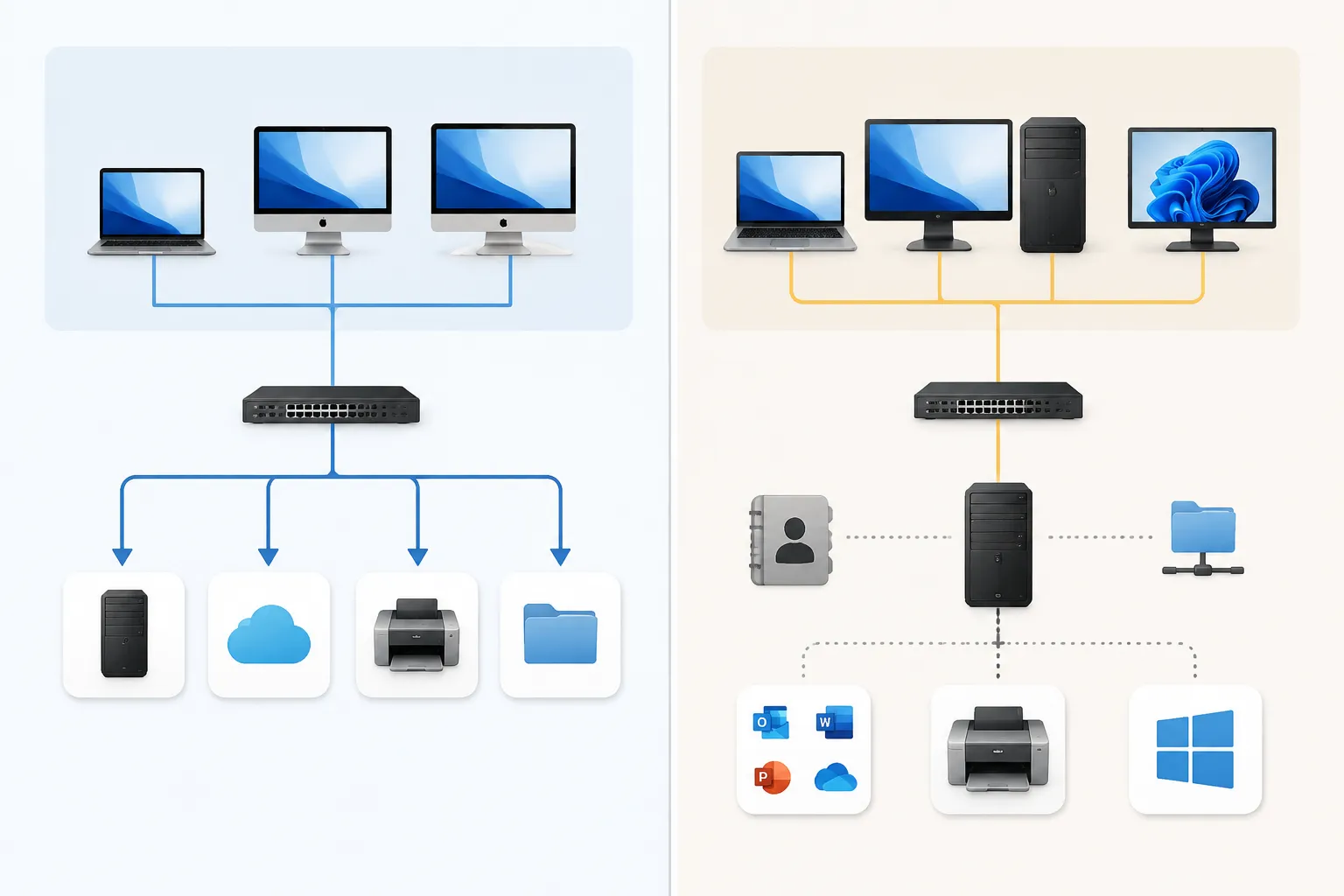
A mixed environment typically involves Windows servers running Active Directory and file shares, with Mac workstations that need to authenticate, access shared storage, print to network printers, and collaborate with Windows users. Each of these connection points requires specific configuration.
What correct Mac-Windows integration looks like:
- Mac computers bound to Active Directory with stable authentication and proper certificate trust
- SMB file sharing configured so Mac users can read, write, and set permissions on Windows server folders without errors
- Network printers accessible from Mac workstations with correct drivers and print queue settings
- Microsoft 365 applications on Mac configured to match the organization’s security and compliance policies
- Cross-platform file compatibility so documents created on Mac open correctly on Windows and vice versa
When this integration is done well, Mac users experience the same access to company resources as their Windows colleagues. When it is done poorly, Mac users face repeated login prompts, files that will not open, and printers that disappear after every macOS update.
Microsoft 365 Support for Mac Users
Microsoft 365 runs on Mac, but the Mac versions of Outlook, Teams, OneDrive, and other applications sometimes need specific configuration to work well in a business environment. This is not a limitation of Mac hardware. It is a configuration and setup issue.
Common Microsoft 365 problems on Mac that require IT attention:
- Outlook for Mac handling large mailboxes slowly, or failing to sync calendar and contacts with Exchange
- OneDrive consuming excessive bandwidth during sync, or creating file conflicts when multiple users edit shared documents
- Teams experiencing audio or video quality issues tied to Mac system permissions or network settings
- SharePoint sites not loading correctly in Safari, requiring browser-specific configuration
- Multi-factor authentication prompts appearing repeatedly because the Mac’s credential store is not retaining tokens correctly
MacWorks 360 configures Microsoft 365 applications on Mac to use the organization’s authentication and security policies, resolves version-specific compatibility issues, and trains users on differences between the Mac and Windows versions of these applications. The goal is for Mac users to have full access to company resources without workarounds.
Onsite Mac Support vs. Remote Mac Support for New Jersey Businesses
Both onsite and remote support have appropriate use cases. The right choice depends on the type of problem and the urgency involved.
Remote Mac support works well for:
- Software troubleshooting and application errors
- macOS configuration changes
- Microsoft 365 setup and optimization
- User training and guidance
- Monitoring and patch management
- Most helpdesk requests that do not involve physical hardware
Onsite Mac support in New Jersey is appropriate for:
- Hardware failures or physical damage
- New Mac deployment and initial network setup
- Network infrastructure changes that affect Mac connectivity
- Situations where remote access is not possible due to connectivity or security restrictions
- Complex migrations where hands-on work reduces risk
MacWorks 360 serves businesses across Northern New Jersey, Central New Jersey, and the Jersey Shore, with onsite visits available when the situation calls for it. Remote support handles most day-to-day requests efficiently, and onsite visits are scheduled when physical presence adds clear value.
Mac IT Support: Managed Services vs. Break-Fix
These are the two fundamental models for business Mac IT support, and the right choice depends on how many Macs a business runs and how much downtime it can tolerate.
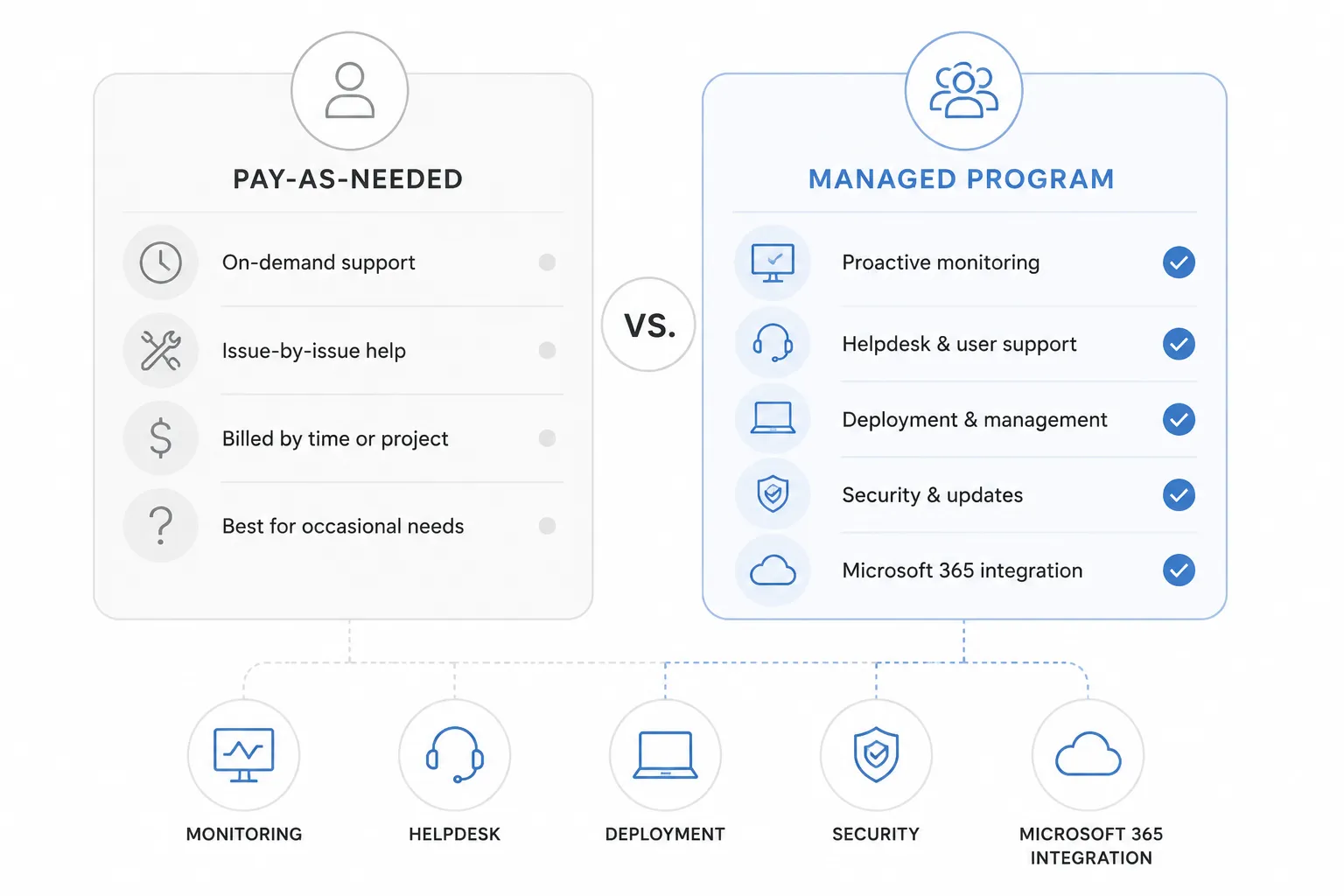
Break-fix (pay-as-needed): A business calls for support when a problem occurs and pays for the time spent resolving it. There is no ongoing contract. This works for smaller organizations with minimal IT complexity or those with some internal technical capability who occasionally need specialized Mac expertise.
Managed IT services for Mac: A provider monitors systems proactively, applies updates, manages security, and responds to issues before they cause outages. The business pays a predictable monthly fee. This model suits companies with five or more Macs where downtime has a measurable cost.
MacWorks 360 offers both:
| Feature | Pay-As-Needed | Managed Program |
|---|---|---|
| Helpdesk support | On demand | Included |
| Proactive monitoring | No | Yes |
| Patch management | On request | Automated |
| Backup monitoring | No | Yes |
| Priority response | Standard | Priority |
| Monthly reporting | No | Yes |
| Project work pricing | Standard rate | Discounted |
| Strategic planning | On request | Included |
Businesses with five or more Macs generally benefit from the Managed Program because proactive monitoring catches configuration drift, failed backups, and security gaps before they become visible problems. Smaller organizations or those with occasional needs often start with pay-as-needed and move to managed services as their Apple environment grows.
How Much Does Mac IT Support Cost in New Jersey?
Mac IT support pricing in New Jersey varies based on the service model, the number of devices, and the scope of work involved. No responsible provider can give an accurate price without first understanding the environment.
General pricing context (these are estimates based on common market ranges and should be confirmed with any provider directly):
- Break-fix or pay-as-needed support is typically billed hourly or per incident. Rates for specialized Mac IT consulting in the Northeast generally range from roughly $125 to $200 per hour, depending on the complexity of the work and the provider’s experience level.
- Managed IT services for Mac are typically priced per device per month. For a small business with 10 to 20 Macs, monthly managed service costs commonly fall in the range of $75 to $150 per device, though this varies significantly based on what is included.
- Project work such as Mac deployment, migration, or Microsoft 365 setup is usually quoted as a flat project fee after an initial assessment.
The most accurate way to understand cost is to request a consultation, describe the environment, and ask for a written proposal. MacWorks 360 offers an initial consultation to assess the environment before recommending a service plan.
Is Mac IT Support Worth It for My Business?
For a business running five or more Macs in a professional environment, yes. The question is not whether to have Mac IT support, but which model fits the situation.
Consider the cost of a single significant outage: a Mac server going down, a failed backup preventing data recovery after a hardware failure, or a security incident caused by an unpatched vulnerability. For most small and midsize businesses, the cost of one serious incident exceeds several months of managed service fees.
Mac IT support is worth the investment when:
- The business depends on Mac computers to deliver work to clients
- Mac users need reliable access to shared files, printers, or cloud services
- The organization handles sensitive data subject to compliance requirements
- There is no internal IT staff with deep macOS experience
- The business has experienced repeated Mac problems that consumed staff time
It may be less critical when:
- The organization has one or two Macs used for non-critical tasks
- An internal IT team already has strong macOS expertise
- The Mac environment is simple and self-contained with no integration requirements
Mac IT Support for Design Agencies, Creative Businesses, and Other Mac-Heavy Industries
Creative businesses and design agencies in New Jersey tend to rely heavily on Mac computers because of the platform’s history in creative workflows. These environments have specific IT needs that differ from general office settings.
Common IT challenges for creative and design businesses:
- Large file management across shared storage, with Mac workstations accessing NAS devices or file servers holding multi-gigabyte project files
- Adobe Creative Cloud application performance, licensing management, and version compatibility across a team
- Color-calibrated display configuration and hardware maintenance for design workstations
- Fast, reliable backup systems for irreplaceable project assets
- Collaboration with clients or vendors who use Windows, requiring cross-platform file compatibility
MacWorks 360 supports businesses in these categories across New Jersey. Adobe application support is part of the service scope for creative environments, covering installation, licensing, and workflow configuration.
Architecture firms, marketing agencies, and media production companies face similar challenges. The common thread is a dependence on Mac hardware for specialized software, combined with a need for reliable network access and data protection.
Mac IT Support for Small Businesses vs. Larger Organizations
Small businesses and larger organizations have different Mac IT support needs, and the right service model reflects that difference.
Small businesses (5 to 15 Macs) often benefit most from a managed service plan that provides proactive monitoring and a predictable monthly cost. Without dedicated internal IT staff, small businesses are most vulnerable to problems going unnoticed until they cause an outage. A managed provider acts as an outsourced IT department for the Mac environment.
Midsize organizations (15 to 100 Macs) may have some internal IT capability but need specialized Mac expertise for complex integrations, migrations, or security projects. In these cases, MacWorks 360 can work alongside an internal team, handling Mac-specific work while internal staff manages other infrastructure.
Not a fit when: MacWorks 360 is designed for business clients, not residential users or consumers seeking personal device repair. The service does not include walk-in support, and it is focused on organizations rather than individuals. Businesses outside Northern New Jersey, Central New Jersey, and the Jersey Shore should confirm service availability before engaging.
What Happens If a Business Does Not Have Mac IT Support?
Without dedicated Mac IT support, businesses typically encounter a predictable pattern of problems that compound over time.
- macOS updates get delayed because no one is managing the update process, leaving systems exposed to known vulnerabilities
- Integration issues between Mac and Windows systems go unresolved, and Mac users develop workarounds that create inconsistency and data risk.
- Backups fail silently, and the failure is only discovered when data recovery is needed.
- Security gaps accumulate because endpoint protection is not configured correctly or is not present at all
- Staff time is consumed by recurring technical problems that have known solutions but no one to implement them.
The risk of credential exposure and data breaches is real for businesses of any size. Mac systems that are not actively managed for security are not inherently protected by the platform. macOS security depends on consistent patch management, proper configuration, and endpoint protection tools suited to the business environment.
How to Choose a Mac IT Support Provider in New Jersey
Choosing a Mac IT provider is a business decision, not just a technical one. The right provider understands the Apple ecosystem, communicates clearly, and structures their service to match the organization’s actual needs.
Questions to ask before choosing a Mac IT provider:
- Does the provider work exclusively or primarily with Mac and Apple environments, or is Mac support a secondary offering alongside Windows?
- Can the provider describe specific experience with Mac and Windows integration, including Active Directory, SMB file sharing, and Microsoft 365 on Mac?
- What does the service plan include, and what triggers additional charges?
- How does the provider handle onsite visits, and what is the geographic coverage area?
- What MDM platform does the provider use for Apple device management, and how are policies applied and updated?
- How does the provider handle macOS major version updates for business clients?
- What is the process when a critical issue occurs outside normal business hours?
- Can the provider provide a written scope of work and service agreement before any work begins?
A provider who answers these questions specifically and without vague language is more likely to deliver consistent results than one who relies on general claims about experience or specialization.
What Does the First Consultation with MacWorks 360 Involve?
The initial consultation is an assessment, not a sales pitch. The goal is to understand the current Mac environment before recommending a service plan.
During a first consultation, MacWorks 360 typically covers:
- The number and types of Apple devices in use (MacBook Pro, MacBook Air, Mac Mini, Mac Studio, iMac, iPads, iPhones)
- The current network infrastructure, including whether Windows servers, Active Directory, or cloud services are in use
- Existing pain points: recurring problems, integration failures, security concerns, or upcoming projects
- Whether the business has an internal IT contact or is fully outsourced
- Current backup and security posture
- Any planned changes such as new hires, office moves, or platform migrations
From that conversation, MacWorks 360 can recommend whether the pay-as-needed or managed program is the better fit, and provide a clear picture of what support would include. Proper employee onboarding for Apple workflows is one area that often surfaces during this conversation, particularly for businesses that are growing or adding Mac users for the first time.
Frequently Asked Questions
Can Mac computers work on a Windows network?
Yes. Macs can authenticate against Active Directory, access Windows file servers via SMB, print to network printers, and use Microsoft 365 alongside Windows users. The integration works reliably when configured correctly. Misconfiguration is the most common source of problems in mixed environments.
Does MacWorks 360 support businesses outside New Jersey?
MacWorks 360’s confirmed service area covers Northern New Jersey, Central New Jersey, and the Jersey Shore. Remote support can extend to other locations in some cases. Contact MacWorks 360 directly to confirm availability for a specific location.
Is Mac IT support different from AppleCare or Apple Support?
Yes. AppleCare is a hardware warranty and consumer support program offered by Apple. Business Mac IT support from a firm like MacWorks 360 covers network integration, security management, Microsoft 365 configuration, deployment, and ongoing managed services. These are distinct services. MacWorks 360 is an independent IT consulting firm and is not affiliated with Apple Inc.
How many Macs does a business need to justify managed IT services?
Five or more Macs is a reasonable threshold where proactive managed services typically deliver more value than break-fix support. Below that number, pay-as-needed support is often sufficient unless the environment has complex integration requirements.
Can MacWorks 360 help with a migration from Windows to Mac?
Yes. Mac migration services cover planning, data transfer, application setup, network integration, and user training. A migration plan is developed before any work begins to minimize disruption.
Are Macs secure enough for business use without additional IT management?
No. macOS has strong built-in security features, but business environments require additional configuration: endpoint protection, patch management, FileVault encryption, MDM policy enforcement, and credential management. A Mac that ships out of the box is not configured for business security requirements.
What industries does MacWorks 360 serve in New Jersey?
MacWorks 360 serves any New Jersey business that relies on Mac computers, including creative agencies, architecture firms, marketing companies, professional services firms, and general small and midsize businesses. The firm does not specialize in a single vertical.
Does MacWorks 360 support iPhones and iPads, not just Mac computers?
Apple device management for businesses can include iPhones and iPads managed through an MDM platform alongside Mac computers. Confirm the specific scope during the initial consultation.
What happens to my data if I switch providers later?
A reputable provider documents configurations, maintains clear records, and does not hold data or systems hostage. Ask any provider upfront about documentation practices and what is delivered at the end of an engagement.
How quickly can MacWorks 360 respond to a critical issue?
Response times depend on the service plan. Managed Program clients receive priority response. Pay-as-needed clients are supported on a scheduling basis. Specific response time commitments should be confirmed in writing before signing any service agreement.
Request a Mac IT Consultation
New Jersey businesses evaluating Mac IT support can schedule an initial consultation with MacWorks 360 to discuss the current environment, identify gaps, and determine which service plan fits the situation. The consultation is an assessment, not a commitment.
Contact MacWorks 360 to schedule a consultation for your business.
MacWorks 360 is an independent IT consulting firm and is not affiliated with Apple Inc.