
Quick Answer: MacWorks 360 provides Mac IT support in New Jersey for small businesses, professional-service firms, and creative studios that rely on Apple devices. The company handles everything from one-time Mac setups and migrations to fully managed, ongoing Apple IT support, delivered both on-site across Northern and Central New Jersey and remotely. If your team runs on Macs and you need dependable, Apple-focused IT help, the next step is to request a free Mac IT consultation.
Note: MacWorks 360 is an independent Apple-focused IT consulting firm. It is not affiliated with, authorized by, or a representative of Apple Inc.
Key Takeaways
- MacWorks 360 specializes exclusively in Mac IT support and Apple consulting, serving businesses across Northern and Central New Jersey and the Jersey Shore.
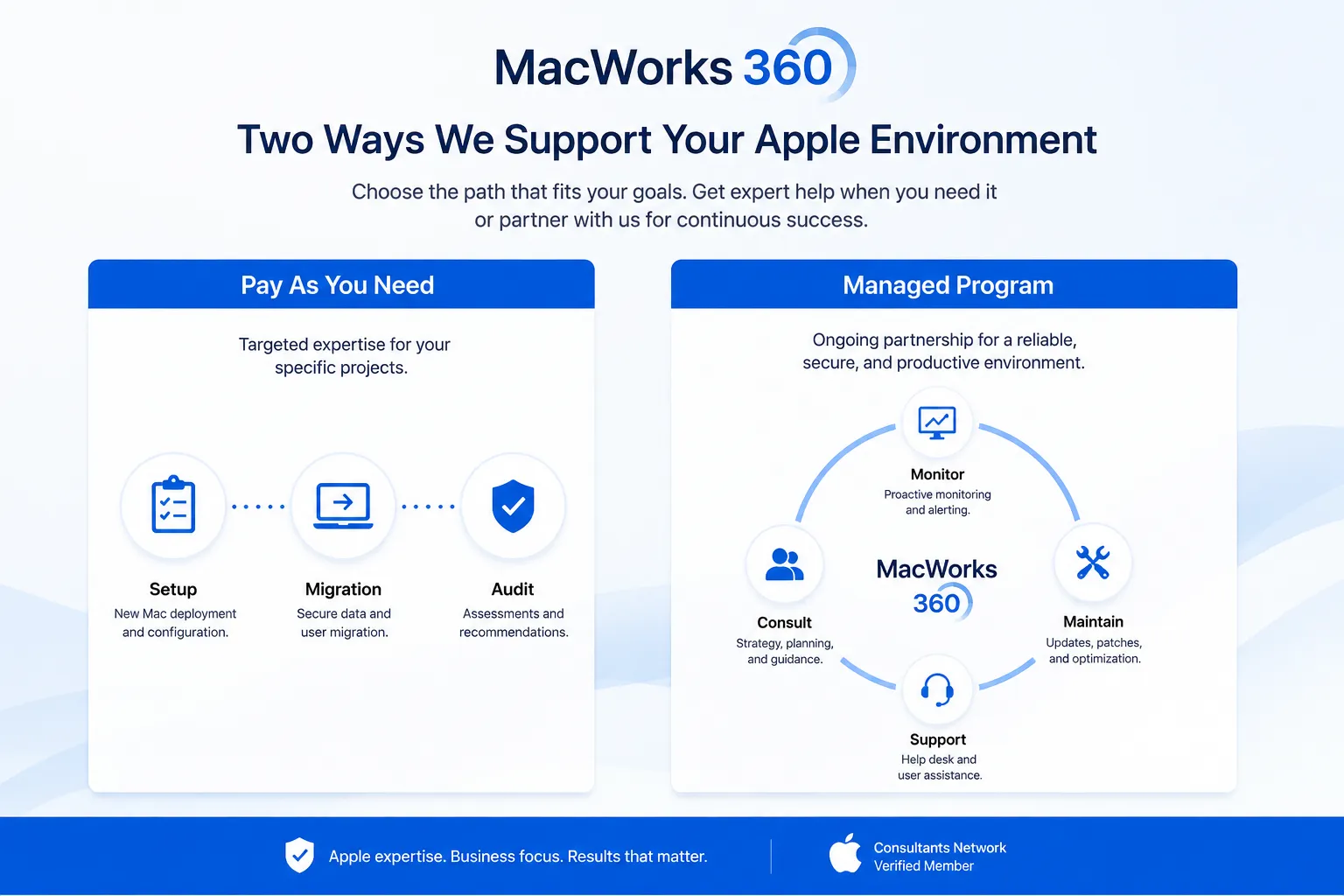
- Two service models are available: Pay As You Need (project-based) and the Managed Program (ongoing monitoring and support).
- Both on-site and remote Mac support are available, depending on the nature of the issue and your location in New Jersey.
- Services include Apple device management, employee onboarding, software deployment, security configuration, business email setup, and cloud storage.
- MacWorks 360 is an independent consultant with over 30 years of Mac-focused experience. It is not affiliated with Apple Inc.
- The company works with a range of industries, including healthcare practices, creative agencies, legal offices, and accounting firms.
- Project-based support suits businesses with occasional IT needs or specific one-time challenges. The Managed Program suits businesses that want continuous, proactive IT coverage.
- Pricing is not published on the website. Contact MacWorks 360 directly for a proposal based on your specific needs.
What Is Mac IT Support and Why Do Businesses Need It?
Mac IT support covers the setup, management, security, and troubleshooting of Apple computers and devices in a business environment. For companies that run on Macs, having a dedicated support resource prevents downtime, protects data, and keeps teams productive.
Most small businesses do not have an in-house IT department with deep Apple expertise. General IT providers often focus on Windows environments and may lack the specific knowledge needed to configure Apple device management, macOS security policies, or Apple ecosystem integrations correctly. Without proper support, even straightforward issues, such as a failed software update or a misconfigured user account, can stall an entire team.
Mac IT support fills that gap by providing:
- Initial device setup and configuration tailored to your business workflows
- Ongoing maintenance and software update management
- Security policies appropriate for your industry
- Troubleshooting for hardware and software issues
- Strategic advice on Apple technology decisions
For New Jersey businesses that depend on Apple devices daily, outsourced Mac IT support is often more cost-effective than hiring a full-time IT employee, especially when the provider offers both remote and on-site coverage.
Mac IT Support vs. Windows IT Support: What Is the Difference?
Mac IT support and Windows IT support are not interchangeable. The underlying operating systems, device management tools, security architectures, and ecosystem integrations differ significantly, and a provider experienced in one may not deliver the same quality in the other.
Key differences that matter for New Jersey businesses:
- Device management platforms: Apple devices use Apple-native management frameworks. A Mac-focused provider understands how to configure and deploy these correctly, whereas a Windows-centric provider may rely on workarounds that create instability.
- Security model: macOS has a distinct security architecture. Applying Windows-oriented security policies to Mac devices can leave gaps or create unnecessary friction for users.
- Ecosystem integration: Apple devices work best when configured to interact with iCloud, Apple Business Manager, and other Apple services. A specialist provider knows how to set these up for business use rather than consumer use.
- Software compatibility: Many creative, healthcare, and professional-service applications have Mac-specific versions with different configuration requirements.
MacWorks 360 focuses exclusively on the Apple ecosystem. That specialization means faster diagnosis, fewer misconfigurations, and support staff who understand macOS, iOS, and Apple device management at a practical level rather than a surface level.
Does My Business Need Mac IT Support?
Your business likely needs dedicated Mac IT support if most of your team uses Apple computers and you do not have an internal IT resource with strong Apple expertise. The clearer the answer to the following questions, the stronger the case for getting support in place.
Signs your business would benefit from Mac IT support:
- You have multiple Macs in your office and no consistent process for updates, backups, or security settings
- New employees wait hours or days before their devices are ready to use
- You have experienced data loss, a security incident, or a significant period of downtime
- Your team uses a mix of Macs, iPhones, and iPads and they do not work together consistently
- You operate in a regulated industry such as healthcare or legal services and are unsure whether your devices meet compliance-related security standards
- You are growing and need a repeatable, scalable process for adding new devices and users
Situations where project-based support may be enough:
- You have a one-time need, such as a Mac migration, a network setup, or a security audit
- You have internal IT staff who handle day-to-day issues but need Apple-specific expertise for a particular project
- Your team is very small (one to three people) with straightforward, stable technology needs
If you are unsure which model fits, learn more about MacWorks 360’s services or request a consultation to discuss your situation directly.
Mac IT Support Services Near Me: What MacWorks 360 Covers in New Jersey
MacWorks 360 provides Mac IT support across Northern and Central New Jersey and the Jersey Shore. Both on-site and remote support are available, depending on the type of issue and your business location.
On-site Mac support is available for situations that require a technician to be physically present, such as network infrastructure setup, hardware assessments, or initial fleet configuration for a new office.
Remote Mac support handles a wide range of issues without requiring a site visit, including software troubleshooting, user account management, application deployment, and security configuration. Remote support is typically faster to initiate and works well for businesses with distributed or hybrid teams.
Services included across both delivery models:
- Mac device setup and configuration
- Apple device onboarding for new employees, including zero-touch deployment
- Application deployment and software update management
- Business email setup and calendar integration
- Cloud storage and backup configuration using iCloud and other cloud storage solutions
- Security configuration at the device, account, and network level
- Apple Maps business listing optimization
- AppleCare+ for Business facilitation (MacWorks 360 helps coordinate coverage; it does not sell or administer AppleCare+ directly)
- Strategic Apple IT consulting for growth-focused decisions
For a full breakdown, visit the MacWorks 360 services page.
Mac IT Support for Small Businesses in New Jersey
Small businesses in New Jersey often face a specific challenge: they rely heavily on their Macs but cannot justify a full-time IT hire. Outsourced Mac IT support gives small teams access to expert-level Apple knowledge without the overhead of an internal IT department.
MacWorks 360 works with small businesses across a range of industries, including creative studios, professional-service firms, healthcare practices, legal offices, and accounting firms. The approach is the same regardless of team size: understand the business workflow, configure devices to support it, and keep things running without requiring the business owner or office manager to become an IT expert.
What small business Mac support typically includes:
- Role-based device configurations so each team member gets the applications and access they need from day one
- Automated software updates scheduled to avoid disrupting business hours
- Backup systems that run in the background without requiring manual action from staff
- Security settings appropriate for the size and industry of the business
- A clear point of contact who knows your systems and your team
For small businesses with occasional IT needs, the Pay As You Need model provides access to this expertise without a long-term commitment. For businesses that want consistent coverage and proactive monitoring, the Managed Program is the better fit.
Mac IT Support for Healthcare and Regulated Industries in New Jersey
Healthcare practices and other regulated businesses in New Jersey have specific requirements around data security and patient or client confidentiality. Mac IT support for these environments needs to go beyond basic setup and include security configurations that align with applicable regulatory frameworks.
MacWorks 360 works with healthcare practices, legal offices, and accounting firms that need security measures aligned with HIPAA requirements, financial data protections, and client confidentiality obligations. The company does not guarantee compliance outcomes, as regulatory compliance depends on a combination of technology, policies, and staff behavior. However, the security configurations MacWorks 360 implements are designed with these requirements in mind.
Security measures relevant to regulated industries include:
- Encrypted storage on all Mac devices
- Secure authentication methods and access controls
- Remote lock and wipe capabilities for lost or stolen devices
- User account permissions that limit access to sensitive data on a need-to-know basis
- Device tracking and audit trail capabilities
If your practice or firm is in a regulated industry and you are unsure whether your current Mac setup meets security expectations, a consultation with MacWorks 360 is a practical starting point. You can also review general guidance on digital security practices as background reading.
Mac Network Setup and Maintenance in New Jersey
A properly configured network is the foundation of reliable Mac performance in a business environment. MacWorks 360 handles network setup and ongoing maintenance as part of both its project-based and managed service offerings.
Network setup for Mac-centric businesses involves more than plugging in a router. It includes configuring network access permissions, ensuring Mac devices authenticate correctly, setting up file sharing between team members, and integrating cloud services. This ensures consistent performance across the office and for remote workers.
Network-related services MacWorks 360 provides:
- Initial network design and setup for Mac-focused offices
- Network access configuration for new devices and users
- File sharing and collaboration setup across Mac devices
- Integration of cloud storage so remote and in-office teams access the same files
- Ongoing network monitoring as part of the Managed Program
For businesses that have grown quickly or moved offices, a network audit as a standalone project is a common starting point before moving to ongoing managed support.
Mac Security and Antivirus Support in New Jersey
Mac security requires a layered approach. No single tool eliminates all risk, and the most effective security configurations address threats at the device, account, and network levels simultaneously.
MacWorks 360 implements multi-layered security configurations for Mac devices in business environments. The goal is to reduce exposure to the most common threats while keeping the user experience practical for day-to-day work.
Security measures MacWorks 360 configures:
- Encrypted storage to protect data if a device is lost or stolen
- Secure authentication and access controls for user accounts
- Remote lock and wipe capabilities for lost or stolen Mac laptops
- Device-level protections against unauthorized access
- Network-level security configurations
- User permission structures that limit unnecessary access to sensitive data
Password security is one of the most frequently overlooked areas in small business IT. For context on why this matters, see recent reporting on large-scale password exposures and guidance on identifying phishing emails, both of which are relevant for any business team using Macs.
MacWorks 360 does not guarantee specific security outcomes. Security posture depends on technology configuration, staff behavior, and ongoing maintenance, all of which the Managed Program addresses continuously.
Mac Employee Onboarding and Device Setup
Getting a new employee productive on their first day requires more than handing them a Mac and a login. Without a structured onboarding process, new hires often wait hours for access, receive devices with inconsistent configurations, and create support issues that could have been avoided.
MacWorks 360 uses zero-touch deployment strategies so that Mac devices arrive at your office, or directly to a remote employee, already configured with the correct applications, security settings, and network access for that person’s role. The device is ready to use from the moment it is unboxed.
What structured Mac onboarding includes:
- Role-based configurations so design teams, sales staff, and executives each get the right tools and access levels
- Pre-installed business applications with consistent settings across all devices
- Network and email access configured before the device reaches the employee
- Security policies applied automatically as part of the device setup
- A repeatable process that scales as your team grows
For a closer look at how this works in practice, see training new employees on company-approved Apple workflows.
Consistent onboarding also reduces long-term support needs. When every device starts from a known, tested configuration, troubleshooting is faster and less frequent.
Mac IT Support Troubleshooting: Common Issues MacWorks 360 Resolves
Most Mac IT issues in business environments fall into a predictable set of categories. Knowing what to expect helps business owners and office managers communicate problems clearly and get faster resolutions.
Common Mac business issues and how MacWorks 360 addresses them:
| Issue | Typical Cause | How It Is Addressed |
|---|---|---|
| Mac running slowly | Outdated software, storage nearly full, background processes | Software audit, storage management, configuration review |
| Email not syncing across devices | Misconfigured account settings | Account reconfiguration across Mac, iPhone, and iPad |
| New employee cannot access shared files | Incorrect permissions or network configuration | Access control and network permission review |
| Software update breaks a key application | Staged updates not in place | Update scheduling and compatibility testing before deployment |
| Lost or stolen Mac with sensitive data | No remote wipe capability configured | Remote lock or wipe via device management, plus post-incident review |
| Inconsistent application versions across team | No centralized software management | Application deployment system setup |
Remote support resolves most of these issues without a site visit. On-site support is available when the issue involves hardware, physical network infrastructure, or a situation that requires hands-on access.
Mac IT Support Emergency and Same-Day Service in New Jersey
When a critical Mac issue stops your team from working, response time matters. MacWorks 360 offers support for urgent situations, though specific response time guarantees are not published and will depend on the nature of the issue and your service arrangement.
Businesses on the Managed Program benefit from proactive monitoring that catches many problems before they become emergencies. Continuous monitoring of Mac devices and network performance identifies early warning signs of failures, software conflicts, and security issues, reducing the likelihood of a sudden, business-stopping event.
For businesses on the Pay As You Need model, urgent project requests can be submitted directly. MacWorks 360 serves Northern and Central New Jersey and the Jersey Shore, which supports practical on-site response for businesses in those areas when a physical visit is required.
If you are currently experiencing a Mac IT emergency or want to discuss what response coverage looks like under each service model, contact MacWorks 360 directly.
How Much Does Mac IT Support Cost in New Jersey?
MacWorks 360 does not publish pricing on its website, which is common for IT consulting firms because costs vary based on the number of devices, the complexity of the environment, the services required, and whether you choose project-based or managed support.
What affects the cost of Mac IT support:
- Number of Mac devices in your organization
- Whether you need on-site support, remote support, or both
- The scope of services required (basic troubleshooting vs. full device management, security, and consulting)
- Whether you choose Pay As You Need (billed per project) or the Managed Program (ongoing relationship)
- Industry-specific requirements such as regulated security configurations
Pay As You Need suits businesses with a defined, one-time project. You receive a proposal with a clear scope and cost before work begins. There is no ongoing commitment.
The Managed Program suits businesses that want continuous coverage. Pricing for managed IT programs is typically structured around the number of devices and users, though MacWorks 360 does not publish specific rates.
To get an accurate cost estimate for your business, the most direct path is to request a consultation. MacWorks 360 will assess your environment and provide a proposal based on your actual needs.
Pay As You Need vs. the Managed Program: Which Service Model Fits Your Business?
MacWorks 360 offers two distinct service models. Choosing the right one depends on how frequently you need IT support, how much your business depends on technology running without interruption, and whether you have any internal IT capacity.
Pay As You Need: Project-Based Mac IT Support
This model is designed for businesses that have a specific, defined IT challenge or need occasional expert help without an ongoing commitment.
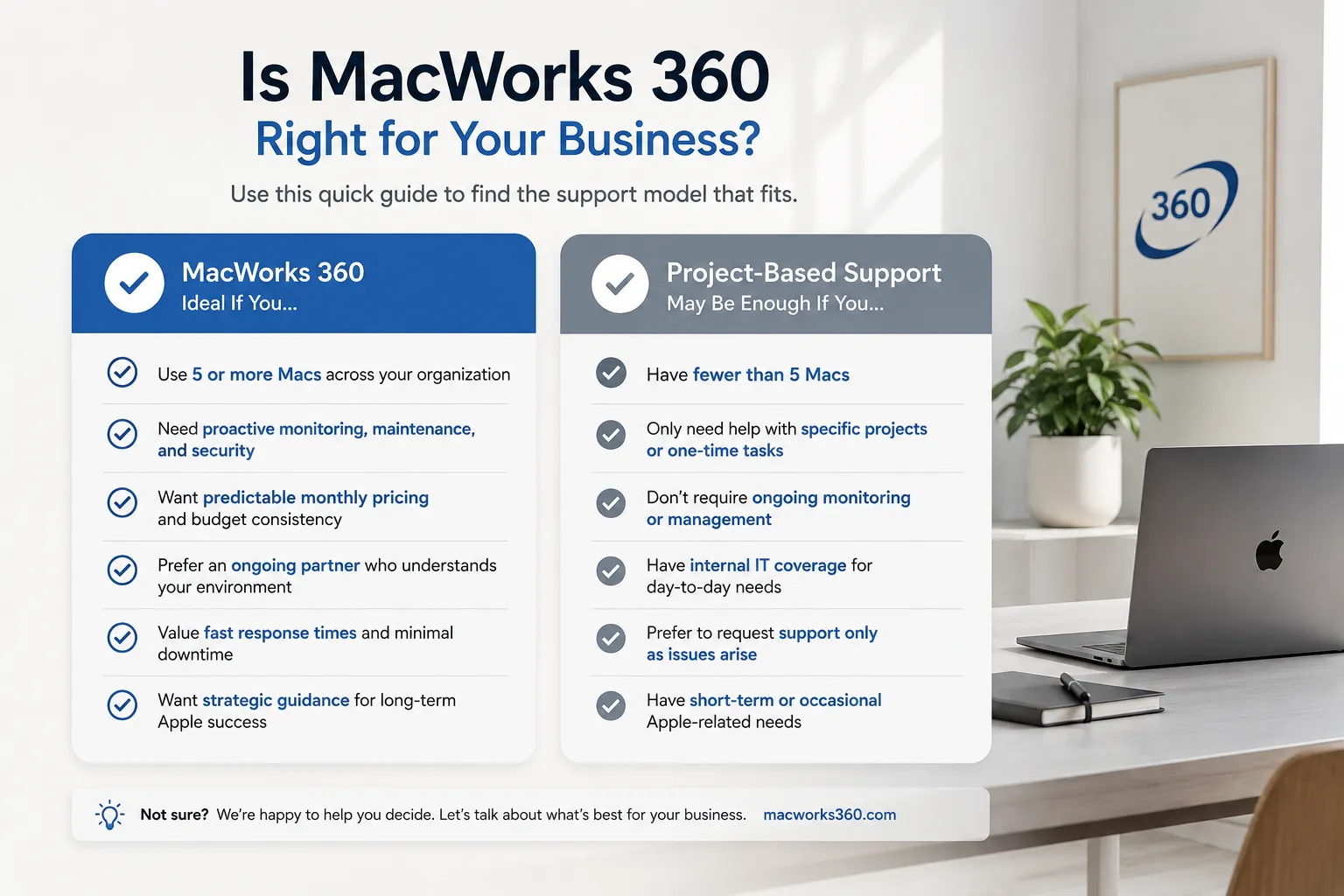
Choose Pay As You Need if:
- You need a one-time project completed, such as a Mac migration, a new office network setup, a security audit, or a software deployment
- You have internal IT staff who handle routine issues but need Apple-specific expertise for a particular task
- Your team is small, and your technology environment is relatively stable
- You want to evaluate MacWorks 360 before committing to ongoing support
You receive a detailed proposal before work begins. Once the project is complete, there is no ongoing obligation.
The Managed Program: Ongoing Mac IT Support and Monitoring
This model is designed for businesses that want continuous, proactive IT coverage and a dedicated support relationship.
Choose the Managed Program if:
- Your business depends heavily on Mac devices, and downtime has a direct cost
- You do not have internal IT staff and need a reliable point of contact for any technology issue
- You want proactive monitoring that catches problems before they affect your team
- You are growing and need a scalable system for onboarding new devices and employees
- You want strategic Apple IT consulting as part of the relationship, not just break-fix support
Under the Managed Program, MacWorks 360 acts as your outsourced IT department. The same team members who know your systems handle your support, which means faster diagnosis and support that understands your context over time.
For more detail on how ongoing managed support works, visit the managed IT for Mac page.
Why MacWorks 360 May or May Not Be the Right Fit
No IT provider is the right fit for every business. Here is an honest assessment to help you decide whether to move forward.
MacWorks 360 is likely a strong fit if:
- Your business runs primarily or exclusively on Apple devices
- You are located in Northern or Central New Jersey or the Jersey Shore
- You want a long-term support relationship with a provider who specializes in Mac, not a generalist firm that handles Mac as a secondary offering
- You value on-site availability in addition to remote support
- You need Apple device management, security configuration, or employee onboarding handled by someone with deep Apple experience
MacWorks 360 may not be the right fit if:
- Your business runs a mixed environment of Windows and Mac devices, and you need a single provider to manage both equally
- You are located outside Northern or Central New Jersey and require frequent on-site support
- You need a provider with published SLAs or guaranteed response times in a formal contract
If you are on the fence, the Pay As You Need model is a low-risk way to experience the quality of support before committing to an ongoing arrangement. Read more about MacWorks 360’s background and approach before making a decision.
What Happens After You Request a Consultation
The process is straightforward. When you submit a consultation request, MacWorks 360 will connect with you to understand your current technology environment, the challenges you are experiencing, and your business goals.
From there, the typical path looks like this:
- Discovery conversation: You describe your current Mac setup, team size, pain points, and what you need from an IT partner.
- Environment assessment: For more complex situations, MacWorks 360 may review your current devices, network, and configurations.
- Proposal: You receive a clear proposal outlining the recommended service model, scope of work, and pricing before any commitment is made.
- Onboarding: If you move forward, MacWorks 360 sets up the systems, configurations, and processes needed to support your business.
- Ongoing relationship: Under the Managed Program, regular check-ins and proactive monitoring begin. Under Pay As You Need, the project is completed, and you retain the option to return for future projects.
There is no pressure to commit to the Managed Program if your needs are project-based, and there is no obligation after the initial consultation.
Frequently Asked Questions
What is Mac IT support?
Mac IT support covers the setup, management, security, troubleshooting, and strategic consulting for Apple computers and devices in a business environment. It is distinct from general IT support because it requires specific knowledge of macOS, Apple device management, and the Apple business ecosystem.
Is MacWorks 360 affiliated with Apple?
No. MacWorks 360 is an independent IT consulting firm specializing in Apple technology. It is not affiliated with, authorized by, or a representative of Apple Inc.
Does MacWorks 360 provide on-site support in New Jersey?
Yes. MacWorks 360 provides on-site Mac support across Northern and Central New Jersey and the Jersey Shore, as well as remote support for issues that do not require a physical visit.
What is the difference between Pay As You Need and the Managed Program?
Pay As You Need is project-based support with no ongoing commitment, suited for one-time IT challenges. The Managed Program provides continuous monitoring, proactive maintenance, and dedicated support for businesses that want ongoing coverage.
Can MacWorks 360 help with Mac security for a healthcare practice in New Jersey?
Yes. MacWorks 360 implements security configurations designed with HIPAA-related requirements in mind for healthcare practices. Note that technology configuration alone does not guarantee compliance. Compliance depends on a combination of technology, policies, and staff practices.
How quickly can MacWorks 360 respond to an urgent Mac issue?
Response times are not published — businesses on the Managed Program benefit from proactive monitoring that reduces the likelihood of sudden failures. For urgent project-based requests, contact MacWorks 360 directly to discuss availability.
Does MacWorks 360 support remote employees?
Yes. Remote Mac support is available and works well for distributed or hybrid teams. Device management and configuration can also be handled remotely, including zero-touch deployment for new employees working outside the office.
What industries does MacWorks 360 serve?
MacWorks 360 works with a range of industries, including creative agencies, healthcare practices, legal offices, accounting firms, and professional-service businesses across New Jersey.
How do I get a price estimate for Mac IT support?
MacWorks 360 does not publish pricing. The most direct path is to request a consultation so the team can assess your environment and provide a proposal based on your specific needs.
What happens if a Mac is lost or stolen?
MacWorks 360 configures remote lock and wipe capabilities as part of its security setup. If a device is lost or stolen, it can be remotely locked or wiped to prevent unauthorized access to business data.
Can MacWorks 360 help set up business email on Mac devices?
Yes. MacWorks 360 sets up business email with your domain, configured to work across Mac, iPhone, and iPad, including shared calendars and contact directories.
Is MacWorks 360 suitable for a very small business with only two or three Macs?
It can be, particularly through the Pay As You Need model for specific projects. For very small teams with stable, simple technology needs, a consultation will help clarify whether ongoing managed support is cost-effective for your situation.
Request a Free Mac IT Consultation
If your New Jersey business runs on Apple devices and you need dependable, Apple-focused IT support, MacWorks 360 is ready to help. Whether you have a specific project in mind or want to explore what ongoing managed support looks like for your team, the first step is a no-obligation conversation.
Request a Free Mac IT Consultation and find out which service model fits your business.
MacWorks 360 is an independent Apple-focused IT consulting firm serving businesses across Northern and Central New Jersey and the Jersey Shore. MacWorks 360 is not affiliated with, authorized by, or a representative of Apple Inc. All Apple product names and trademarks are the property of Apple Inc.