
Quick Answer: MacWorks 360 provides specialized Mac IT support and Apple consulting for businesses across Northern and Central New Jersey, within approximately an hour to an hour and a half of Springfield, NJ, including select Monmouth and Ocean County communities. Services are available as pay-as-needed incident support, defined projects, and ongoing managed IT programs that include proactive monitoring, maintenance, and technology planning. MacWorks 360 is an independent consultant and is not affiliated with Apple Inc.
Key Takeaways
- MacWorks 360 focuses on Apple-centered business environments, including Mac, iPhone, iPad, and related infrastructure.
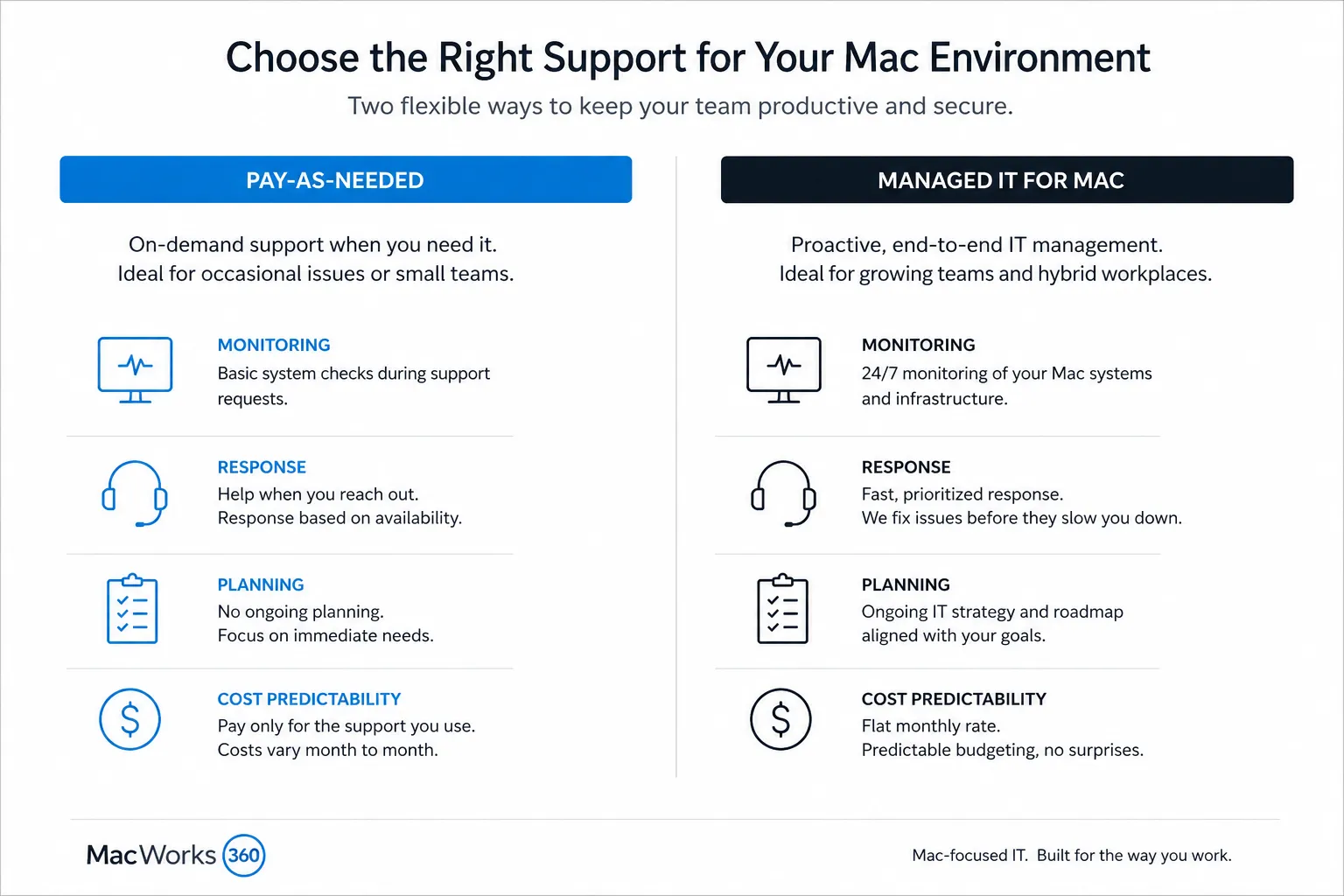
- Two service models are available: pay-as-needed support for occasional incidents and projects, and a managed IT program for proactive, ongoing coverage.
- Services include network setup, server configuration, hardware upgrades, email migration, cloud backup, device onboarding, and security.
- Both remote Mac support and on-site visits are available, depending on the situation.
- MacWorks 360 has been supporting Apple-centered businesses since 1994.
- The service is best suited for small and midsize businesses, professional offices, and creative teams that rely primarily on Apple devices.
- MacWorks 360 is not Apple-authorized or Apple-affiliated. Certification claims should be verified directly with the company before engagement.
- Businesses evaluating ongoing management should review the managed IT for Mac program for full details on what that plan includes.
What Is Mac IT Support and Why Do Businesses Need It?
Mac IT support covers the setup, maintenance, troubleshooting, and strategic management of Apple devices and the infrastructure those devices depend on. For businesses, that includes MacBooks, iMacs, Mac minis, iPhones, iPads, servers, networks, cloud services, and the software that ties them together.
General IT providers can handle Windows environments well. Still, Mac systems behave differently at the operating system level, in how devices enroll and communicate on a network, and in how Apple’s ecosystem integrates across hardware. A technician who primarily supports Windows will often take longer to diagnose Mac-specific issues and may recommend workarounds that create new problems downstream.
Businesses need Mac-focused IT support because:
- macOS updates, security patches, and hardware transitions (such as the Apple Silicon shift) require platform-specific knowledge to manage without disrupting operations.
- Apple device management for business, including Mobile Device Management (MDM) and Apple Business Manager enrollment, involves processes that differ from Windows device management.
- Creative professionals and design teams using tools like Adobe Creative Cloud depend on Mac performance in ways that generic IT tuning does not address.
- Mixed environments where Macs connect to shared servers, Microsoft 365, or legacy databases require careful configuration to avoid persistent connectivity and permission issues.
Mac IT Support vs. Windows IT Support: What’s the Difference?
The core difference is platform architecture, not just preference. macOS, iOS, and iPadOS share a common foundation and integrate through Apple’s ecosystem in ways that require Apple-specific knowledge to configure and support correctly.
Key practical differences for business owners to understand:
- Device enrollment: Apple Business Manager and MDM platforms like Jamf or Mosyle handle Apple device provisioning differently than Windows Intune or Group Policy. Mixing up approaches causes enrollment failures and security gaps.
- File sharing and permissions: macOS uses a different permissions model than Windows Server. Misconfigured file servers are one of the most common sources of frustration in Mac-heavy offices.
- Software compatibility: Not every business application has a native Mac version. An Apple-focused consultant knows which alternatives work well and which workarounds cause long-term problems.
- Security posture: macOS has strong built-in protections, but businesses still need proper configuration, patch management, and monitoring. The threat landscape for Mac has grown as Mac adoption in business has increased.
A Windows-focused IT provider is not a bad choice for a Windows environment. It is simply not the right fit for a business that runs primarily on Apple hardware.
How Much Does Mac IT Support Cost in New Jersey?
Mac IT support pricing in New Jersey varies based on the service model, the size of the environment, and the scope of work. MacWorks 360 offers two models, and pricing for either should be discussed directly during a consultation.
General market context (not MacWorks 360-specific pricing):
- Pay-as-needed or break-fix support is typically billed by the hour or by the project. Hourly rates for specialized Apple consultants in the Northeast generally range from roughly $125 to $250 per hour, depending on complexity and provider. This is an industry estimate, not a MacWorks 360 quote.
- Managed IT programs are usually priced per device per month or as a flat monthly retainer. Per-device pricing for Mac-focused managed services in the Northeast commonly falls between $75 and $200 per device per month, depending on what is included. Again, this is a market estimate.
The right model depends on how often issues arise, how critical uptime is, and whether proactive monitoring would prevent costly emergencies. Businesses that experience frequent disruptions often find managed programs more cost-effective than accumulating hourly charges.
For MacWorks 360’s specific pricing, request a consultation to discuss your environment and get an accurate estimate.
Mac IT Support Near Me: Serving New Jersey Businesses
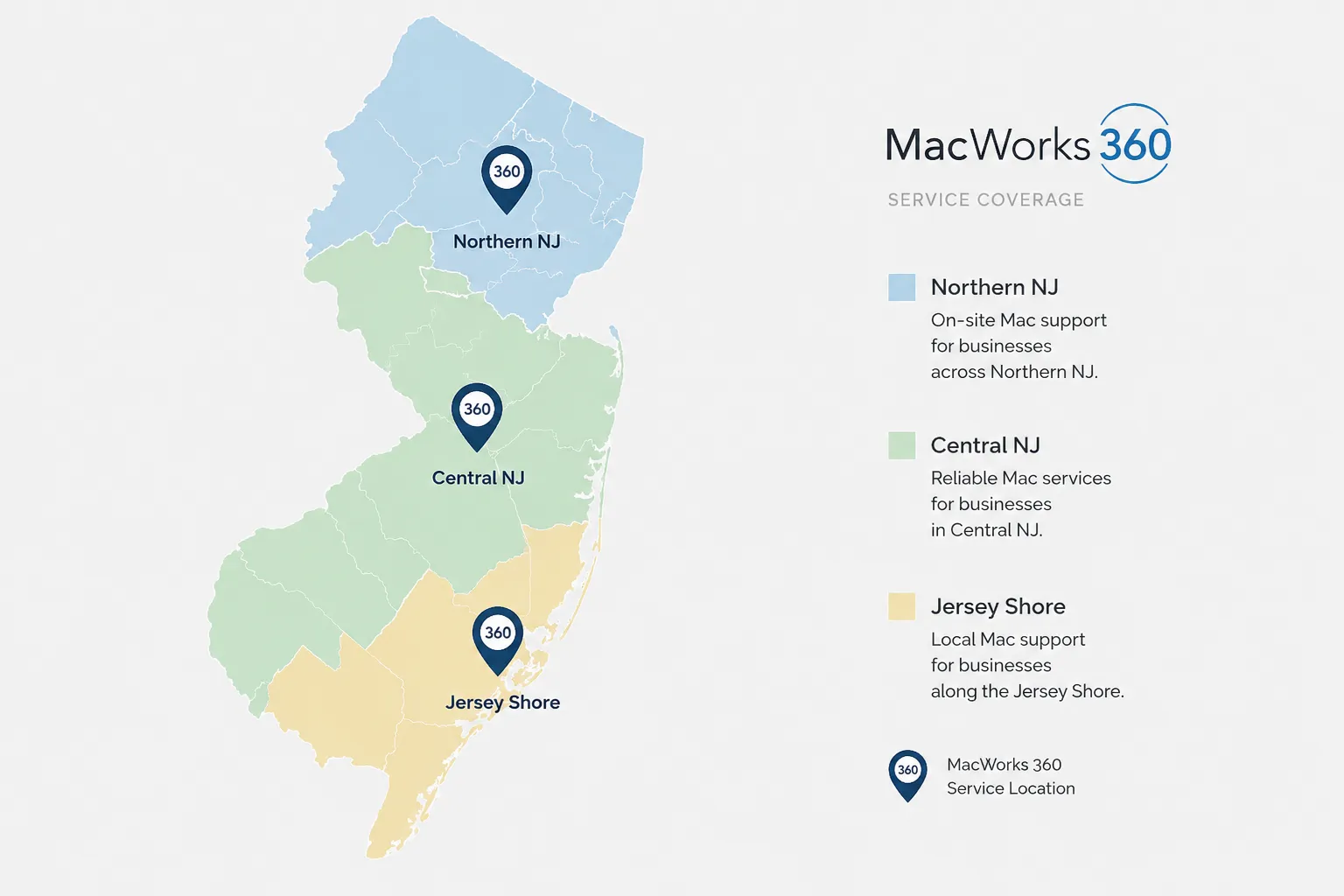
MacWorks 360 serves businesses across Northern and Central New Jersey, with on-site coverage extending roughly an hour to an hour and a half from Springfield, NJ. That includes communities throughout Morris, Union, Essex, Somerset, Middlesex, and Mercer counties — reaching as far south as the Princeton area — as well as select Monmouth and Ocean County communities including Red Bank and surrounding shore towns. Remote support extends coverage beyond the on-site service area for issues that do not require a technician on location.
If your business is in or near communities like Princeton, New Brunswick, the Monmouth County shore towns, or the Northern NJ suburbs, MacWorks 360 is positioned to provide local, responsive service without the impersonal experience of a national provider.
For businesses outside the core service area, remote Mac support handles a wide range of issues effectively. See the remote versus on-site section below for guidance on when each approach makes sense.
Is MacWorks 360 the Right Fit? Who This Service Is Best For
MacWorks 360 is a strong fit for:
- Small and midsize businesses in New Jersey that run primarily on Apple hardware.
- Professional offices, including legal, financial, and healthcare-adjacent practices, where Mac reliability is critical to daily operations.
- Creative teams and studios using Mac-based workflows for design, photography, video, or content production.
- Growing companies that need ongoing Apple device management for business as their headcount increases.
- Organizations that want a consistent, knowledgeable consultant rather than a different technician every time.
MacWorks 360 may not be the right fit for:
- Individual consumers looking for personal device repair or warranty service. Apple’s own support channels or Apple Authorized Service Providers are better options for personal devices.
- Businesses with large enterprise IT departments that need a primary managed service provider handling hundreds of endpoints across multiple platforms.
- Situations requiring emergency same-day data recovery from physically damaged hardware. While MacWorks 360 handles data management and backup, urgent hardware recovery cases may require a dedicated data recovery lab.
- Organizations that need a provider to support a predominantly Windows environment with only a few Macs on the side.
Common Mac Problems That Need IT Support (and Why Your Mac Is Running Slow)
A slow Mac is the most common complaint businesses bring to IT consultants. The cause is rarely one thing.
Frequent culprits include:
- Startup drive nearing capacity. macOS needs free space to manage virtual memory and temporary files. Drives that are more than 80 percent full often cause noticeable slowdowns.
- Outdated macOS or application versions. Apple regularly releases performance and security improvements. Skipping updates for months creates both speed and vulnerability problems.
- Background processes consuming resources. Poorly configured software, login items, and cloud sync services can consume CPU and memory without obvious symptoms.
- Aging hardware running current software demands. A Mac from 2017 running the latest macOS and modern applications may be undersized for the workload.
- Network or server bottlenecks. If slowness only appears when accessing shared files or cloud services, the problem may be infrastructure, not the Mac itself.
Other common Mac business problems that benefit from professional support:
- Email migration failures when moving to or from Microsoft 365, Google Workspace, or on-premises Exchange.
- iPhone and iPad connectivity issues in corporate Wi-Fi environments.
- Printer and peripheral compatibility after macOS updates.
- File permission errors on shared servers after staff changes.
- Failed Time Machine backups that went unnoticed until data was needed.
MacWorks 360 handles all of these as both one-time incidents and as part of ongoing managed coverage. For context on keeping devices current, the Apple device onboarding process is a useful starting point for businesses adding new Macs to an existing environment.
On-Demand vs. Managed IT for Mac: Which Service Model Do You Need?
The choice between pay-as-needed support and a managed IT program comes down to how predictable your needs are and how much risk you are comfortable carrying.
Pay-as-needed support works well when:
- Issues are infrequent and unpredictable.
- The business needs help with a defined project, such as a server migration, office move, or new device rollout.
- Budget flexibility matters more than cost predictability.
- The internal team can handle day-to-day questions and only needs expert help for complex problems.
Managed IT for Mac works well when:
- Downtime is costly, and you want problems caught before they affect operations.
- The business is growing and needs consistent Apple device management as new staff and devices are added.
- No one internally has the time or expertise to monitor systems, apply updates, and track security.
- Predictable monthly costs are easier to budget than variable hourly charges.
The managed program includes proactive monitoring, scheduled maintenance, and ongoing technology planning. Because that program has its own detailed page, businesses interested in ongoing management should review the managed IT for Mac program directly rather than relying on the summary here.
Mac IT Support for Remote Teams and Distributed Workforces
Remote Mac support is effective for a wide range of business IT issues and does not require a technician to be on-site. MacWorks 360 uses secure remote access tools to diagnose problems, push updates, adjust configurations, and resolve software issues on Macs and iOS devices regardless of where the user is located.
Remote support is appropriate for:
- Software troubleshooting and application configuration.
- macOS updates and patch management.
- Email setup and account configuration.
- User account management and permissions.
- Performance diagnostics and basic optimization.
- Training new employees on company-approved Apple workflows.
On-site support is more appropriate for:
- Hardware installations, upgrades, or replacements.
- Network cabling, Wi-Fi infrastructure, and physical server work.
- Complex multi-device setups that require hands-on configuration.
- Situations where remote access is unavailable because the device or network itself is the problem.
For businesses with staff working from home or across multiple locations, remote support reduces response time and eliminates the need to wait for a technician to travel.
Do You Need Mac IT Support If You Only Have a Few Devices?
Yes, small Apple environments still benefit from professional support, though the right model looks different than it does for a 50-person office.
A business with three to ten Macs may not need a full managed IT program. Pay-as-needed support for incidents and an occasional project engagement for things like a new server setup or a security review can be more practical and cost-effective.
That said, small environments are not immune to serious problems. A single failed backup, a misconfigured firewall, or an unpatched vulnerability can cause the same disruption for a five-person firm as it does for a fifty-person company. The consequences are often worse because there is less redundancy.
For small businesses evaluating whether specialized support makes sense, a one-time consultation to review the current environment and identify gaps is a low-commitment starting point.
Mac IT Support for Healthcare Practices and Regulated Industries in New Jersey
Healthcare practices, legal offices, and other regulated businesses in New Jersey face additional requirements around data handling, access controls, and audit trails. Mac environments in these settings need configuration that goes beyond basic setup.
MacWorks 360 can assist with:
- Configuring Macs and iOS devices to support HIPAA-aligned access controls and encryption settings.
- Setting up secure file sharing and backup systems appropriate for sensitive records.
- Implementing MDM policies that enforce device-level security requirements.
- Advising on password policies and two-factor authentication. For background on why this matters, the recent data breach affecting 16 billion passwords illustrates the current risk environment.
MacWorks 360 does not provide legal or compliance certification. Regulated businesses should confirm that any IT configuration meets their specific compliance obligations with qualified legal or compliance counsel.
How to Find Certified Mac Support Technicians in New Jersey
Finding a qualified Apple IT consultant in New Jersey requires looking past marketing language and asking specific questions.
What to ask any prospective Mac IT provider:
- Do your technicians hold current Apple certifications, and if so, which ones? (Ask for specifics, not general claims.)
- What is your primary focus: Apple environments, Windows, or mixed?
- How do you handle after-hours or urgent issues, and what are your actual response commitments?
- Can you describe a project similar to our environment that you have completed recently?
- Do you use a formal MDM platform for device management, and which one?
- Are you Apple-authorized for warranty service, or are you an independent consultant?
MacWorks 360 is an independent consultant and is not affiliated with Apple Inc. For warranty repairs or AppleCare-covered service, Apple’s own support channels or an Apple Authorized Service Provider should be the first contact.
Mac IT Services Included: What MacWorks 360 Covers
MacWorks 360 provides support across the full range of Apple business infrastructure. Services include:
Devices and hardware:
- Mac setup, configuration, and device onboarding for new employees and new equipment.
- Hardware upgrades including memory, storage, and peripheral configuration.
- iPhone and iPad setup and business configuration.
Networks and infrastructure:
- Wireless network design and installation optimized for Apple devices.
- Wired network cabling and structured cabling systems.
- Mac and Linux server setup, file sharing, and access control configuration.
- Email hosting setup and migration (including Microsoft 365 and Google Workspace).
Data and security:
- Cloud backup design and implementation.
- Shared data server configuration for team collaboration.
- Security assessments and configuration hardening.
- Data recovery support for failed or corrupted systems.
Software and integration:
- macOS and application configuration and troubleshooting.
- Adobe Creative Cloud and other professional application support. See the Adobe support resources for context on Mac-based creative workflows.
- Enterprise integration for businesses connecting Macs to other business systems.
Ongoing management (Managed IT program):
- Proactive monitoring of Mac systems, servers, and networks.
- Scheduled maintenance and update management.
- Apple device management for business using MDM.
- Strategic technology planning and vendor coordination.
Frequently Asked Questions
What is Mac IT support?
Mac IT support covers the setup, maintenance, troubleshooting, and management of Apple devices and related business infrastructure. It differs from general IT support in that it requires platform-specific knowledge of macOS, iOS, Apple Business Manager, and the way Apple devices interact with networks and servers.
Does MacWorks 360 only support Macs?
MacWorks 360 focuses on Apple-centered environments. Those environments often include supporting infrastructure such as Microsoft 365, cloud services, network hardware, and business software that runs alongside Apple devices. The focus is Apple, but the work is not limited to Apple hardware in isolation.
Can MacWorks 360 support my team if we work remotely?
Yes. Remote Mac support handles a wide range of issues without requiring an on-site visit. On-site service is available within the New Jersey service area when the situation requires hands-on work.
Is MacWorks 360 Apple-authorized?
No. MacWorks 360 is an independent consultant and is not affiliated with or authorized by Apple Inc. For AppleCare warranty service, contact Apple directly or locate an Apple Authorized Service Provider.
What is the difference between pay-as-needed support and the managed IT program?
Pay-as-needed support is billed for individual incidents or defined projects. The managed IT program provides ongoing proactive monitoring, maintenance, device management, and technology planning for a predictable monthly cost. Businesses that need consistent coverage and want problems caught before they cause downtime are better served by the managed program.
How long has MacWorks 360 been in business?
MacWorks 360 has been supporting Apple-centered businesses since 1994.
Does MacWorks 360 provide same-day emergency support?
Response times depend on the service plan and the nature of the issue. Specific response commitments should be confirmed directly with MacWorks 360 before signing any agreement.
Can MacWorks 360 help with HIPAA compliance for a medical practice?
MacWorks 360 can configure Mac systems and networks to support access controls, encryption, and audit requirements relevant to healthcare environments. Compliance certification is outside the scope of IT consulting. Practices should work with legal and compliance professionals to confirm their obligations.
What areas does MacWorks 360 serve?
MacWorks 360 provides on-site service within approximately an hour to an hour and a half of Springfield, NJ. That covers much of Northern and Central New Jersey, including the Princeton corridor and select Monmouth and Ocean County communities such as Red Bank. Remote support is available more broadly for issues that do not require an on-site visit.
How do I get started?
Contact MacWorks 360 to schedule an initial consultation. The conversation will cover your current environment, pain points, and goals before any recommendation is made.
Ready to Talk About Mac IT Support for Your New Jersey Business?
If your business runs on Apple technology and you want support from a consultant who focuses on that environment, MacWorks 360 is worth a conversation. The first step is a consultation to review your current setup and identify where support would make the most difference.
Request a consultation with MacWorks 360 to discuss your Mac environment, your goals, and which service model fits your needs.
MacWorks 360 is an independent Apple IT consultant serving New Jersey businesses since 1994. MacWorks 360 is not affiliated with or authorized by Apple Inc.