
The Short Answer: Should Your Business Outsource Mac IT Support?
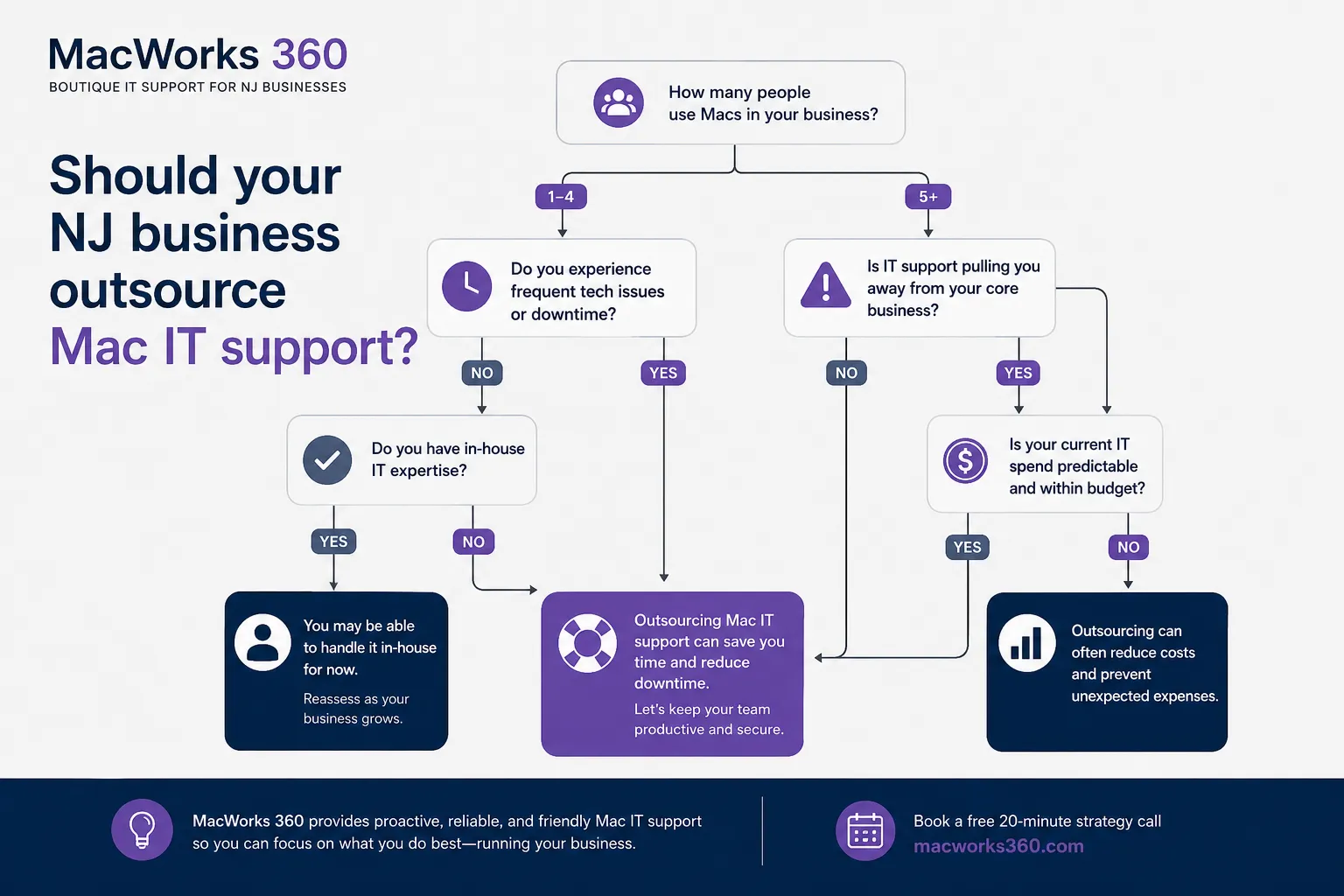
For most New Jersey small and mid-sized businesses running primarily on Apple devices, outsourced Mac IT support is a practical alternative to hiring in-house Apple specialists. It makes the most sense when your current support is reactive, your internal team lacks deep macOS expertise, or device management is pulling staff away from core responsibilities. The right Mac IT support for New Jersey businesses gives you access to Apple-focused expertise on a flexible basis, without the overhead of a full-time hire.
Signs Your New Jersey Business Has Outgrown Reactive Mac Support
Reactive support means waiting for something to break before calling for help. That model works when Apple devices are incidental to operations. It stops working when Macs are central to how your business runs.
Watch for these signals:
- Employees are losing productive time to recurring software conflicts, slow performance, or login issues that never get fully resolved.
- New hires are waiting days for a properly configured Mac because no one owns the setup process.
- Security updates are applied inconsistently, or not at all, across the device fleet.
- Your office manager or internal generalist is spending hours each week on Mac troubleshooting instead of their actual job.
- A hardware failure or data loss event revealed there was no reliable backup or recovery process in place.
If two or more of these apply, the cost of doing nothing is already higher than the cost of structured Apple IT support in New Jersey.
What Outsourced Mac IT Support May Include
A qualified Mac support provider in New Jersey should be able to handle most or all of the following, depending on the service tier:
Device deployment and configuration: New Macs arrive pre-configured with business software, user permissions, and security settings. Employees are productive on day one rather than waiting for manual setup. Providers like MacWorks 360 offer structured Apple device onboarding to standardize this process.
Remote and onsite technical support: Most issues are resolved remotely. When physical access is required, such as hardware repairs or network infrastructure work, onsite visits are available across Northern and Central New Jersey.
System monitoring and maintenance: Automated tools track performance, storage, and application health. Updates and patches are applied on a scheduled basis to reduce disruption.
Security configuration: Endpoint protection, disk encryption, secure authentication, and network security settings are configured and maintained. Note that technology controls support a broader security posture, but no provider can guarantee compliance with regulatory frameworks such as HIPAA or PCI DSS on their own.
Cloud and application integration: Proper configuration of iCloud, Microsoft 365, Google Workspace, and other platforms your team relies on daily.
Backup and recovery planning: Automated backup schedules with tested recovery procedures, stored locally and in the cloud.
Hardware and software procurement guidance: Recommendations on Mac models, configurations, and licensing options suited to specific roles and budgets.
On-Demand Support Versus Managed Mac Support
This is one of the most important decisions when evaluating outsourced Apple IT services. The two models serve different needs.
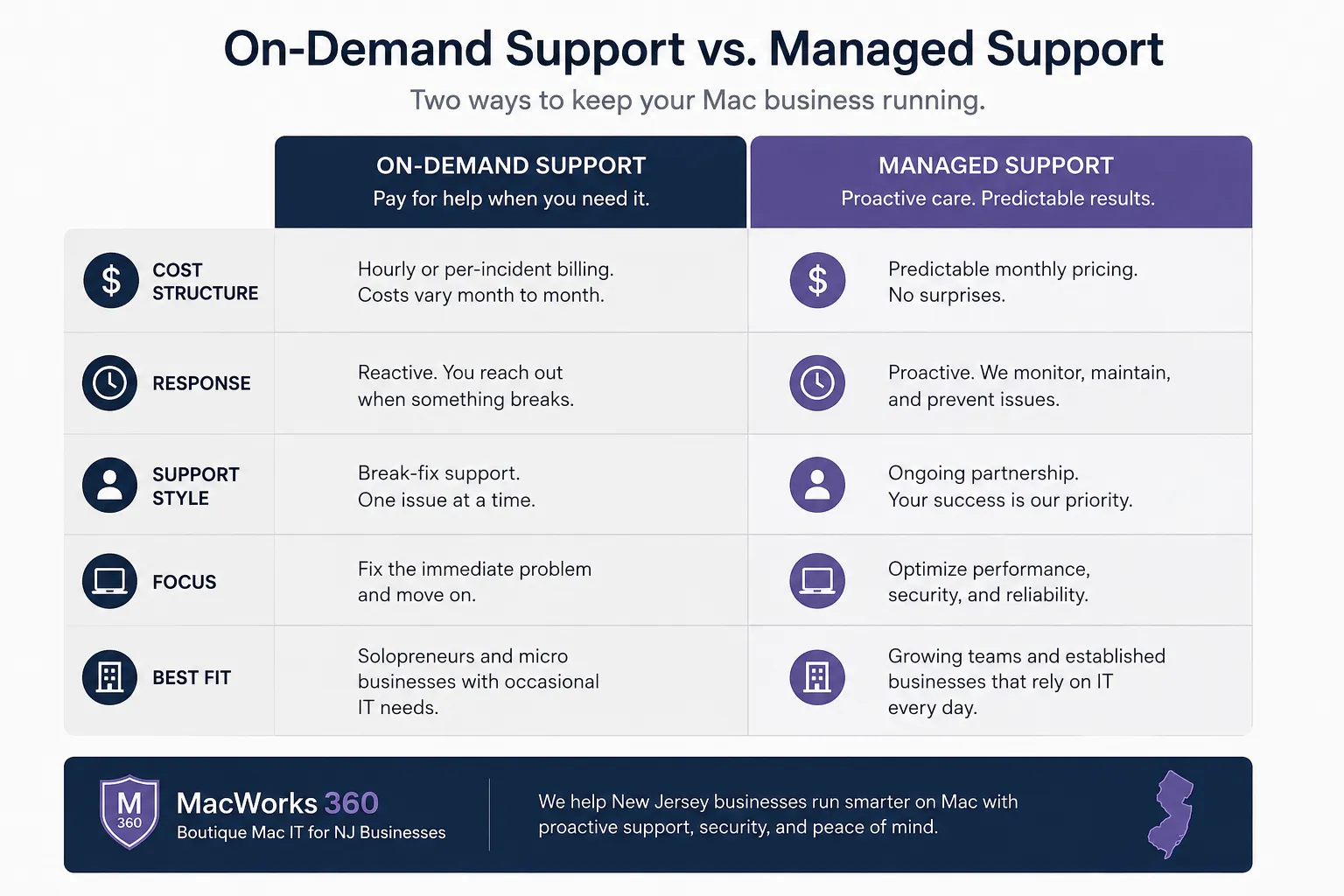
On-demand (Pay as You Need): You contact the provider when an issue arises, or a project requires support. There is no ongoing contract. This works well for smaller teams with infrequent needs or businesses that want to test a provider before committing to a deeper relationship.
Managed Mac support: A recurring arrangement where the provider handles proactive monitoring, scheduled maintenance, and support requests under an agreed scope. This model is better suited to businesses with five or more Macs, active growth, or environments where downtime has a direct cost. MacWorks 360 offers a Managed IT program for Mac structured around this ongoing relationship.
The right choice depends on how frequently your team needs support, how much unplanned downtime costs your business, and whether you want maintenance handled proactively or only when something breaks.
When Outsourcing May Not Be the Right Fit
Outsourced Mac IT support is not the right answer for every organization. Consider these situations where it may not fit:
- Your business has a capable in-house IT team that already holds Apple-specific experience and needs occasional overflow support.
- Your Apple device count is very low (one or two Macs), and issues are rare enough that on-demand help from a local technician is sufficient.
- Your industry or data environment requires an IT partner to be physically embedded in your operations on a full-time basis.
- You need a provider to own compliance certification outcomes. No outsourced provider can make that guarantee.
Being honest about these factors before engaging a provider saves time on both sides.
Questions to Ask a Mac IT Support Provider Before Hiring
Do not skip this step. The answers reveal whether a provider genuinely understands Apple environments or handles Macs as a secondary offering alongside Windows infrastructure.
- What percentage of your client base runs primarily on Mac? How long have you supported Apple-focused environments?
- How do you handle macOS updates across a mixed fleet of older and newer hardware?
- What does your onboarding process look like for a business with 15 existing Macs and three new hires starting next month?
- How are security incidents handled, and what is your process for notifying clients?
- What is your typical response time for remote support requests, and how is onsite availability structured in New Jersey?
- How do you document the work performed on our systems, and how is that information shared with us?
A provider who answers these questions clearly and specifically, without vague promises, is worth a closer look.
What Onboarding Should Look Like
A structured onboarding process is a sign of a mature provider. Expect the following during the first 30 to 60 days:
- A full audit of your existing Mac fleet, software licenses, and current security configuration.
- Documentation of your network setup, user accounts, and any third-party integrations.
- Identification of immediate risks, such as devices running outdated operating systems or missing encryption.
- Establishment of backup procedures and verification that recovery works.
- A clear communication plan covering how to submit support requests and who your primary contact is.
Onboarding that skips the audit phase and jumps straight to billing is a warning sign.
Why Consider MacWorks 360
MacWorks 360 provides onsite and remote Mac support for businesses across New Jersey, with a focus on Apple-first environments. Services include device deployment, managed maintenance, cloud integration, security configuration, and procurement guidance.
The company offers two clearly defined service options: a Pay as You Need model for businesses with occasional requirements, and a Managed Program for organizations that want proactive, ongoing support. Both are structured around Mac and Apple device environments rather than bolted onto a Windows-centric service offering.
Independent consultant; not affiliated with Apple Inc.
Frequently Asked Questions
How many Macs do we need before outsourced support makes financial sense?
There is no fixed threshold, but businesses with five or more Macs typically see the clearest return. At that scale, the time spent on ad hoc troubleshooting, manual updates, and inconsistent configurations adds up quickly. A managed arrangement becomes cost-competitive with the hours lost to unmanaged issues.
Can a Mac IT support provider also support our iPhones and iPads?
Yes, most providers covering Mac environments also handle iOS and iPadOS device management. This includes mobile device management configuration, app deployment, and integration with business email and cloud platforms. Confirm the scope during your initial consultation.
Will outsourcing Mac IT support create a security risk by giving a third party access to our systems?
A reputable provider will use secure, auditable remote access tools and document every session. Ask specifically how access is granted, logged, and revoked. Remote access that is not properly controlled is a risk, but that risk is managed through clear contractual terms and transparent tooling, not by avoiding remote support altogether. Reviewing guidance on identifying phishing and social engineering risks is also a useful step for any business evaluating its overall security posture.
What is the difference between a managed Mac support plan and a break-fix arrangement?
Break-fix (on-demand) support responds after a problem occurs. Managed support includes proactive monitoring, scheduled maintenance, and regular check-ins designed to prevent problems before they affect your team. Managed plans typically carry a monthly fee; break-fix is billed per incident or per hour.
How long does onboarding typically take?
For a business with 10 to 25 Macs, a thorough onboarding process generally takes two to four weeks. This includes the device audit, documentation, security baseline configuration, and backup verification. Rushing this phase increases the risk of missing existing problems that will surface later.
Next Step: Request a Consultation
If your New Jersey business is running primarily on Macs and current support is inconsistent, reactive, or simply nonexistent, the clearest next step is a direct conversation.
Request a consultation to discuss your Mac environment, current support problems, and whether on-demand or managed support is the better fit. There is no obligation, and the conversation will give you a concrete basis for comparing your options when evaluating outsourced Mac IT support in NJ.