
Quick Answer
Break-fix vs managed Mac IT support comes down to how much risk and unpredictability a business can absorb. Break/fix support works reasonably well for businesses with simple Apple environments, infrequent support needs, capable internal staff, or a high tolerance for occasional downtime. Managed Mac IT support is generally the stronger fit when employee productivity, data security, Apple device management across multiple users, and predictable monthly costs all matter to the business.
Key Takeaways
- Break/fix (also called pay-as-you-need Mac support) means paying per incident with no ongoing relationship. Managed support means paying a recurring fee for proactive monitoring, maintenance, and priority help desk access.
- Neither model is universally better. The right choice depends on environment complexity, support frequency, downtime tolerance, internal capability, and budget predictability.
- Managed support does not guarantee fewer problems, but proactive monitoring and scheduled maintenance tend to catch issues earlier, before they become outages.
- Break/fix creates misaligned incentives: the provider earns more when things break. Managed support aligns provider incentives with keeping systems healthy.
- Total cost comparisons should include provider fees, downtime costs, internal staff time, repeated incident fees, and risk exposure, not just the monthly or hourly rate.
- You can switch from break/fix to managed support at any time. The transition timeline depends on device count, documentation, network complexity, and the current condition of the environment.
- MacWorks 360 serves businesses in Northern and Central New Jersey and the Jersey Shore, offering both a Pay as You Need option and a Managed Program with 24/7 proactive monitoring and priority response.
- 24/7 monitoring is not the same as 24/7 human help-desk availability. Confirm exactly what is covered outside business hours before signing any agreement.
What Is the Difference Between Break/Fix and Managed Mac IT Support?
Break/fix IT support is a reactive model: a business calls when something goes wrong, a technician diagnoses and repairs the problem, and the business pays per incident or by the hour. There is no ongoing relationship, scheduled maintenance, or monitoring between calls.
Managed Mac IT support is a proactive model: a provider monitors Apple devices continuously, performs scheduled maintenance, applies security patches, and responds to issues, typically under a monthly service agreement. The business pays a predictable recurring fee rather than a variable per-incident rate.
The core difference is timing. Break/fix responds after failure. Managed support works to identify and address problems before they interrupt operations.
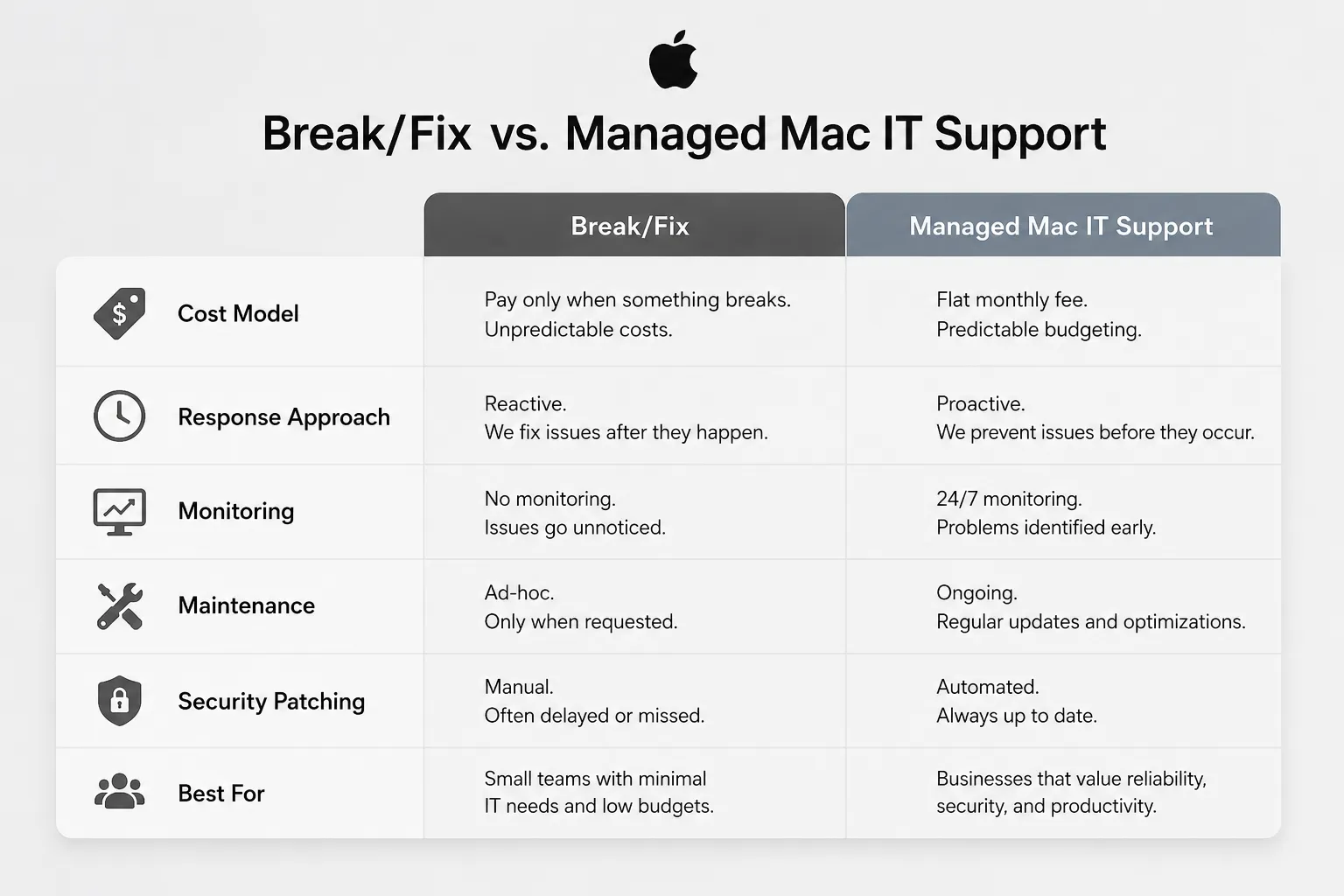
Break/Fix vs Managed Mac IT Support: Side-by-Side Comparison
| Factor | Break/Fix (Pay-as-You-Need) | Managed Mac IT Support |
|---|---|---|
| Cost model | Per incident or hourly | Fixed monthly fee |
| Monitoring | None between calls | 24/7 proactive monitoring |
| Maintenance | On request only | Scheduled and ongoing |
| Security patching | Reactive, when called | Systematic, plan-dependent |
| Response approach | Reactive | Proactive plus reactive |
| Relationship | Transactional | Ongoing partnership |
| Budget predictability | Low | High |
| Best for | Simple environments, low frequency | Multi-user, operationally dependent |
| Provider incentive | More breaks = more revenue | Fewer breaks = better relationship |
When Should a Business Use Break/Fix Instead of Managed Services?
Break/fix is a reasonable choice in specific situations. It is not a sign of poor planning; it is simply the right tool for certain environments.
Break/fix may be the better fit when:
- The business has one or two Macs and a capable internal person who handles most issues.
- Support needs are genuinely infrequent, perhaps a few calls per year.
- The business is in a temporary phase, such as a startup pre-launch or a transitional period between IT arrangements.
- A specific one-time project requires outside Mac expertise without an ongoing commitment.
- A few hours of downtime would be inconvenient but not financially damaging.
- The business knowingly accepts greater variability in IT costs and can absorb an unexpected repair bill.
The honest limitation of break/fix is that it offers no safety net. When something breaks, resolution speed depends entirely on technician availability, how quickly the problem is diagnosed, and whether parts or software are readily accessible. For businesses where Mac systems drive daily revenue, that variability carries real risk.
When Is Managed Mac IT Support the Better Choice?
Managed Apple IT support tends to deliver more value when the environment is complex, downtime has higher stakes, or internal IT capacity is limited.
Managed support is likely the stronger fit when:
- Multiple employees rely on Macs, iPhones, or iPads to do their jobs every day.
- The business has no dedicated internal IT staff and depends on outside expertise for patching, backups, and security.
- The same problems keep recurring, which often signals that quick fixes are masking deeper issues.
- Security and compliance responsibilities require consistent patch management and documented maintenance.
- The business is growing, adding devices, or planning to adopt new Apple tools.
- An unexpected IT bill would create a real cash-flow problem.
- Predictable monthly budgeting matters more than the flexibility of paying only when something breaks.
Proactive Mac support does not completely prevent problems. Hardware fails, software conflicts arise, and user errors happen regardless of the support model. Managed support changes how quickly providers detect problems and how much context they already have when something goes wrong.
How Much Does Managed Mac IT Support Cost Compared to Break/Fix?
There is no universal answer, and anyone who claims managed services always cost less than break/fix is oversimplifying. The honest framework is total cost, not just the line item on an invoice.
Break/fix costs to account for:
- Hourly or per-incident service fees (often at premium rates for urgent calls)
- Repeated visits when the same issue recurs
- Lost productivity during downtime (staff unable to work, deadlines missed, client impact)
- Internal staff time spent troubleshooting or coordinating repairs
- Risk exposure from unpatched systems or undocumented environments
Managed support costs to account for:
- Monthly service fee (varies by provider and plan scope)
- Reduced per-incident charges (typically covered under the agreement)
- Faster resolution due to existing system knowledge
- Ongoing maintenance that may reduce incident frequency over time
For a business that rarely needs IT support, break/fix may cost less in a given year. For a business that calls for help regularly, experiences recurring issues, or has suffered meaningful downtime, managed support often produces a more favorable total cost picture. The key is to calculate honestly, including the indirect costs that rarely appear on an IT invoice.
What Happens When a Mac Breaks Under Break/Fix Support?
Under break/fix support, the process typically follows this sequence: the business contacts the provider, explains the problem to a technician who may have no prior knowledge of the environment, waits for availability, and then waits for diagnosis, parts (if needed), and repair. During that window, affected employees work around the problem or stop working entirely.
The practical challenges include:
- No existing system documentation, so diagnosis starts from scratch.
- No priority queue: urgent calls compete with other clients.
- No visibility into whether related issues are developing elsewhere.
- No guarantee the underlying cause is addressed, only the immediate symptom.
Under a managed program, a provider responding to an outage already has system documentation, remote access credentials, and monitoring data showing what changed before the failure. That context can meaningfully reduce time to resolution, though response time commitments vary by provider and plan.
Do Managed Services Prevent Mac Problems or Fix Them?
Managed services do both, but prevention best describes the primary goal. Proactive monitoring watches for warning signs such as storage nearing capacity, failing drive health indicators, or software conflicts before they cause an outage. Scheduled maintenance tasks keep the environment stable over time.
That said, managed support does not eliminate problems. It changes the odds and the response. A well-maintained Mac environment will still experience hardware failures, application bugs, and user-generated issues. The difference is that a managed provider is more likely to catch early signals, respond faster when something does fail, and have the context needed to resolve it efficiently.
Security is one area where proactive management makes a measurable difference. Macs are not immune to phishing, ransomware, or credential-based attacks. Consistent patch management and security monitoring, features that are typically plan-dependent, reduce exposure compared to systems that only receive attention when something breaks. For more on the risks facing Apple users, see how to identify phishing emails and what to do after a major data breach.
Break/Fix Response Time vs Managed IT: What to Expect
Response time under break/fix depends entirely on the provider’s current workload and your relationship with them. Unless you negotiate one in advance, there is typically no contractual obligation to respond within a specific window.
Managed IT support agreements usually include defined response time tiers based on issue severity. Managed programs often include priority response for critical outages, though specific commitments vary by provider and plan.
The more important difference is detection time. Under break/fix, the clock starts when the business notices a problem and calls. Under managed support with 24/7 monitoring, the clock starts when the monitoring system detects an anomaly, which may be before the business is aware of any issue.
One clarification: 24/7 monitoring is not the same as 24/7 live help-desk support. Monitoring tools run continuously, but human response outside business hours depends on the specific plan. Always confirm what after-hours coverage actually means before committing to an agreement.
Is Managed IT Support Worth It for a Single Mac?
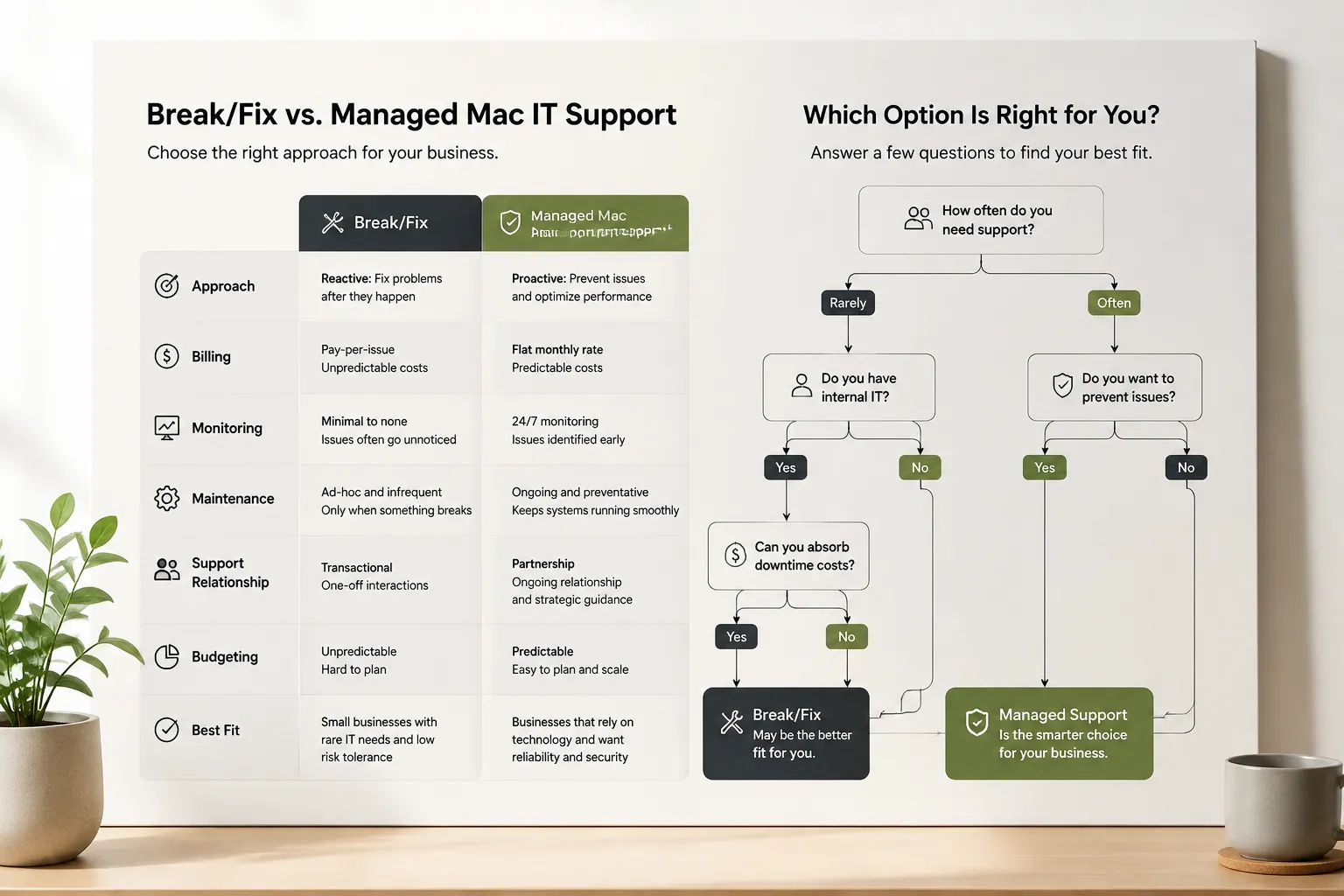
For a single Mac, managed support usually isn’t cost-effective unless the device is mission-critical and the business has no internal capability to handle even basic issues. A solo operator or freelancer with one Mac, reasonable technical comfort, and a high tolerance for occasional downtime is likely better served by pay-as-you-need Mac support.
The value of managed support scales with the number of devices, the complexity of the environment, and how dependent operations are on those devices. A five-person creative studio where every Mac is in use all day has a very different risk profile than a single-person consulting practice with one laptop.
Can a Business Switch from Break/Fix to Managed IT Support Later?
Yes, and many businesses make this transition as they grow. There is no technical barrier to moving from reactive Mac support to a managed program at any point. If you are still deciding whether your organization has reached that point, review when a New Jersey business should outsource Apple IT support.
What the transition involves, in general terms:
- Documenting the current environment (devices, software, network configuration, user accounts).
- Assessing the condition of existing systems and identifying deferred maintenance.
- Installing monitoring and remote management tools.
- Establishing maintenance schedules and security baselines.
- Onboarding staff to new support processes.
How long this takes depends on device count, how well the environment is already documented, network complexity, security requirements, and the overall condition of the existing setup. A small, well-maintained environment may transition relatively quickly. A larger or poorly documented environment will take longer. Any provider who gives a firm timeline without first reviewing the environment is estimating without enough information.
What Is Included in Managed Mac IT Support?
Inclusions vary by provider and plan, so treat the following as common examples rather than a guaranteed list. Confirm specific features with any provider before signing an agreement.
Features commonly associated with managed Mac IT support programs:
- 24/7 proactive monitoring of device health, storage, and network connectivity
- Scheduled preventative maintenance
- macOS update testing and deployment management
- Priority help desk access during business hours
- Remote troubleshooting and support
- Recurring onsite visits (plan-dependent)
- Security patch management
- Documentation of the Apple environment
Features that may or may not be included depending on the plan:
- Data backup configuration and oversight
- Email and cloud service management
- Employee onboarding for new Apple devices (see Apple device onboarding)
- Cloud migration support (see Apple cloud solutions)
- After-hours emergency response
Always ask for a written description of what is and is not covered before committing to any managed IT agreement.
Self-Assessment: Which Model Fits Your Business Right Now?
Work through these questions honestly before deciding.
- How costly is one hour of downtime? (Lost revenue, idle staff, missed deadlines)
- Are the same problems recurring, or are issues genuinely one-off?
- Who currently owns patching, backups, security monitoring, and system documentation?
- Does the business have reliable internal Mac expertise, or does every issue require an outside call?
- Would an unexpected IT bill of several hundred to several thousand dollars create a cash-flow problem?
- Is the Mac environment growing in complexity, devices, or users?
- How long can the business operate if a critical Mac or server goes down?
If most answers point toward high stakes, limited internal capability, and low tolerance for surprises, managed support is worth a serious look. If the environment is simple, support needs are rare, and the business can absorb occasional disruption, pay-as-you-need Mac support may be the more practical choice right now.
How Do MacWorks 360’s Pay-as-You-Need and Managed Program Options Differ?
MacWorks 360 serves businesses across Northern and Central New Jersey and the Jersey Shore with two distinct support structures.
Pay as You Need is a flexible option for businesses that want access to experienced Mac support without a monthly commitment. Clients pay for support as needed, with priority service and predictable hourly rates. This works well for businesses with occasional needs, capable internal staff, or those in a transitional phase.
The Managed Program is designed for businesses that want ongoing coverage. Published features include 24/7/365 proactive monitoring, preventative maintenance, priority response, and unlimited help desk support during business hours. The program also includes recurring onsite visits. This option suits businesses where Mac systems are central to daily operations and where consistent, documented support matters.
MacWorks 360 focuses specifically on Apple technology, so support is built around how macOS, iOS, and the broader Apple ecosystem work in business environments, rather than adapted from a Windows-first approach. For businesses keeping up with Apple’s evolving platform, that specialization matters. Compare the Managed Mac IT Support Plans, review Pay-As-You-Need Apple IT Support, or schedule an Apple IT consultation to identify the right fit.
Common Mistakes When Choosing Between Break/Fix and Managed Mac Support
Avoiding these mistakes can save significant time, money, and frustration.
Comparing only the monthly fee to the hourly rate. The real comparison is total cost, including downtime, repeated incidents, and internal time spent managing IT problems.
Assuming managed support is always cheaper. For a business with very low support frequency, break/fix may cost less in a given year. The math changes when incidents become frequent, or downtime becomes costly.
Choosing break/fix to “save money” without accounting for risk. A single serious outage or security incident can cost far more than a year of managed support fees. Risk tolerance is a legitimate factor, but it should be a conscious decision.
Signing a managed agreement without reading the inclusions carefully. Not all managed programs cover the same things. Backup, after-hours support, and cloud management are often add-ons, not standard inclusions.
Waiting until after a crisis to evaluate the model. The best time to assess IT support structure is before a problem, not during one.
Questions to Ask a Prospective Mac IT Provider
Before committing to either model, ask any provider these questions directly:
- What is included in the monthly fee, and what is billed separately?
- What does “24/7 monitoring” cover, and what is the after-hours human response commitment?
- What are the response time commitments for different issue severities?
- How will you handle the transition from our current setup, and what will it require from our team?
- How do you handle macOS updates and compatibility testing before deployment?
- What documentation do you maintain about our environment, and do we have access to it?
- What happens if we want to leave the agreement?
Clear, specific answers to these questions separate providers who have thought through service delivery from those selling a concept without a defined process behind it.
Frequently Asked Questions
What is break/fix IT support for Mac?
Break/fix Mac support is a reactive model where a business pays for IT help only when something goes wrong. There is no ongoing monitoring, scheduled maintenance, or monthly fee. The business calls when a problem occurs and pays per incident or by the hour.
What is managed Mac IT support?
Managed Mac IT support is a proactive model where a provider monitors Apple devices continuously, performs scheduled maintenance, and responds to issues under a monthly service agreement. The goal is to catch and address problems before they disrupt operations.
Is managed IT support always cheaper than break/fix?
No. For businesses with very infrequent support needs, break/fix may cost less in a given year. Managed support tends to produce a better total cost outcome when incidents are frequent, downtime is costly, or the same problems keep recurring.
Do Macs need managed IT support, or are they more reliable than PCs?
Macs are generally stable, but they still require patch management, security monitoring, backup oversight, and periodic maintenance. Businesses with multiple Mac users, sensitive data, or limited internal IT capacity benefit from the same proactive management that any business-critical device environment requires.
Can a small business with just a few Macs use managed support?
Yes, though the value depends on how critical those Macs are to daily operations. A three-person office where every Mac is essential to revenue generation has a different calculus than a solo operator with one laptop used occasionally.
What does 24/7 monitoring mean in a managed Mac IT agreement?
It means automated tools are watching device health, network connectivity, and system performance around the clock. It does not automatically mean a human technician is available to respond at 3 a.m. Confirm the provider’s after-hours human response policy before signing.
How long does it take to switch from break/fix to managed IT support?
It depends on the size and condition of the environment. A small, well-documented setup may transition relatively quickly. A larger or poorly documented environment takes longer. Any provider giving a firm timeline without reviewing the environment first is guessing.
What if my Mac never breaks? Do I still get value from managed support?
Yes, if the managed program includes proactive monitoring, security patch management, and scheduled maintenance. The value is in prevention and peace of mind, not just repair service. That said, if a Mac genuinely never needs attention, break/fix may be more cost-effective in that situation.
Is break/fix appropriate for a growing business?
It can be a starting point, but growing businesses typically add devices, users, and complexity faster than break/fix support can keep up with. Most businesses that outgrow break/fix do so because recurring incidents and unplanned costs disrupt operations and budgeting.
What should be in a managed IT service agreement?
At minimum: a clear list of included services, response time commitments by issue severity, after-hours coverage terms, how updates and maintenance are handled, what documentation the provider maintains, and the terms for ending the agreement.
Ready to Compare Your Options?
Not sure which support model fits your business? Request a Mac IT consultation with MacWorks 360. The team will review how your business uses Apple technology, where support problems are occurring, and whether Pay as You Need or the Managed Program is the more practical fit for your situation. There is no obligation to commit to the Managed Program; the goal is to match the right model to the business’s actual needs.
Schedule an Apple IT consultation with MacWorks 360 to compare your support options.