
Consider Moving Your Mac’s Dock to the Side of the Screen

For most of us, our Mac’s screen is wider than it is tall, so longer Web pages and documents often benefit from more room from top to bottom. To maximize […]
Sidestep MacBook Optimized Battery Charging When Necessary

Have you ever run into a situation where the battery icon in your menu bar is stuck at 80% even though your Mac has been plugged in for hours? Luckily, […]
How to Turn Mail’s Rich Website Previews into Plain Links
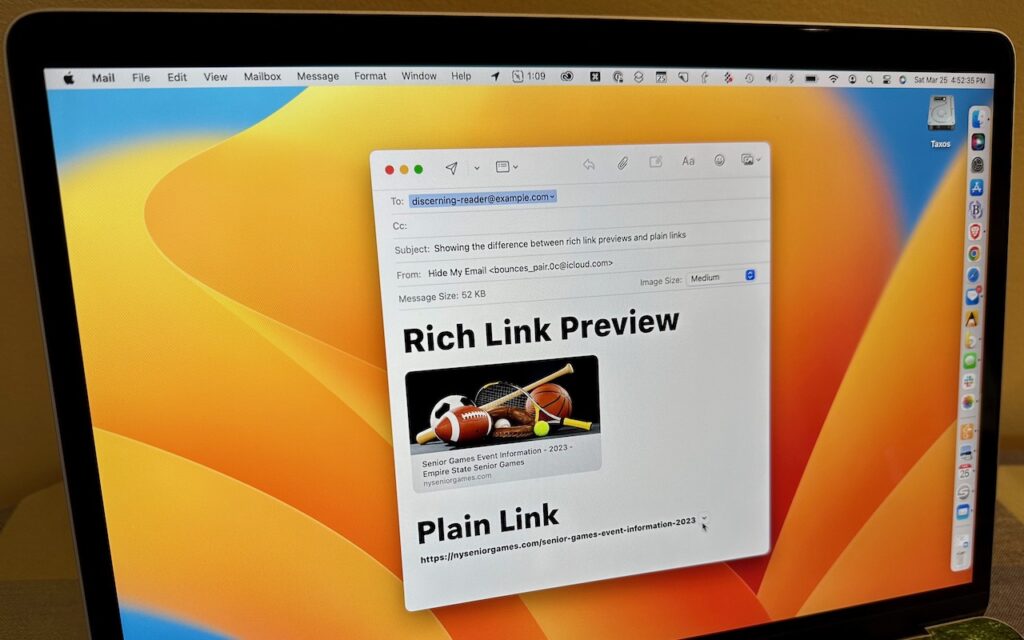
Sometimes apps can be too helpful. Apple’s Mail on the Mac likes to turn pasted URLs into graphically rich previews, and sometimes that’s OK. But other times, the preview is […]
Need to Back Up or Export a Messages Conversation? Try PDF or iMazing

Occasionally, we hear from a client who needs to document a Messages conversation with timestamps, perhaps as part of a lawsuit. The only way to do that on an iPhone […]
Quickly Put Lots of Files in a Folder with One Command

Imagine that you’re working with a bunch of files, and you want to put a set of them in a new folder. You could stop what you’re doing, make a […]
Manage Email Faster in Mail by Swiping

We all get too much email, and while Mail can’t help you get less (other than by making it easy to unsubscribe from mailing lists), it does provide shortcuts for […]
Get Some Color (On Your Mac) This Summer with the Color Picker

If you’re over 40, you probably remember the point in The Wizard of Oz where the movie switches from black-and-white to Technicolor (and if not, go see it!). It wasn’t […]
Picking Group Meeting Times Is Easy with Crab Fit

Various calendar services let you schedule a meeting based on invited attendees picking preferred times from a set of specified options—Doodle is the most well-known. But the problem with such […]
Do You Keep Losing Your Pointer on a Large Screen? Try This Tip for Finding It

A large screen—or several screens!—increases productivity by helping you see more content at once. It’s a big help to refer to a Web page in one window while writing in […]
Copy and Paste between Your Apple Devices with Universal Clipboard

Everyone is accustomed to using the Copy and Paste commands on the Mac, but fewer people know that you can also copy and paste between your Mac and your iPhone […]