
Last updated: September 25, 2026
Quick answer
Claude Code is safe for business use when it runs under a commercial account, starts inside a scoped project folder, and operates under explicit deny rules for secrets and credentials. No configuration setting makes it safe to expose production credentials directly to the model. The setup below takes about ten minutes and applies to any team running Claude Code against company repositories.
Key takeaways
- Use a Team, Enterprise, API, or cloud-provider account for company code. Personal Free, Pro, and Max accounts have different data-use defaults.
- Anthropic does not train generative models on code or prompts sent under commercial terms unless a customer opts in, and standard server-side retention is 30 days.
- Deny rules for
.env,.pem,.key, and SSH folders should exist in.claude/settings.javabefore the first session, not after. - Sandboxing command execution and isolating untrusted repos in a container or VM prevents the most damaging accidental exposures.
- Every MCP server is a new trust boundary. Remove unrecognized or unused servers; don’t leave them running.
- Local transcripts sit in plaintext
~/.claude/projects/for 30 days by default and should be shortened for sensitive projects. - Secure coding practices from frameworks like the NIST Secure Software Development Framework apply to AI-assisted development the same way they apply to human-written code.
What is Claude Code and why do businesses need secure configuration
Claude Code is Anthropic’s command-line coding agent. It can read and edit files, run shell commands, reach the network, and connect to external tools through the Model Context Protocol (MCP). That range of capabilities makes secure configuration necessary, not optional.
A coding assistant that can execute shell commands and touch the filesystem is functionally similar to giving a new contractor shell access to a machine. Businesses need secure configuration because:
- Default settings prioritize convenience over restriction.
- A single overly broad approval (like allowing all
Bashcommands) can expose credentials, push unreviewed code, or leak files to the network. - Regulated industries (finance, healthcare, legal) have data handling obligations that don’t disappear because an AI tool is doing the work.
IBM’s overview of secure coding practices and the OWASP Developer Guide’s secure-by-default principles make the same core point: tools should be restrictive by default and opened up deliberately, not the reverse. Claude Code’s permission system is built around that idea, but only if a team actually configures it that way.
How do you set up Claude Code securely for a team?
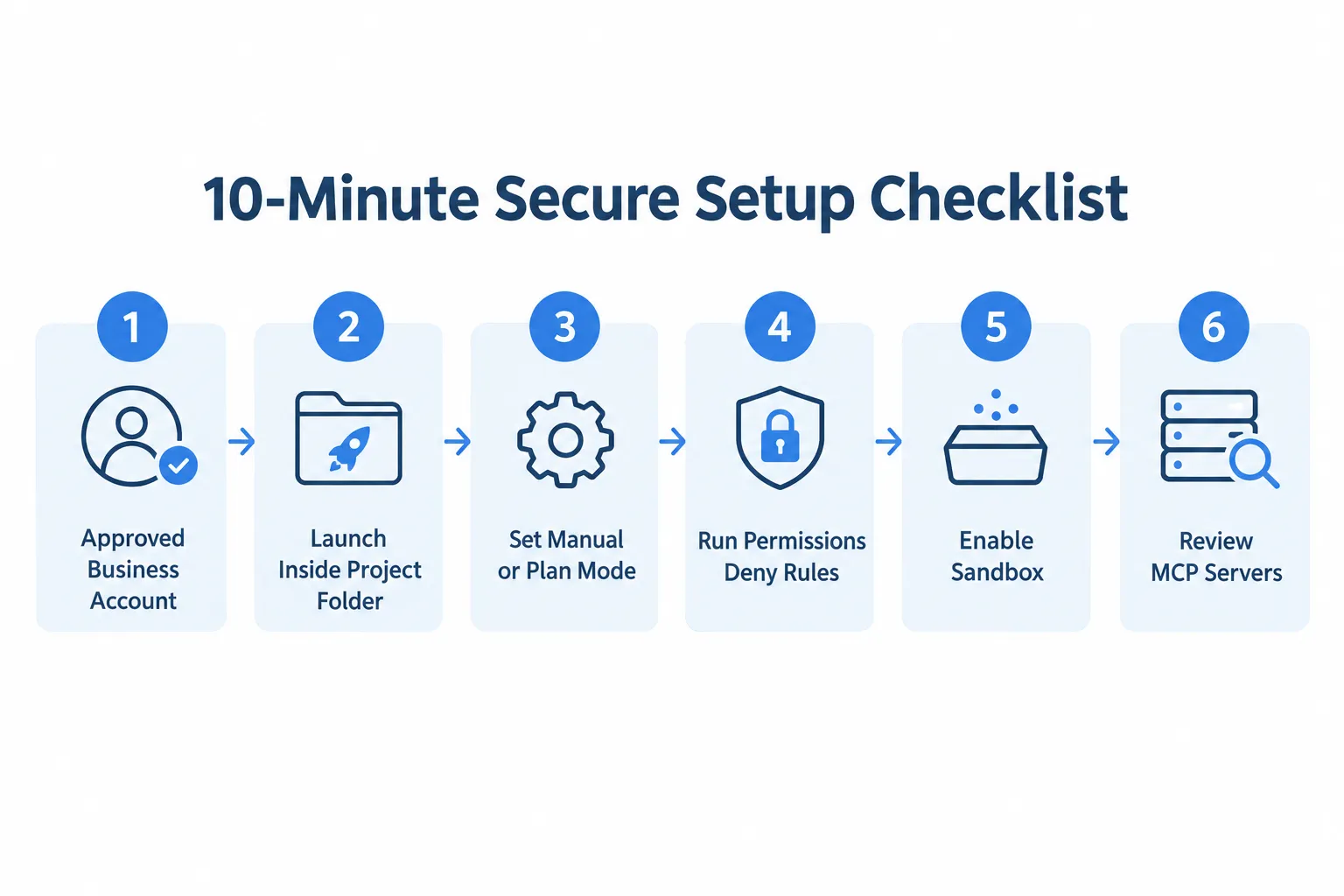
The fastest path to a safe baseline is a documented checklist run once per machine and repeated for every new project. This is the same 10-minute quick start MacWorks 360 uses when onboarding client teams.
10-minute quick start
- Use a company-approved Team, Enterprise, API, or cloud-provider account, not a personal Free, Pro, or Max account.
- Start Claude Code inside the project folder, never from the home directory.
- Keep Manual mode for normal work; use Plan mode for review-only tasks.
- Run
/permissions; remove broad approvals and add deny rules for.envsecrets, keys, and credential folders. - Run
/sandboxand enable sandboxing for command execution; use a dev container or VM for untrusted repositories. - Do not use
bypassPermissionsoutside an isolated container or VM. - Review every MCP server and its permissions; remove servers you don’t recognize or need.
- Set a shorter
cleanupPeriodDaysif 30 days of plaintext local transcripts is too long. - Do not use
/feedback,/bug, or/sharewith confidential sessions unless the company has approved the disclosure.
Where Claude Code settings live
Configuration is layered across four scopes, and the layer with the highest precedence wins:
| Scope | File | Use |
|---|---|---|
| User | ~/.claude/settings.json | Defaults on one machine |
| Shared project | .claude/settings.json | Team rules committed with the repository |
| Project local | .claude/settings.local.json | Private overrides for one project |
| Managed | managed-settings.json or managed sources | Organization-enforced policy, highest precedence |
IT administrators should push security-critical rules through the managed scope so individual developers cannot override them. This mirrors the configuration-management guidance in the NIST SP 800-218 Secure Software Development Framework, which treats enforced baseline configurations as a control, not a suggestion.
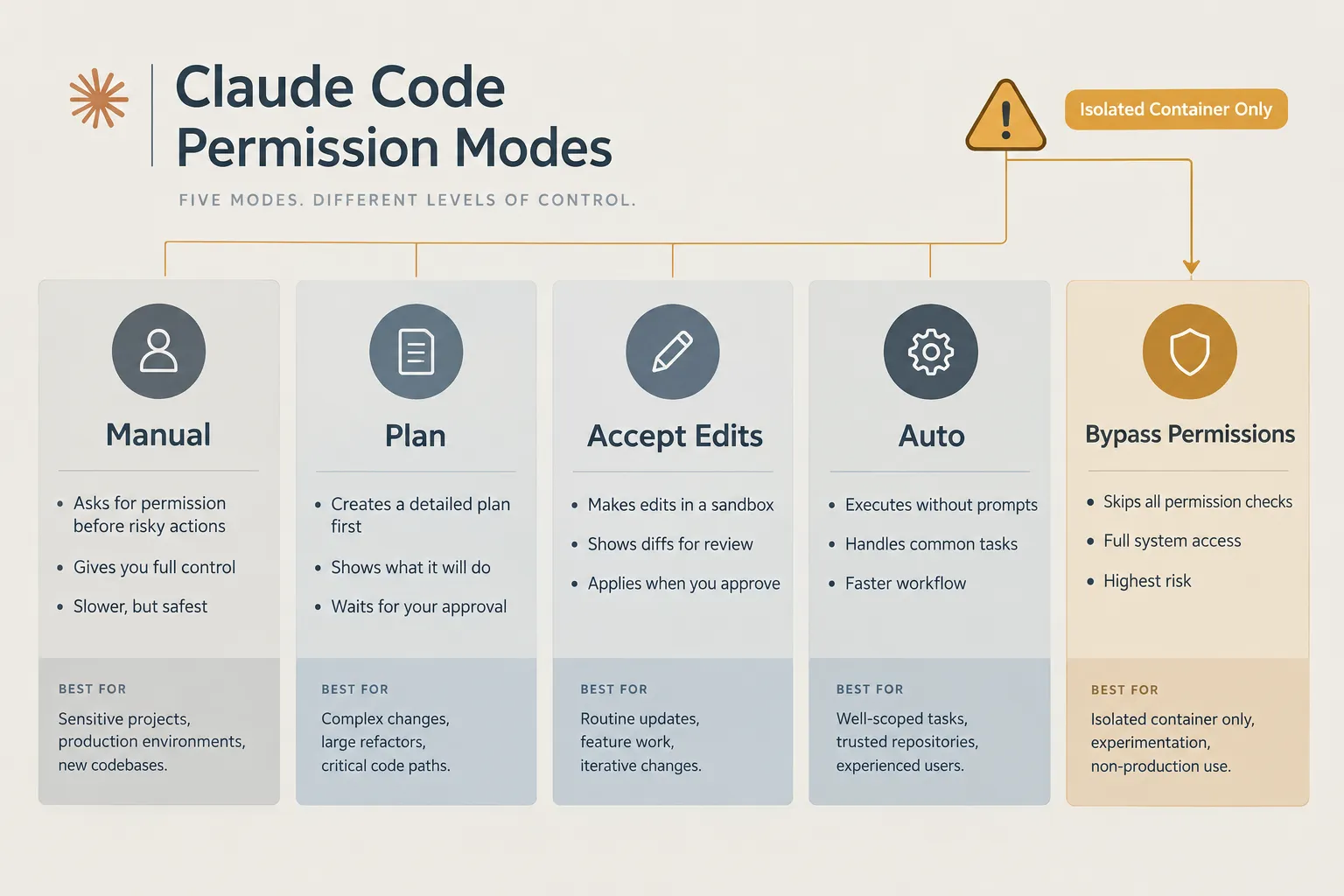
Permission modes at a glance
| Mode | Behavior | When to use |
|---|---|---|
| Manual (default) | Asks on first use of most tools | Normal development |
| Plan | Explores and plans without editing source files | Audits, design work, unfamiliar repos |
| Accept Edits | Automatically accepts edits and some filesystem commands | Trusted repos with easy-to-review changes |
| Auto | A classifier approves actions in the background | Only with documented risk review for sensitive repos |
| Bypass Permissions | Skips most prompts | Only in a disposable, isolated container or VM |
Choose Manual for anything touching production code or customer data. Choose Plan for a first pass through an unfamiliar repository—Reserve Bypass Permissions entirely for throwaway containers.
Claude Code security best practices for enterprise
Enterprise teams need deny rules in place before the first session runs, plus a sandboxed execution environment for anything touching untrusted code. Two controls do most of the work: explicit deny rules and command sandboxing.
Deny access to secrets, example settings
Add these deny rules to .claude/settings.json before the first session. Adjust the patterns to the project and test them with /permissions.
deny: ["Read(.env)", "Read(.env.*)", "Read(**/secrets/**)", "Read(**/*.pem)",
"Read(**/*.key)", "Read(~/.ssh/**)", "Bash(curl *)", "Bash(wget *)", "Bash(git push *)"]
Sandbox command execution
- Allow writes only within the project and an approved temporary or build directory.
- Deny reads to home-directory secrets and credential locations.
- Allow network access only to required package registries and company services.
- Keep unfamiliar build scripts, installers, and downloaded code inside a dev container or VM.
- Never mount
~/.sshloud credential files, or broad host directories into the container.
Before approving any action, ask:
- What exact command or tool will run?
- Which files can it read or change?
- Does it send data outside the machine?
- Is the approval once, for this session, or permanent?
- Can you narrow the approval to one command, path, or domain?
These questions echo the least-privilege and clean-code principles in the UK NCSC’s guidance on producing clean and maintainable code and the secure coding checklists published by UC Berkeley’s information security office. Both treat scoped, reviewable permissions as a baseline requirement, not an advanced option.
Common security mistakes and how to troubleshoot Claude Code configuration
The most common mistake is approving broad permissions to stop the prompts, then forgetting they’re still active weeks later. Others include starting Claude Code from a home directory that contains unrelated client projects, and running --dangerously-skip-permissions directly on a host machine instead of inside a container.
Frequent mistakes:
- Choosing “don’t ask again” without checking
/permissionsafterward. - Leaving unused MCP servers connected with live tokens.
- Assuming a personal Pro or Max account has the same data-use terms as a commercial plan.
- Pasting API keys, session cookies, or credentials directly into a prompt to “test something quickly.”
Troubleshooting checklist:
- If Claude Code reads a file it shouldn’t, check whether the deny pattern matches the actual file path (glob patterns are case- and path-sensitive).
- If a command runs outside the sandbox unexpectedly, confirm
/sandboxis actually enabled for the current session, not just configured. - If an MCP tool behaves unexpectedly, turn off the server, then re-enable it with narrower, tool-specific rules.
- If permissions seem inconsistent across a team, check for a lower-precedence local override fighting with the managed or shared settings file.
Claude Code vs other AI coding tools: security comparison for business
Claude Code’s security profile depends more on account type and configuration than on the tool itself; the same is true of most competing AI coding assistants. Meaningful differences between tools usually come down to default data retention, permission granularity, and how easily a team can enforce managed policy across every developer machine.
When evaluating alternatives, compare:
- Whether the vendor offers zero data retention for qualified enterprise customers.
- Whether permissions are file- and command-level, or all-or-nothing.
- Whether sandboxing for shell execution is built in or requires a separate container setup.
- Whether third-party tool integrations (MCP or equivalent) can be individually reviewed and revoked.
Who should use Claude Code: teams with a documented review process, a commercial account, and staff willing to spend the ten minutes on configuration above.
Who shouldn’t (yet): organizations with no secret-management practice in place, no ability to enforce managed settings, or regulatory obligations they haven’t mapped to Anthropic’s data usage documentation. Businesses in that position should fix credential handling and access governance first; a related starting point is AI governance planning for small business.
How much does Claude Code cost for business teams
Claude Code is available through commercial Team, Enterprise, and API plans, with pricing structured around usage and seats rather than a flat consumer fee; current rates should be confirmed directly at claude.ai since they change frequently. For a business, the cost decision is less about the sticker price and more about which plan tier includes the data-handling terms the business actually needs.
- API and Team plans typically suit smaller engineering groups that need commercial data terms without full enterprise procurement.
- Enterprise plans add options like zero data retention for qualified organizations, which matters for regulated industries.
- Personal Free, Pro, and Max accounts are not appropriate for company code, regardless of price, because coding sessions may be used to improve future models unless model improvement is turned off at claude.ai/settings/data-privacy-controls.
Can Claude Code handle sensitive data and proprietary code
Claude Code can technically process sensitive data and proprietary code, but doing so safely requires commercial account terms, strict deny rules, and short-lived credentials rather than any single “safe mode.” No setting eliminates the risk of exposing production secrets if the tool can reach them.
What compliance standards does Claude Code meet for businesses? Anthropic states that commercial Team, Enterprise, and API usage is not used to train generative models unless a customer opts in, with standard 30-day server-side retention and zero data retention available for qualified Enterprise organizations. Businesses in regulated industries should map these terms against their own obligations; a fuller breakdown is available in AI data compliance guidance for New Jersey businesses covering SOC 2, GDPR, and the EU AI Act.
Edge cases and limitations:
- A sanitized sample dataset is always safer to hand to Claude than a production database export.
- Deny rules only work if patterns match actual file paths; a misconfigured glob pattern can silently fail to block a secrets folder.
- MCP servers introduce a separate trust boundary that local deny rules don’t cover.
What happens if Claude Code processes confidential information: if confidential data reaches a session under a personal account with model improvement enabled, it may be used to improve future models; under commercial terms without an opt-in, standard retention still applies for 30 days unless zero data retention is in effect. Treat any accidental exposure like any other data incident: rotate affected credentials immediately, review the local transcript for what was actually read, and document the exposure per company policy. Broader risk context is covered in AI data privacy risks for businesses.
How to integrate Claude Code securely with existing business tools
Claude Code connects to outside tools through MCP servers, and each one should be treated as a separate access grant that needs its own review, not an extension of trust already given to Claude itself. Before enabling any MCP server:
- Verify the publisher and source code or vendor.
- Use a dedicated, least-privilege service account when possible.
- Add tool-specific ask or deny rules instead of allowing every MCP tool.
- Remove unused servers and rotate their tokens.
- Never commit MCP credentials to the repository.
Vendors offering AI coding tools with training data opt-in defaults deserve extra scrutiny before integration; see AI vendor data training policy considerations for questions to ask before signing.
How to audit and monitor Claude Code usage in your company
Claude Code stores local session transcripts in plaintext ~/.claude/projects/ for 30 days by default, and that retention window (not the model’s memory files) is the first thing to check during a routine audit. Set cleanupPeriodDays to a shorter, company-approved period. Cleanup does not remove Claude’s memory files; review both before disposing of a device or ending a sensitive project.
Safe daily-use rules
| Do | Do not |
|---|---|
| Give Claude a sanitized sample rather than a production database or customer export. | Start Claude Code in ~, /, or a directory containing unrelated client projects |
| Keep secrets in a secret manager; inject only short-lived, scoped credentials | Run --dangerously-skip-permissions on the host |
| Review git diff, tests, and security-sensitive files before commit | Approve broad commands or domains merely to stop prompts |
Check /permissions after choosing “don’t ask again” | Paste API keys, passwords, session cookies, signing keys, or MFA codes into prompts. |
Compromised credentials remain one of the fastest routes to a breach regardless of which AI tool is involved; the same discipline described in reviewing exposed passwords and enabling two-factor authentication applies directly to tokens used by Claude Code and its MCP servers.
FAQ
Is Claude Code safe for company code?
It can be, with a commercial account, deny rules, sandboxing, and MCP review in place. No configuration eliminates all risk, especially around production secrets.
Does Claude Code train on business code?
Anthropic states commercial Team, Enterprise, and API usage is not used to train generative models unless the customer opts in. Personal Free, Pro, and Max accounts have separate settings that may allow model improvement unless you turn them off.
What is the difference between Manual and Plan mode?
Manual mode asks for approval the first time you use most tools. Plan mode explores and plans without editing source files, which suits audits and unfamiliar repos.
Should small businesses use Bypass Permissions mode?
Only inside a disposable, isolated container or VM, never on a host machine with real credentials or client data.
How long does Claude Code keep local transcripts?
Thirty days by default, stored in plaintext under ~/.claude/projects/. Businesses can shorten this with cleanupPeriodDays.
Do MCP servers need separate security review?
Yes. Each MCP server is a distinct trust boundary with its own permissions, publisher, and credentials, and should be reviewed and removed if unused.
Can Claude Code access production databases directly?
It can if credentials are reachable, which is why sanitized samples and secret managers with short-lived scoped tokens matter more than any single permission setting.
About MacWorks 360
MacWorks 360 helps New Jersey businesses configure AI tools responsibly, with the right account types, permissions, and guardrails in place from day one. Businesses already working with the team on broader Apple environment setup can review the Apple business setup and support services for New Jersey companies for related IT groundwork.
Contact: macworks360.com/contact | Call Richard: 973-671-1122
Related Comparisons
- Microsoft Copilot: Secure Configuration Guide for Business Users
- Gemini for Google Workspace: Secure Configuration Guide for Business Users
- ChatGPT Secure Configuration Guide for Business Users
- Goodweek vs ChatGPT for Business: Governance, Security and Model Choice
- Goodweek vs ChatGPT, Claude, Gemini, and Microsoft Copilot: A Business AI Governance Guide
- Goodweek vs Claude Enterprise: Multi-Model AI Governance Compared
- Goodweek vs Gemini for Google Workspace Business: Which AI Fits Your Team?
- Goodweek vs Microsoft Copilot: AI Governance Compared for 2026
References
- NIST Secure Software Development Framework (SSDF) Project
- NIST SP 800-218, Secure Software Development Framework (SSDF) Version 1.1
- IBM: What Is Secure Coding?
- UC Berkeley: Secure Coding Practice Guidelines
- OWASP Developer Guide, Secure by Default
- UK NCSC: Produce Clean and Maintainable Code
Checked September 25, 2026. Claude Code changes quickly; validate examples in a test repository before deploying as managed settings.