
Last updated: September 25, 2026
Quick answer
Choose Goodweek when the organization needs one governed workspace across multiple AI model families and departments. Choose Microsoft Copilot when Microsoft 365, Entra ID, sensitivity labels, and Purview already form the organization’s control plane. Neither tool fixes bad permissions on its own: a poorly permissioned Microsoft 365 tenant stays poorly permissioned once Copilot is added on top of it.
Key takeaways
- Goodweek is a multi-model AI workspace that lets teams use GPT, Claude, Gemini, Mistral, and DeepSeek inside governed Spaces with role-based access.
- Microsoft Copilot grounds responses in Microsoft Graph data and inherits existing Microsoft 365 permissions, labels, and retention policies.
- Copilot does not create new access controls; it surfaces whatever a user already has permission to see, per Microsoft’s governance documentation.
- Purview adds DLP, eDiscovery, retention, and audit capability to Copilot, but only when licensed and configured correctly.
- Goodweek’s core pitch is consolidation: one governed doorway instead of scattered, unmanaged AI accounts across a department.
- Organizations can run both tools if they define which workflows belong in each platform and avoid duplicate, unmanaged data paths.
- Cost, compliance maturity, and how many AI model families a team actually needs should drive the decision, not brand familiarity.
What is the Goodweek AI governance platform?
Goodweek is an AI work platform that gives businesses a single governed entry point to several leading AI model families instead of forcing employees onto separate, unmanaged accounts. Teams work inside “Spaces,” each with its own access rules, connected tools, and shared knowledge base.
According to Goodweek’s platform overview and company background, the product is built around three ideas:
- Model choice: employees can choose from GPT, Claude, Gemini, Mistral, DeepSeek, and other model families in one interface, rather than juggling separate logins and data trails.
- Space-level governance: departments or projects get their own Space with defined membership, permissions, and connected knowledge, so marketing’s AI workspace does not bleed into finance’s.
- Vendor commitment on training data: Goodweek states customer data is never used to train third-party foundation models, a claim organizations should confirm contractually before rollout.
Goodweek is not a replacement for Microsoft 365, Google Workspace, or any core productivity suite. It sits as an AI layer on top of existing tools, per Goodweek’s business-focused page.
How does Microsoft Copilot handle AI governance?
Microsoft Copilot handles governance by inheriting the controls already present in a Microsoft 365 tenant rather than building a parallel permission system. Copilot’s access to a document, email, or Teams message depends entirely on whether the requesting user already has permission to that content through Microsoft 365.
Microsoft documents this design in its guidance for configuring a secure and governed data foundation for Copilot and its security and governance controls reference. Key mechanisms include:
- Entra ID identity and conditional access governing who can use Copilot at all.
- Sensitivity labels and retention policies from Purview carrying over into Copilot-generated content.
- DLP policies that can restrict what Copilot can reference or output.
- Audit logs capturing Copilot prompts and responses for later review, subject to licensing tier.
This is why Microsoft frames enterprise rollout as a maturity exercise. The agentic AI maturity model treats data hygiene and permission review as prerequisites, not optional cleanup.
Why a poorly permissioned Microsoft 365 environment stays poorly permissioned with Copilot
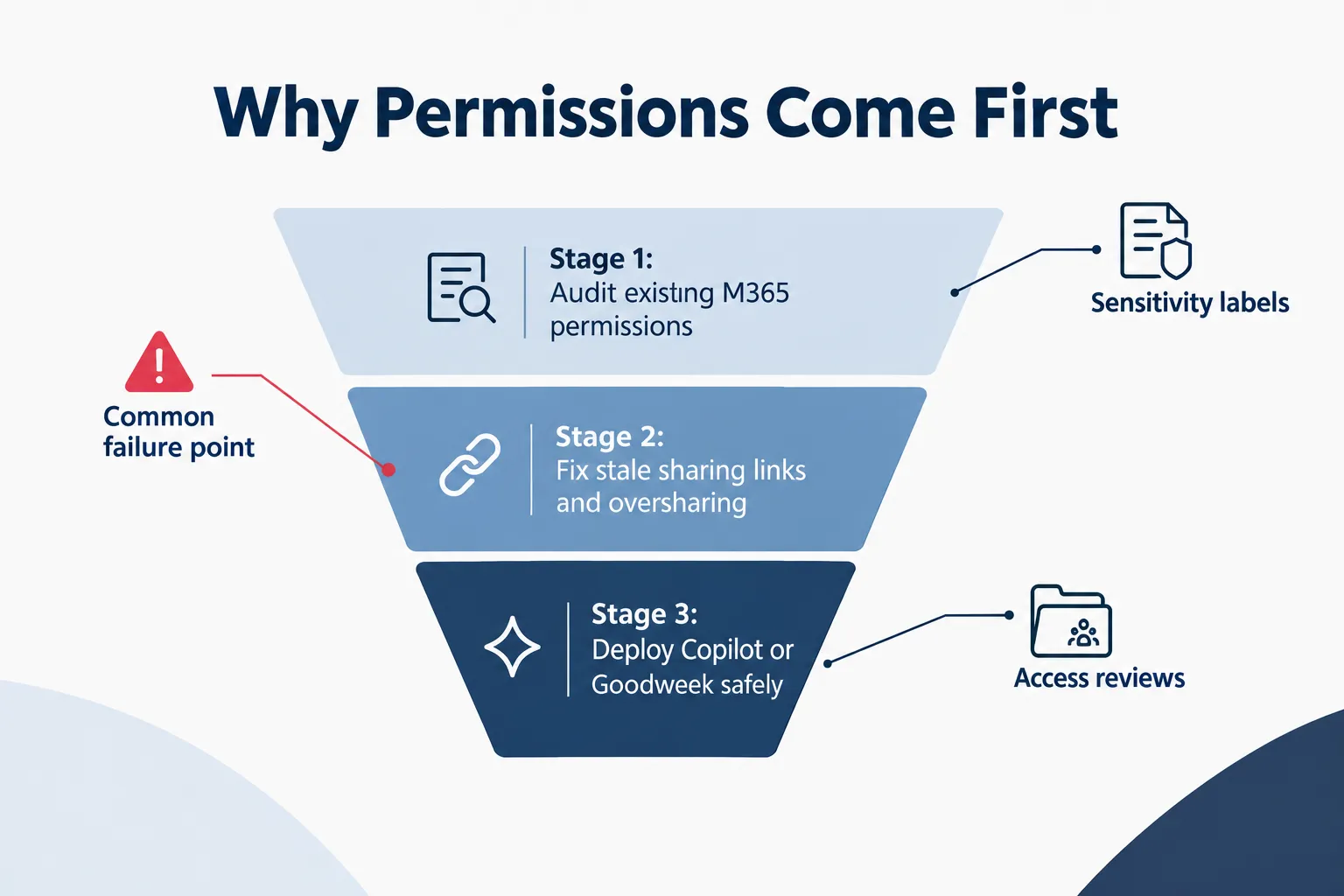
Copilot does not repair broken permissions. It reads them. If a SharePoint site has been shared too broadly, or a document link never expired, Copilot can surface that content to anyone with existing access, sometimes faster and more visibly than a manual search would have.
This matters because most Microsoft 365 tenants accumulate permission drift over years: departed employees with lingering access, “anyone with the link” shares from 2021, and stale group memberships nobody has audited. Copilot does not create these problems. It exposes them.
Before a broad Copilot deployment, an IT team or business owner should:
- Run a permissions audit across SharePoint, OneDrive, and Teams to find overshared sites and stale links.
- Apply or correct sensitivity labels so Purview policies actually match the content they are meant to protect.
- Review guest and external access since Copilot respects whatever access those accounts already hold.
- Test Copilot in a pilot group before tenant-wide rollout, watching for unexpected surfacing of sensitive files.
Organizations that skip this step are the ones that end up surprised, not because Copilot malfunctioned, but because the underlying environment was never clean. This is a recurring theme in AI governance guidance for small businesses and in broader AI data privacy risk assessments for SMBs.
Goodweek vs Microsoft Copilot: which is better for enterprises
The better platform for an enterprise depends on whether the organization’s compliance posture is Microsoft-centered or model-agnostic. There is no universal winner; the right answer follows the existing IT stack.
Choose Microsoft Copilot if the enterprise:
- Already runs Microsoft 365 E3/E5 or equivalent with Entra ID and Purview configured.
- Has a mature identity and access management program.
- Needs eDiscovery, legal hold, and retention tied directly to existing compliance workflows.
Choose Goodweek if the enterprise:
- Wants employees using several model families (GPT, Claude, Gemini, and others) without scattered personal accounts.
- Operates across departments that need distinct, separately governed AI workspaces.
- Lacks a fully built-out Microsoft compliance stack and wants a lighter, faster-to-deploy governance layer.
Key differences between Goodweek and Copilot governance
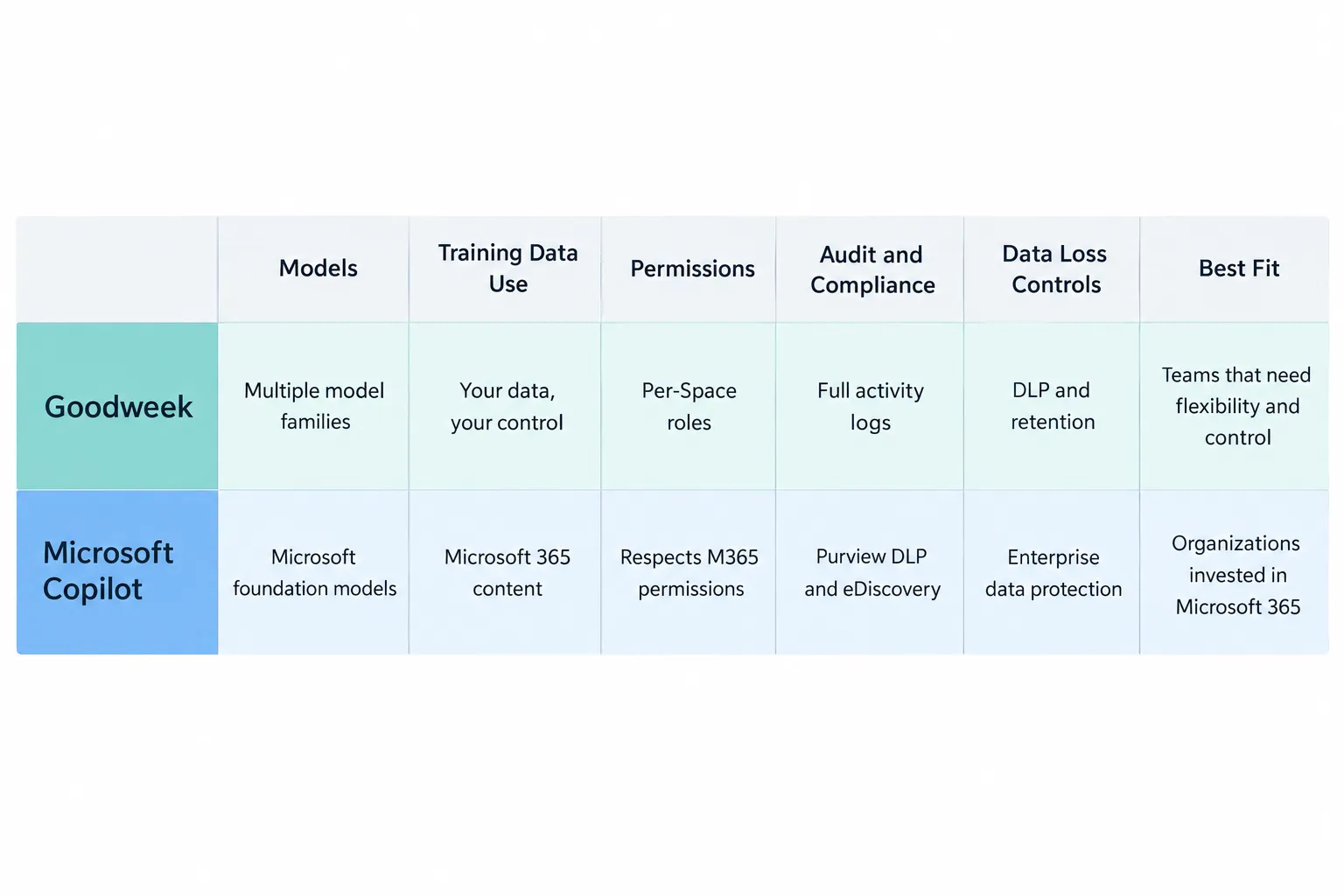
| Area | Goodweek | Microsoft Copilot |
|---|---|---|
| Models | GPT, Claude, Gemini, Mistral, DeepSeek, and more | Microsoft-selected models with Microsoft 365 grounding |
| Training | Customer data never trains third-party models (vendor claim) | Prompts, responses, and Graph data not used to train foundation models per Microsoft’s privacy documentation |
| Permissions | Per-Space role controls | Respects Microsoft 365 identity, permissions, and policies |
| Audit and compliance | Full audit trails and policy-event visibility (vendor claim) | Microsoft 365 audit plus Purview capabilities, depending on licensing and configuration |
| Data loss controls | Sensitive-data alerts and policy flags (vendor claim) | Purview can apply labels, DLP, retention, and eDiscovery |
| Best fit | Cross-model, cross-tool standardization | Microsoft 365-centered organization with mature governance |
Is Goodweek better for compliance and risk management
Goodweek is not automatically better for compliance; it is simpler to govern when an organization uses several AI models and lacks a mature Microsoft compliance stack. Purview, when properly licensed and configured, still offers deeper native audit, DLP, and eDiscovery capability than most third-party AI layers.
Goodweek’s stronger argument is consolidation, not superior compliance depth. An organization already invested in Microsoft’s compliance tooling, as outlined in Microsoft’s Copilot Studio governance overview, will likely get more risk-management value from extending that stack than from adding a parallel platform. Regulated industries evaluating either option should also review AI vendor data-training policies and state and federal AI compliance requirements before signing a contract with either vendor.
What companies use Goodweek for AI governance
Goodweek is positioned for small and mid-sized businesses and multi-department teams that want to standardize AI use across marketing, sales, operations, and support without managing separate vendor relationships for each model. According to Goodweek’s business page, the platform’s Spaces model is built for organizations juggling several teams with different AI needs but no dedicated AI governance staff.
Companies without a full-time compliance officer or a mature Microsoft licensing tier are often the best fit, since Goodweek’s per-Space controls require less setup than a full Purview deployment.
Who should use Goodweek vs. who should use Copilot?
A Microsoft-native organization with Entra ID, sensitivity labels, and Purview already active should default to Copilot. A multi-model, multi-department organization without that stack should default to Goodweek.
- Use Copilot if the business already pays for Microsoft 365 E3/E5, has IT staff managing conditional access, and wants AI grounded in existing files, email, and Teams data.
- Use Goodweek if the business wants flexibility across model families, has multiple teams with different AI needs, or is not ready to build out full Purview governance.
- Use both if different departments have genuinely different requirements, as long as you document data ownership per platform.
How much does Goodweek cost compared to Microsoft Copilot?
Both platforms price by seat, and exact figures change often enough that you should always confirm current numbers directly with each vendor before budgeting. Microsoft Copilot for Microsoft 365 is typically an add-on license layered on top of existing Microsoft 365 E3/E5 subscriptions, meaning total cost depends on which base plan a tenant already holds. Goodweek’s pricing is structured around workspace seats and model access rather than a base productivity suite, since it is not a substitute for Microsoft 365 or Google Workspace.
Because published rates change and often depend on contract size, organizations should request current quotes from Goodweek and Microsoft’s licensing team rather than rely on cached pricing pages.
Can you use Goodweek with Microsoft Copilot together
Yes. A business can run Goodweek and Microsoft Copilot side by side as long as workflows and data ownership are clearly divided between them. The risk is not technical incompatibility; it is duplicate, unmanaged data paths if nobody decides which platform owns which workflow.
Practical steps for running both:
- Assign specific workflows (e.g., cross-model research in Goodweek, Microsoft 365 document drafting in Copilot) to a single platform each.
- Keep logging and incident ownership explicit so a security event has one clear owner, not two competing logs.
- Avoid letting the same sensitive dataset flow through both platforms unless there’s a documented reason.
Does Goodweek work with Azure and Microsoft tools?
Goodweek functions as an AI layer that can connect to external tools and knowledge sources. Still, it is a separate platform from Microsoft’s native ecosystem rather than an Azure-native product. Organizations wanting deep Graph-level integration with Microsoft 365 files, mail, and Teams data should expect that level of native grounding from Copilot itself, per Microsoft’s Copilot adoption resources, while treating Goodweek’s connections to Microsoft tools as supplementary rather than equivalent to native Graph integration.
How do you set up governance rules in Goodweek vs Copilot
Goodweek governance is configured at the Space level: an admin defines membership, model access, and connected knowledge sources per team. Copilot governance is configured at the tenant level through Entra ID, Purview, and Microsoft 365 admin policies that already exist for the organization.
In Goodweek:
- Create a Space per department or project.
- Assign roles and permissions specific to that Space.
- Connect only the knowledge sources relevant to that team.
In Copilot:
- Confirm Entra ID groups and conditional access policies are current.
- Apply sensitivity labels correctly across SharePoint and OneDrive.
- Configure Purview DLP and retention policies before enabling Copilot broadly, following Microsoft’s secure data foundation guidance.
Goodweek AI governance common problems and solutions
The most common problem in any multi-model AI workspace, including Goodweek, is Space sprawl: too many Spaces created without a clear ownership plan, mirroring the permission drift problem in Microsoft 365. The fix is the same discipline applied on either platform.
- Problem: Departments create overlapping Spaces with duplicate knowledge sources.
Solution: Assign a Space owner to regularly review and consolidate content. - Problem: Employees connect personal accounts to bypass governed Spaces.
Solution: Restrict unmanaged model access at the network or SSO level. - Problem: Sensitive data gets uploaded into a Space without classification.
Solution: Use Goodweek’s sensitive-data alerts and pair them with a manual review step, since vendor-reported detection should not be the only safeguard.
What are alternatives to Goodweek and Microsoft Copilot for AI governance?
Alternatives fall into two categories: other multi-model AI workspace platforms and native suite-embedded copilots tied to a specific productivity ecosystem. Organizations evaluating options beyond these two should weigh the same core question this article opened with: does the organization need cross-model flexibility, or does it need deep native grounding in one existing productivity suite?
Businesses researching this decision often benefit from reviewing broader AI governance fundamentals for small business and general AI resources before comparing specific vendors, since the underlying governance questions (data training policy, permission hygiene, audit visibility) apply regardless of which platform is chosen.
Frequently asked questions
Does Microsoft use Copilot prompts to train foundation models?
No. Microsoft states that prompts, responses, and data accessed through Microsoft Graph in covered enterprise Copilot use are not used to train foundation models, per Microsoft’s privacy documentation.
Is Goodweek a replacement for Microsoft 365?
No. Goodweek is an AI work platform, not a productivity suite. Microsoft 365 remains the identity, data, and productivity environment; the real question is which AI layer sits on top of it.
Does Copilot have stronger compliance tools than Goodweek?
For an organization with the right Microsoft licensing and configuration, Purview offers deep native compliance controls. Goodweek’s stronger argument is simpler multi-model governance, not that Microsoft lacks compliance capability.
Can a company use both Goodweek and Copilot?
Yes. Define which workflows and data belong in each platform, prevent duplicate unmanaged paths, and make logging and incident ownership explicit.
What is the biggest mistake companies make before deploying Copilot?
Deploying Copilot before auditing Microsoft 365 permissions. Copilot surfaces whatever users already have access to, so overshared files and stale links become visible faster once Copilot is active.
Is Goodweek suitable for regulated industries?
It can be, but organizations in regulated industries should confirm Goodweek’s training-data and audit claims contractually rather than relying on vendor marketing alone, especially given the higher compliance bar in industries covered under regulated AI vendor policy considerations.
Which platform is easier to set up for a small business?
Goodweek is generally faster to configure for a small business without a mature Microsoft compliance stack, since it does not require building out Entra ID and Purview policies from scratch.
Start with a controlled workflow.
Pick one workflow, one team, and one platform before rolling either tool out broadly. Compare governance requirements before comparing features, since the platform that fits the organization’s existing compliance maturity will outperform the one with more model options on paper.
Sources referenced in the original briefing: Goodweek platform overview, Microsoft enterprise data protection documentation, Microsoft 365 Copilot privacy documentation. Checked September 20, 2026. Verify plan-level and contractual terms before purchase.
Contact MacWorks 360: macworks360.com/contact | Call Richard: 973-671-1122
Related Comparisons
- Microsoft Copilot: Secure Configuration Guide for Business Users
- ChatGPT Secure Configuration Guide for Business Users
- Claude Code Secure Configuration Guide for Business Teams
- Goodweek vs ChatGPT for Business: Governance, Security and Model Choice
- Goodweek vs ChatGPT, Claude, Gemini, and Microsoft Copilot: A Business AI Governance Guide
- Goodweek vs Claude Enterprise: Multi-Model AI Governance Compared
- Goodweek vs Gemini for Google Workspace Business: Which AI Fits Your Team?
References
- Goodweek
- Goodweek About
- Goodweek for Businesses
- Microsoft Adoption: Microsoft Copilot
- Microsoft Learn: Configure a secure and governed foundation for Microsoft Copilot
- Microsoft Learn: Copilot controls security and governance
- Microsoft Learn: Manage your Copilot Studio projects, an overview
- Microsoft Learn: Agentic AI maturity model
- Microsoft Learn: Microsoft 365 Copilot privacy documentation