
Last updated: September 25, 2026
Quick answer
A secure ChatGPT configuration for business takes about five minutes and covers six settings: account type, model training, Memory, temporary Chat, multi-factor authentication, and connected apps. These controls reduce the chance that sensitive company data ends up stored, shared, or used to train a model. They do not make it safe to enter passwords, payment data, health records, or anything your employer has told you not to disclose.
Key takeaways
- Personal ChatGPT accounts (Free, Plus, Pro) train on your conversations by default. Turn this off before using one for work, or better, use a company-approved workspace.
- Business, Enterprise, Edu, and API accounts do not train on your data by default, according to OpenAI’s enterprise privacy documentation.
- Memory can quietly store sensitive details from past chats. Review or turn it off for work use.
- Temporary Chat is not the same as “secret.” OpenAI may retain a copy for up to 30 days for safety review.
- Deleting a chat does not automatically delete an associated memory, connected-app copy, or shared link.
- A new Lockdown Mode and elevated-risk labeling system rolled out in 2026 to flag higher-risk actions inside ChatGPT.
- No consumer or business ChatGPT plan replaces a written company AI policy.
- Multi-factor authentication and single sign-on are the two settings most likely to stop an account takeover.
What is ChatGPT secure configuration and why does it matter for business
ChatGPT secure configuration means adjusting account type, Memory, training permissions, and access controls so the tool does not become an unmanaged storage point for company data. It matters because ChatGPT is now embedded in daily workflows at small and mid-size companies, and a single unreviewed setting (like model training left on, or Memory quietly logging client names) can expose information nobody intended to share.
The risk isn’t that ChatGPT is inherently unsafe. It’s that default settings on a personal account are built for individual convenience, not corporate data handling. A five-minute configuration pass closes most of that gap. For a broader look at how generative AI tools introduce privacy exposure, see this breakdown of AI data privacy risks for small businesses.
How do I set up ChatGPT securely for my company?
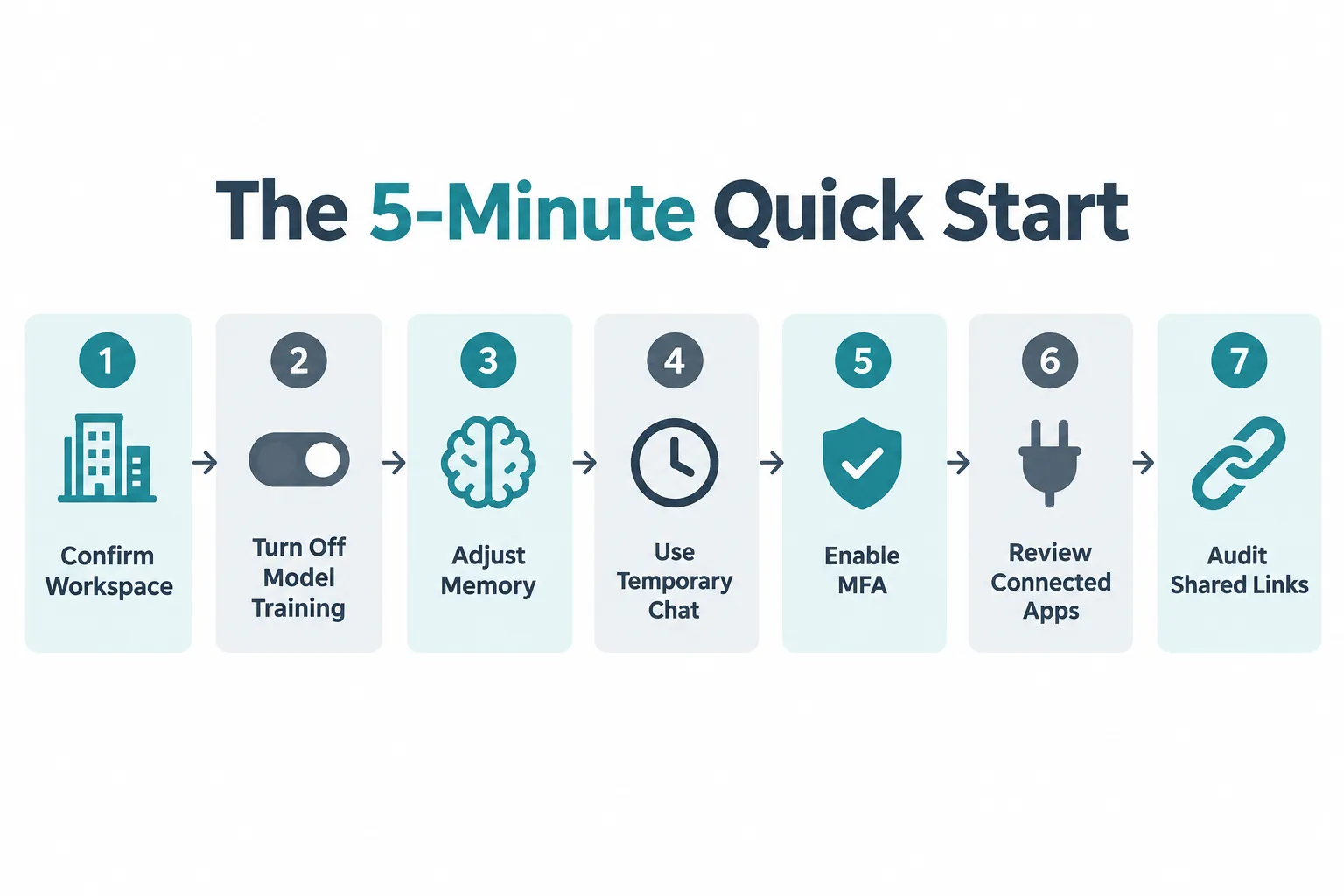
Set up a secure ChatGPT configuration by confirming the account type, disabling model training on personal accounts, adjusting Memory, enabling MFA, and reviewing connected apps. Each step takes under a minute. Do these in order the first time you use ChatGPT for anything work-related.
5-minute quick start:
- For work, sign in to the company-approved ChatGPT workspace, not a personal Free, Plus, or Pro account.
- On a personal account: Profile > Settings > Data Controls, turn “Improve the model for everyone” OFF.
- Settings > Personalization > Memory: turn off for sensitive work, or review and clean the memory summary.
- Use Temporary > Unpersonalized for a one-off sensitive conversation.
- Settings > Security: enable multi-factor authentication (MFA).
- Settings > Apps: disconnect anything you do not actively use.
- Never share a chat link until you have reviewed the entire preview, including files and earlier messages.
Can I use regular ChatGPT or do I need ChatGPT Enterprise for security
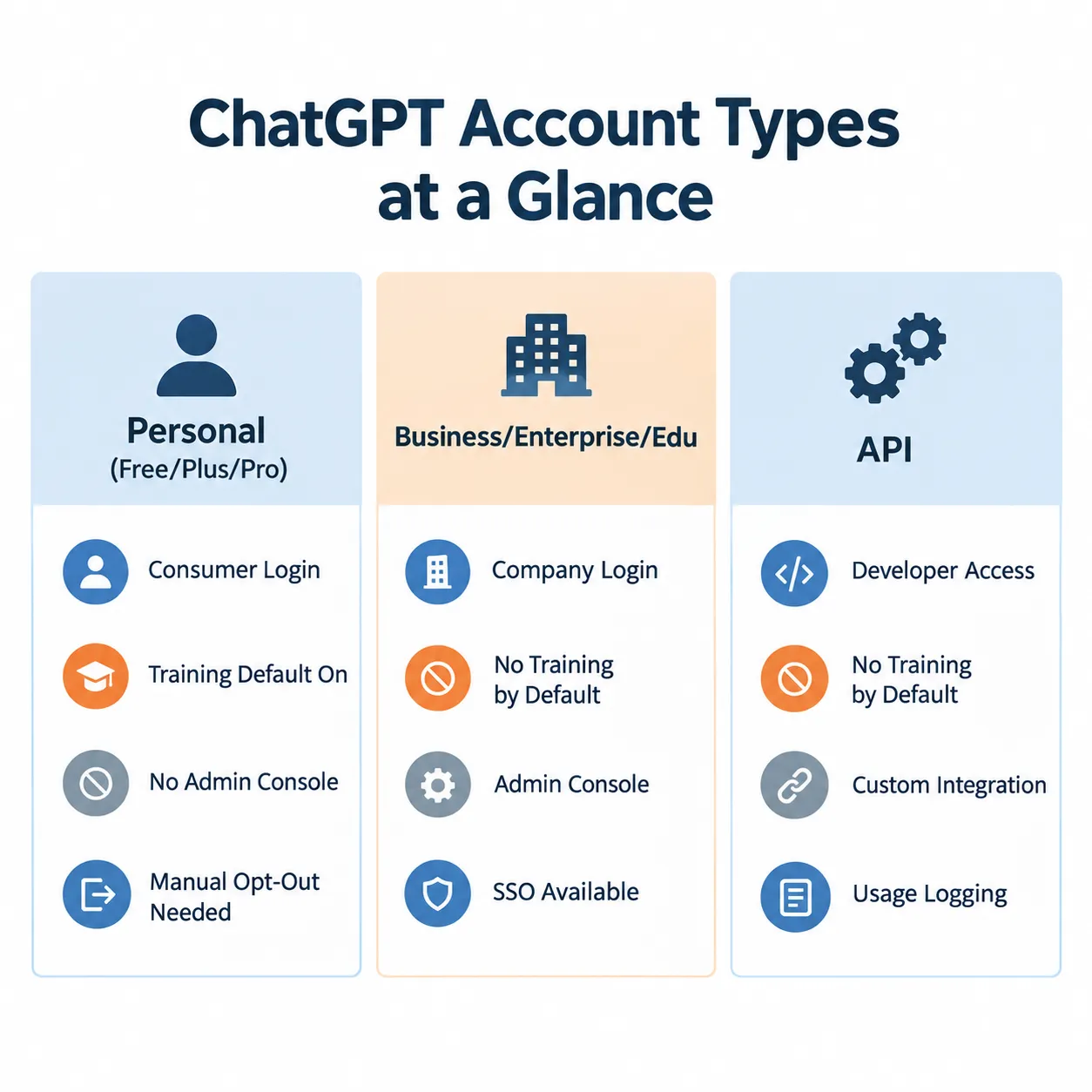
You can use a regular personal ChatGPT account for low-sensitivity work if model training is turned off. Still, ChatGPT Enterprise, Business, or Edu plans are built for company use and don’t train on your data by default. Choose Enterprise if you need centralized admin controls, SSO, and audit logging across a team.
- Personal plans (Free, Plus, Pro): consumer accounts. Fine for general drafting and research once “Improve the model for everyone” is off, but they lack admin oversight.
- Business, Enterprise, Edu, and API: OpenAI states these do not train models on business data by default, per its enterprise privacy overview and the ChatGPT Enterprise product page. That is a real protection, not blanket permission to upload anything.
Choose a personal account only for tasks with no confidential content: brainstorming, general research, drafting public-facing copy. Choose Business or Enterprise the moment client names, financials, or internal documents enter the conversation.
What data does ChatGPT store when I use it for work
ChatGPT can store chat history, uploaded files, memory summaries, and connected-app data, depending on settings. Memory, in particular, can carry sensitive details into future conversations without an obvious prompt.
- Memory: Uses details from chats, files, and connected apps to personalize later answers. For the lowest-risk setup, turn Memory off. If it stays on, review the memory summary regularly.
- Temporary Chat: Selecting Temporary > Unpersonalized skips memory, custom instructions, and plugins, and it won’t appear in history or train the model. OpenAI may still retain a copy for up to 30 days for safety review, per its Temporary Chat documentation.
- Archive vs. delete: Archive hides a chat from the sidebar but keeps it in the account. Delete removes it from view and schedules permanent deletion from OpenAI systems within 30 days. For sensitive work, delete a completed chat once there is no business need to keep it.
Important: deleting a chat alone may not remove a saved memory created from it. Fully removing a fact may require deleting every source, including chats, archived chats, files, the memory summary, and connected apps.
What are the security risks of using ChatGPT in business
The main risks are accidental data disclosure, memory retention of sensitive details, unmanaged third-party app connections, and shared links with no access restrictions. None of these are hypothetical; they follow directly from how default settings behave.
- Pasting confidential data into a personal account with training left on.
- Memory carrying forward client names, account numbers, or strategy notes into unrelated chats.
- Connected apps or custom GPT actions sending data to a third party under that third party’s own privacy policy, which may retain it longer than ChatGPT itself.
- Shared links that anyone with the URL can open, with no expiration or recipient restriction.
- Employees using AI tools without any company visibility into what was entered. See this guide to AI governance for small business for how to close that gap.
OpenAI introduced Lockdown Mode and elevated-risk labels in 2026 to flag higher-risk actions, such as connector permissions or automated tasks, before they run. It’s a useful signal, but it works best alongside a written policy, not instead of one.
How do I prevent employees from leaking sensitive data on ChatGPT
Prevent data leaks by combining account-level controls (training off, Memory managed) with a written usage policy that tells employees exactly what they can and cannot enter. Technical settings alone won’t stop someone from pasting a customer list into the wrong window.
Do:
- Minimize first: replace names with roles, remove account numbers.
- Redact secrets before uploading logs, screenshots, spreadsheets, or code.
- Verify generated content before it reaches a customer or production system.
- Report an accidental disclosure immediately through the company’s security process.
Do not:
- Paste passwords, API keys, session cookies, MFA codes, or private keys.
- Upload an entire mailbox, drive, customer list, HR file, or source repository.
- Assume turning off training deletes history, memories, shared links, or third-party copies.
- Assume a custom GPT or action has the same privacy boundary as the main workspace.
Is ChatGPT secure for handling customer information and financial data?
ChatGPT Business or Enterprise, configured correctly, is reasonably secure for internal drafting and analysis involving customer or financial context. Still, it is not a safe place for full payment-card numbers, authentication credentials, or unpublished financial results. Treat “no training by default” as a data-handling improvement, not a green light for regulated data.
If disclosure would cause harm, the simple rule is: do not paste it into ChatGPT unless the company has approved the account, plan, and use case for that specific data type.
What compliance requirements does ChatGPT meet for HIPAA and GDPR?
ChatGPT Enterprise and Edu plans offer contractual and technical controls that support GDPR and, in some configurations, HIPAA-aligned workflow. Still, compliance depends on the business associate agreement and admin setup, not just the plan tier. Review the ChatGPT Enterprise and Edu collection and confirm requirements with legal or compliance counsel before processing regulated records. Companies in regulated industries should also check vendor training policies directly; this overview of AI vendor data training policy explains what to ask for. New Jersey businesses navigating SOC 2, GDPR, and EU AI Act overlap can also reference this AI data compliance guide for 2026.
Can I disable ChatGPT from training on my company data
Yes. On personal accounts, go to Profile > Settings > Data Controls and turn “Improve the model for everyone” OFF. On Business, Enterprise, Edu, and API accounts, training is off by default, per OpenAI’s enterprise privacy statement, so there’s no toggle to hunt for, but it’s worth confirming with the admin console anyway.
How do I set up single sign-on and access controls for ChatGPT at work
Set up SSO and access controls through the admin console on a Business or Enterprise plan, then apply MFA and app permissions at the individual account level. The ChatGPT Enterprise admin quickstart and Work admin FAQ walk through domain verification and role assignment.
- Settings > Security: enable multi-factor authentication.
- Prefer the strongest available MFA method: passkey or authenticator app. Recent breach data makes the case; see why 16 billion exposed passwords means it’s time to turn on 2FA.
- Store any recovery key in an approved password manager, never in a chat or plain-text note.
- Settings > Apps: review each connected app, disconnect anything unused, and grant only the permissions needed for the task.
- Prefer “Always ask” or “Allow read actions” over automatic approval where available.
- If you suspect a compromise, change the password and log out other sessions immediately.
How much does the ChatGPT Business plan cost, and what security features does it include
ChatGPT Business plans are priced per seat with billing options that change periodically, so current rates should be checked directly on OpenAI’s site rather than assumed from older figures. Security features on Business and Enterprise tiers typically include no training on business data by default, an admin console, SSO support, and workspace-level data controls, as outlined in the ChatGPT Business release notes. Budget for setup time and a short employee training session in addition to the license cost.
ChatGPT vs Microsoft Copilot vs Claude for business security
| Factor | ChatGPT Business/Enterprise | Microsoft Copilot | Claude for Work |
|---|---|---|---|
| Training on business data | Off by default | Off by default within Microsoft 365 tenant boundary | Off by default on team/enterprise plans |
| Admin console | Yes | Yes, via Microsoft 365 admin center | Yes, on Team/Enterprise |
| SSO support | Yes on Business/Enterprise | Yes, native to Microsoft identity | Yes on Enterprise |
| Best fit | Teams already using ChatGPT for drafting, research, coding help | Organizations fully inside the Microsoft 365 ecosystem | Teams prioritizing longer context and document analysis |
Choose ChatGPT if the team already relies on its interface and plugin ecosystem. Choose Copilot if the company runs entirely on Microsoft 365 and wants identity and data controls unified in one place. Choose Claude if long-document analysis is the primary use case. Security posture across all three depends more on admin configuration than on brand choice.
What are common mistakes when configuring ChatGPT for business
The most common mistake is using a personal account for work without checking the training toggle, followed closely by leaving Memory on without ever reviewing it. Other frequent errors:
- Assuming a shared chat link is private just because no one has asked for it.
- Connecting a third-party app once for a demo and forgetting to disconnect it.
- Treating Temporary Chat as fully untraceable rather than a 30-day retention window.
- Skipping MFA because the account “isn’t important enough” to secure.
- Rolling out ChatGPT company-wide with no written policy.
What should I include in a ChatGPT security policy for employees
A ChatGPT security policy should name the approved account type, list data categories that are never allowed in a prompt, define reporting steps for accidental disclosure, and set a review schedule. Keep it short enough that people actually read it.
- Approved workspace and login method for company use.
- Explicit list of prohibited data: passwords, private keys, MFA codes, full payment-card data, regulated records, unpublished financials.
- Redaction expectations before uploading logs, code, or spreadsheets.
- Reporting process for accidental disclosure.
- Monthly review cadence for accounts, apps, and shared links.
Monthly 3-minute check
- Correct workspace and account confirmed.
- “Improve the model for everyone” remains OFF on personal accounts.
- Memory reviewed or disabled.
- Unused apps disconnected.
- Old shared links deleted.
- Sensitive chats deleted under company policy.
- MFA still enabled.
FAQ
Does ChatGPT delete my data when I delete a chat?
Deleting a chat schedules permanent deletion from OpenAI systems within 30 days, but it does not automatically remove an associated memory, file copy, or shared link. You must delete each separately.
Is Temporary Chat completely private?
No. Temporary Chat skips memory and history, but OpenAI may retain a copy for up to 30 days for safety review, per its official documentation.
Do I need ChatGPT Enterprise for a small business?
Not necessarily. A Business plan may cover a small team’s needs at lower cost, while Enterprise adds deeper admin controls better suited to larger or regulated organizations.
Can a custom GPT or plugin see my data?
Yes, if it uses an action or connector. Data sent to that third party follows the third party’s own privacy policy and retention rules, which can differ from ChatGPT’s.
What is Lockdown Mode?
Lockdown Mode is a 2026 OpenAI feature that flags higher-risk actions, such as connector permissions, with elevated-risk labels before they execute, giving users a chance to review before granting access.
Should employees use their personal ChatGPT accounts for work?
No, not for anything involving confidential data. Use the company-approved workspace so training, Memory, and admin controls are managed centrally.
Related reading
- AI governance for small business
- AI data privacy risks for SMBs in 2026
- AI data compliance in New Jersey: SOC 2, GDPR, and the EU AI Act
- ChatGPT resources hub
Need help rolling out ChatGPT safely across your team? MacWorks 360 helps New Jersey businesses configure AI tools the right way, from account setup to policy and training.
Contact: macworks360.com/contact/ | Call Richard: 973-671-1122
Related Comparisons
- Microsoft Copilot: Secure Configuration Guide for Business Users
- Gemini for Google Workspace: Secure Configuration Guide for Business Users
- Claude Code Secure Configuration Guide for Business Teams
- Goodweek vs ChatGPT for Business: Governance, Security and Model Choice
- Goodweek vs ChatGPT, Claude, Gemini, and Microsoft Copilot: A Business AI Governance Guide
- Goodweek vs Claude Enterprise: Multi-Model AI Governance Compared
- Goodweek vs Gemini for Google Workspace Business: Which AI Fits Your Team?
- Goodweek vs Microsoft Copilot: AI Governance Compared for 2026