
Why Your MFA Can Still Be Hacked: Key Vulnerabilities
Picture this: You’ve set up multi-factor authentication (MFA) on all your business accounts, feeling confident your creative studio is protected. Then one morning, you discover someone accessed your client files, despite your “bulletproof” security. The harsh reality? Traditional MFA isn’t the impenetrable fortress most business owners believe it to be. Understanding why your MFA can still be hacked and how to implement truly robust authentication in 2026 could be the difference between protecting your business and becoming another cybersecurity statistic.
Key Takeaways
- Traditional MFA methods like SMS and email codes remain vulnerable to sophisticated attacks, including SIM swapping and social engineering.
- Apple’s ecosystem offers unique security advantages through hardware-based authentication and biometric integration.
- A Zero-trust architecture combined with hardware security keys provides the most vigorous defense against modern threats.
- Behavioral authentication and contextual security will define robust MFA implementations in 2026
- Proactive monitoring and incident response planning are essential components of any comprehensive security strategy.
The False Security of Traditional MFA
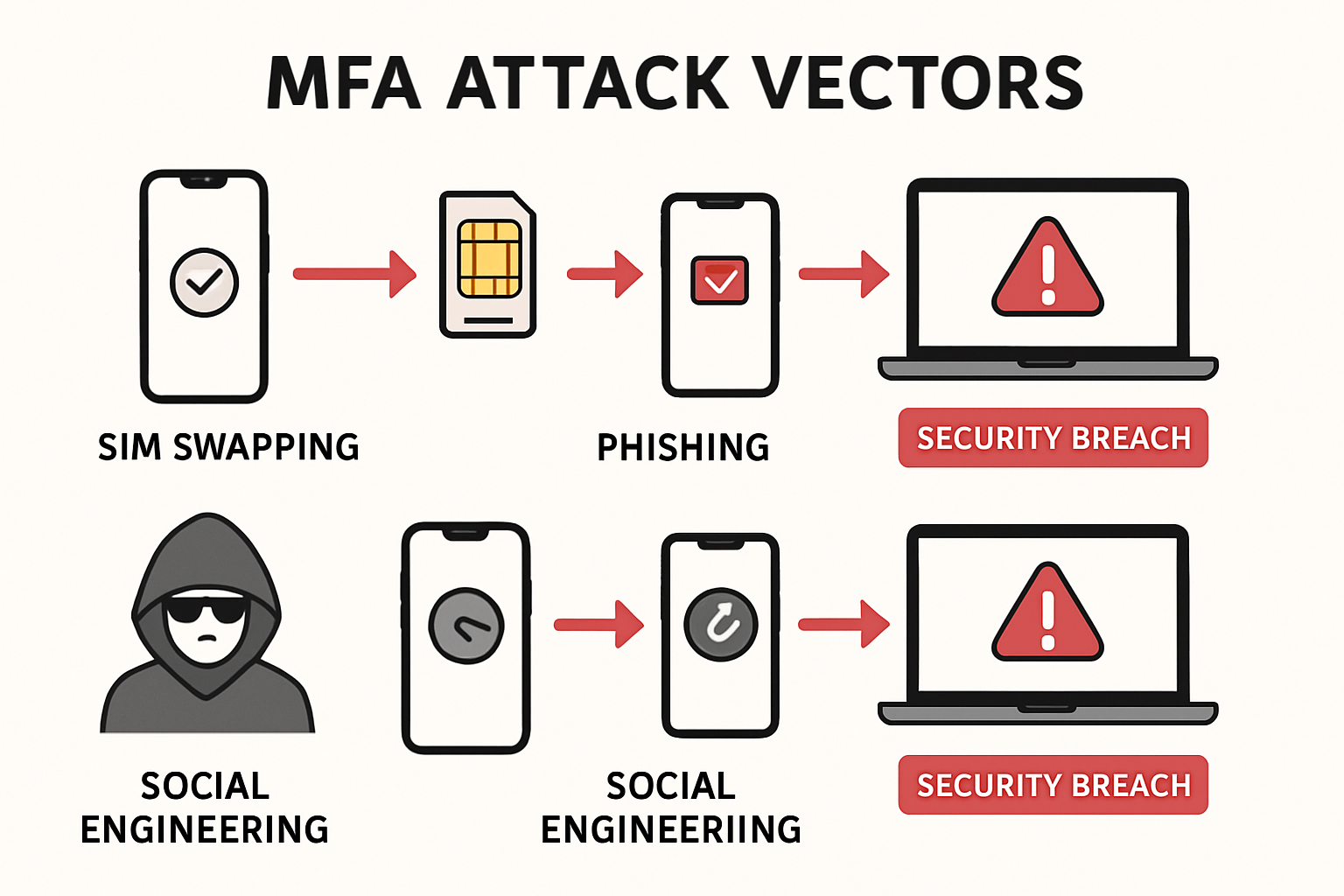
Many creative professionals and small business owners implement basic MFA, thinking they’ve solved their security challenges. However, traditional authentication methods create a dangerous illusion of protection while leaving critical vulnerabilities exposed.
SMS-Based Authentication: A Sitting Duck
SMS-based two-factor authentication represents one of the most common—and most compromised—security implementations. SIM swapping attacks have become increasingly sophisticated, allowing attackers to intercept your text messages by convincing cellular providers to transfer your number to their device.
Consider this scenario: An attacker researches your business through social media, gathers personal information, and contacts your cellular provider claiming to be you. With enough convincing details, they successfully transfer your number. Now every “secure” SMS code goes directly to them, bypassing your MFA entirely.
Email-Based Codes: Another Weak Link
Email-based authentication codes suffer from similar vulnerabilities. If an attacker gains access to your email account—often through phishing attacks or compromised passwords—they can intercept authentication codes and access your protected accounts.
The interconnected nature of digital accounts means that compromising one often leads to accessing many others, creating a domino effect that traditional MFA cannot prevent.
Social Engineering: The Human Factor
Even the most sophisticated technical security measures fail when attackers exploit human psychology. Social engineering attacks target the weakest link in any security system: people. Attackers might pose as IT support, emergency contacts, or trusted vendors to convince employees to share authentication codes or bypass security protocols.
Why Your MFA Can Still Be Hacked: Modern Attack Vectors
Understanding current attack methodologies helps explain why your MFA can still be hacked despite seeming comprehensive. Modern cybercriminals employ increasingly sophisticated techniques that exploit both technical vulnerabilities and human behavior.
Man-in-the-Middle Attacks
Sophisticated attackers create fake websites that perfectly mimic legitimate login pages. When users enter their credentials and MFA codes, attackers capture this information in real time and use it to access the service before the authentication window expires.
These attacks have become particularly effective because they occur in real time, rendering traditional MFA codes ineffective as a security measure.
Session Hijacking
Once an attacker gains initial access through compromised MFA, they can hijack active sessions, maintaining access even after the authentication window expires. This technique allows persistent access without triggering additional authentication requests.
Malware and Keyloggers
Advanced malware can capture authentication codes as users type them, or even intercept codes from authentication apps. Some malware targets explicitly popular authentication applications, stealing codes before users can enter them.
Credential Stuffing at Scale
Cybercriminals use automated tools to test millions of compromised username/password combinations across multiple services. When they find valid credentials, they attempt to bypass MFA using various techniques, often succeeding because of implementation weaknesses.
After major data breaches expose millions of credentials, businesses must update passwords on compromised sites and strengthen their authentication methods.
The Apple Ecosystem Advantage in Security
For Mac-based creative studios and small businesses, Apple’s integrated ecosystem provides unique security advantages that, when properly implemented, offer superior protection compared to generic solutions.
Hardware-Based Security
Apple devices include dedicated security chips (Secure Enclave) that store cryptographic keys and biometric data separately from the main processor. This hardware-based approach makes it exponentially more difficult for attackers to extract authentication credentials, even if they gain device access.
Biometric Integration
Face ID and Touch ID provide authentication factors that are extremely difficult to replicate or steal. Unlike passwords or SMS codes, biometric data is stored locally on the device and never transmitted across networks, significantly reducing the attack surface.
Seamless Cross-Device Authentication
Apple’s ecosystem allows for secure authentication handoffs between devices. When properly configured, you can authenticate on your iPhone and seamlessly access protected resources on your Mac, maintaining security while improving workflow efficiency.
Built-in Password Management
Apple’s iCloud Keychain password management integrates directly with the operating system, automatically generating and storing complex passwords while synchronizing them securely across devices. This reduces reliance on potentially compromised passwords.
How I’d Implement MFA in 2026: A Comprehensive Strategy
Implementing robust MFA in 2026 requires moving beyond traditional approaches toward a comprehensive, layered security strategy that addresses both current and emerging threats.
Layer 1: Hardware Security Keys
FIDO2/WebAuthn hardware security keys represent the gold standard for authentication security. These physical devices generate cryptographic signatures that are virtually impossible to phish or intercept remotely.
For creative studios managing multiple client accounts, hardware keys provide:
- Phishing resistance: Keys only work with legitimate websites
- No shared secrets: Each authentication creates unique cryptographic signatures
- Offline capability: Keys work without internet connectivity
- Cross-platform compatibility: Support for Mac, iPhone, iPad, and web services
Layer 2: Biometric Authentication
Combining hardware keys with biometric authentication creates multiple independent verification factors. Apple devices excel in this area through:
- Face ID integration for seamless device unlock and app authentication
- Touch ID support on older devices and external keyboards
- Voice recognition for hands-free authentication in appropriate contexts
- Behavioral biometrics that analyze typing patterns and device usage
Layer 3: Contextual Security
Modern MFA implementations must consider context, not just credentials. This includes:
Location-based authentication: Flagging access attempts from unusual geographic locations
Device recognition: Identifying trusted devices and requiring additional verification for new ones
Time-based restrictions: Limiting access during unusual hours or implementing scheduled access controls
Network analysis: Monitoring for suspicious network behavior or VPN usage patterns
Layer 4: Zero-Trust Architecture
Implementing zero-trust principles means never assuming any connection or user is trustworthy by default. For creative businesses, this translates to:
- Continuous verification: Regularly re-authenticating users throughout sessions
- Least privilege access: Granting minimum necessary permissions for each role
- Micro-segmentation: Isolating critical resources and client data
- Real-time monitoring: Detecting and responding to anomalous behavior immediately
Layer 5: Backup and Recovery Planning
Even the most robust MFA implementation requires comprehensive backup and recovery procedures:
Multiple authentication methods: Ensuring users can access accounts if primary methods fail
Secure recovery codes: Storing backup codes in encrypted, offline locations
Emergency access procedures: Documented processes for urgent access situations
Regular testing: Verifying recovery procedures work before emergencies occur
Advanced Security Measures for Mac-Based Businesses
Creative studios and small businesses using Mac ecosystems can implement additional security measures that leverage Apple’s unique capabilities while addressing specific industry challenges.
Device Management and Control
Implementing Mobile Device Management (MDM) solutions specifically designed for Apple devices provides centralized control over authentication policies, app installations, and security configurations. This ensures consistent security standards across all business devices.
Modern MDM solutions offer:
- Remote authentication policy enforcement
- Automatic security update deployment
- App-specific authentication requirements
- Device compliance monitoring
Secure File Sharing and Collaboration
Creative businesses frequently share large files with clients and collaborators. Implementing secure sharing solutions with integrated MFA ensures that sensitive creative work remains protected throughout the collaboration process.
Key features include:
- Client-specific authentication requirements
- Time-limited access controls
- Download tracking and audit trails
- Integration with existing creative workflows
Backup and Data Protection
Robust MFA implementation must extend to backup and data protection systems. This includes:
Encrypted local backups with hardware key authentication
Cloud backup services with multi-factor protection
Version control systems with authentication logging
Client data segregation with individual access controls
Understanding Apple’s approach to device longevity helps inform long-term security planning and device replacement strategies.
Monitoring and Incident Response
Even with comprehensive MFA implementation, businesses must prepare for potential security incidents through proactive monitoring and response planning.
Real-Time Security Monitoring
Implementing continuous monitoring solutions provides early warning of potential security breaches:
- Authentication anomaly detection: Identifying unusual login patterns or failed attempts
- Device behavior analysis: Monitoring for compromised or suspicious device activity
- Network traffic analysis: Detecting data exfiltration or unauthorized communications
- Application usage monitoring: Tracking unusual application access or behavior
Incident Response Procedures
When security incidents occur, having documented response procedures ensures quick, effective action:
Immediate containment: Procedures for isolating compromised accounts or devices
Forensic analysis: Processes for determining breach scope and attack vectors
Client notification: Communication protocols for affected clients or stakeholders
Recovery procedures: Steps for restoring secure operations and preventing recurrence
Regular Security Audits
Conducting regular security audits helps identify vulnerabilities before attackers exploit them:
Authentication system testing: Verifying MFA implementations work as intended
Access control reviews: Ensuring users have appropriate permissions
Device security assessments: Checking for outdated software or configuration issues
Policy compliance verification: Confirming adherence to security policies and procedures
Training and Human Factors
Technology alone cannot solve security challenges. Comprehensive MFA implementation requires addressing human factors through education and training.
Security Awareness Training
Regular training helps employees recognize and respond appropriately to security threats:
- Phishing recognition: Teaching employees to identify suspicious emails and websites
- Social engineering awareness: Understanding manipulation techniques and appropriate responses
- Password hygiene: Proper password creation, storage, and management practices
- Incident reporting: Encouraging prompt reporting of suspected security issues
Creating a Security-Conscious Culture
Building a security-conscious organizational culture ensures that security considerations become part of daily operations rather than an afterthought.
This involves:
Leadership commitment: Demonstrating that security is a business priority
Regular communication: Keeping security awareness high through ongoing communication
Positive reinforcement: Recognizing good security practices rather than only addressing failures
Continuous improvement: Regularly updating security practices based on new threats and technologies
Implementation Roadmap for 2026
Successfully implementing comprehensive MFA requires a structured approach that balances security improvements with operational continuity.
Phase 1: Assessment and Planning (Months 1-2)
Current security audit: Evaluate existing authentication methods and identify vulnerabilities
Risk assessment: Determine which systems and data require the highest protection levels
Technology selection: Choose hardware keys, biometric systems, and supporting infrastructure
Policy development: Create comprehensive security policies and procedures
Phase 2: Infrastructure Deployment (Months 3-4)
Hardware procurement: Purchase and configure security keys and supporting hardware
Software installation: Deploy MDM solutions, monitoring tools, and authentication systems
Network configuration: Implement a zero-trust architecture and network segmentation
Testing and validation: Verify all systems work correctly in controlled environments
Phase 3: User Training and Rollout (Months 5-6)
Staff training: Educate employees on new security procedures and technologies
Gradual deployment: Implement new authentication methods in phases to minimize disruption
Support procedures: Establish help desk and support processes for authentication issues
Monitoring and adjustment: Track adoption and adjust procedures based on user feedback
Phase 4: Optimization and Maintenance (Ongoing)
Performance monitoring: Track authentication system performance and user satisfaction
Security updates: Regularly update software and security configurations
Procedure refinement: Continuously improve processes based on experience and new threats
Compliance verification: Ensure ongoing compliance with security policies and regulations
Cost-Benefit Analysis
Understanding the financial implications of comprehensive MFA implementation helps justify investment and ensure appropriate resource allocation.
Implementation Costs
Hardware security keys: $50-100 per user for enterprise-grade keys
Software licensing: MDM and monitoring solutions typically cost $5-15 per device monthly
Training and deployment: Initial training and setup costs of $500-1,500 per employee
Ongoing maintenance: Annual costs of 15-20% of the initial implementation investment
Risk Mitigation Benefits
Data breach prevention: Average data breach costs exceed $4.45 million, according to recent studies
Business continuity: Preventing operational disruptions that could cost thousands daily
Client trust: Maintaining client relationships by demonstrating strong security practices
Regulatory compliance: Avoiding fines and penalties for inadequate security measures
Return on Investment
Most businesses see positive ROI within 12-18 months through:
- Reduced security incidents: Fewer breaches and associated costs
- Improved productivity: Streamlined authentication processes
- Enhanced reputation: Client confidence in security practices
- Competitive advantage: Superior security as a business differentiator
Conclusion
Understanding why your MFA can still be hacked reveals the critical importance of implementing comprehensive, layered security strategies that go far beyond traditional authentication methods. The sophisticated attack vectors targeting businesses in 2025 require equally sophisticated defensive measures that leverage hardware security, biometric authentication, contextual analysis, and zero-trust principles.
For Mac-based creative studios and small businesses, Apple’s ecosystem provides unique advantages that, when properly implemented, offer superior protection compared to generic solutions. However, technology alone cannot ensure security—successful implementation requires addressing human factors, establishing monitoring procedures, and maintaining ongoing vigilance.
The roadmap for implementing robust MFA in 2026 involves careful planning, phased deployment, comprehensive training, and continuous optimization. While the initial investment may seem substantial, the cost of inadequate security—including data breaches, operational disruptions, and lost client trust—far exceeds the expense of proper implementation.
Ready to secure your Mac-based business with enterprise-grade authentication that actually works? MacWorks 360 specializes in implementing comprehensive security solutions tailored specifically for creative professionals and small companies using Apple ecosystems. Our 20+ years of expertise in Mac IT support and Apple consulting ensure your authentication implementation provides genuine security without compromising workflow efficiency.
Contact MacWorks 360 today for a comprehensive security assessment and customized MFA implementation plan that protects your business, clients, and competitive advantage in 2026 and beyond.
References
[1] IBM Security. “Cost of a Data Breach Report 2024.” IBM Corporation, 2024.
[2] FIDO Alliance. “FIDO2: WebAuthn & CTAP Specifications.” FIDO Alliance Technical Specifications, 2024.
[3] Apple Inc. “Platform Security Guide.” Apple Developer Documentation, 2025.
[4] NIST. “Digital Identity Guidelines: Authentication and Lifecycle Management.” NIST Special Publication 800-63B, 2024.

Want this Mac Email Security implemented for you?
MacWorks 360 hardens, monitors, and backs up Mac fleets across New Jersey. We build policies, deploy tools, and prove restores—so your team stays safe and focused.
Contact us · Managed IT for Mac · Apple IT Support
Based in Springfield, NJ—serving Summit, Millburn, Short Hills, Chatham, Montclair, and beyond.