
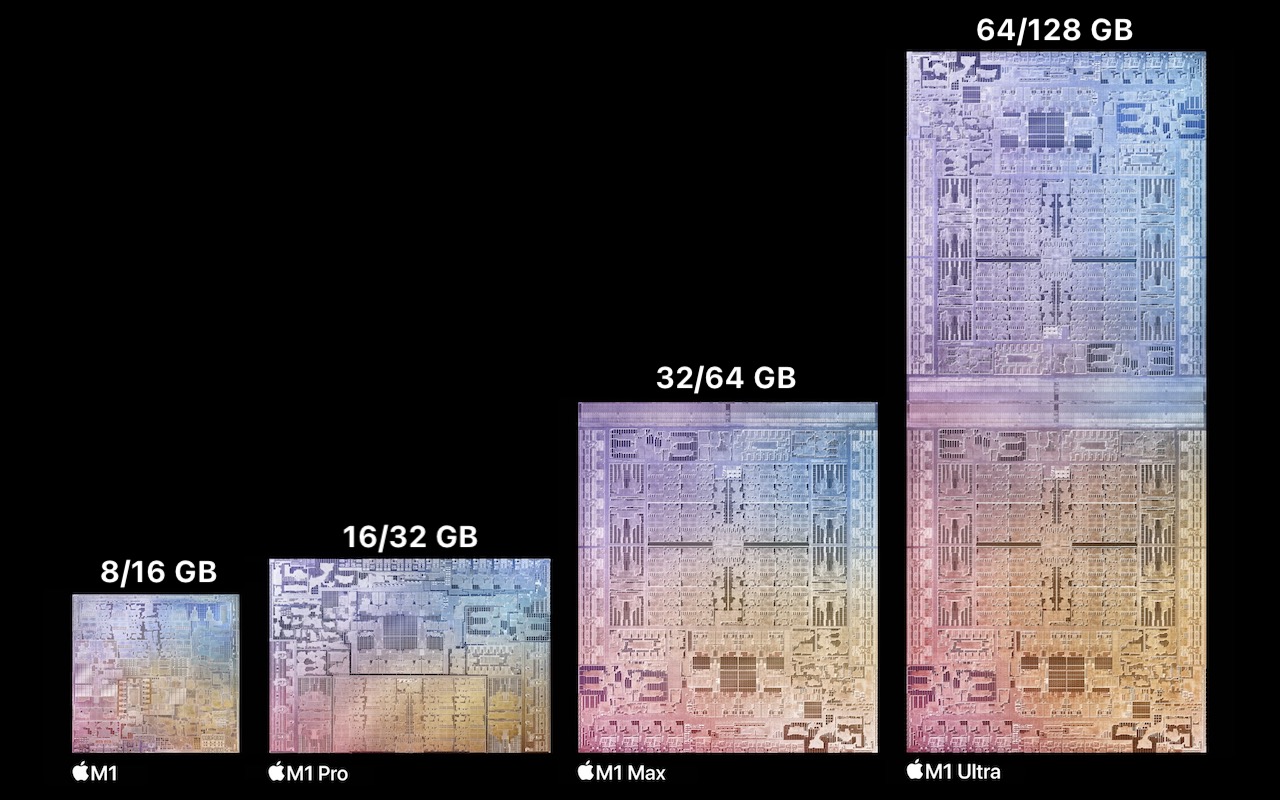
If you’re thinking about buying a new Mac, you’re almost certainly planning to get one that uses a chip from Apple’s M1 family—the M1, M1 Pro, M1 Max, and M1 Ultra. Only the Mac Pro and one Mac mini configuration still rely on Intel CPUs, and they will likely be discontinued before the end of 2022. That’s not a bad thing—the M1 chips offer astonishing performance combined with low power consumption. But the move from Intel chips to Apple silicon has changed the game when it comes to one decision: how much memory to get.
That’s because Apple completely rearchitected how M1-based Macs incorporate memory. On Intel-based Macs that have separate CPU and GPU chips, each chip has its own memory. For instance, the base level Mac Pro comes with 32 GB of RAM on user-replaceable memory sticks, while its Radeon Pro graphics card has 8 GB of memory. The main advantage of this approach is that you can install more system memory if you need it—up to 1.5 TB at purchase time or later—and you can opt for one or even two video cards with up to 64 GB of memory. But that sort of flexibility was available only for the Mac Pro, Mac mini, and now-discontinued 27-inch iMac—with Apple’s laptops, you couldn’t upgrade memory because it was soldered onto the logic board, not socketed.
For M1-based Macs, Apple went even further and built “unified memory” directly onto the M1 chip itself. This provides significant performance benefits for two reasons:
- Shared memory pool: The M1 chips contain CPU cores, GPU cores, and Neural Engine cores, all of which need to use memory. By creating a shared pool of memory—hence the “unified memory” name—each processor can operate on the same data in memory rather than sending it back and forth from chip to chip. That’s both faster and more efficient.
- Higher memory bandwidth: By building memory onto the M1 chips themselves, Apple could also speed up the connection between memory and the various processors. Communication between on-chip components is much faster than when data has to travel back and forth between chips across the circuitry of the logic board and graphics card, as was the case for Intel-based Macs.
The downside of unified memory is that you’re stuck with how much you choose when you buy a Mac—there’s no way to upgrade the memory later. Given that only certain Macs have particular M1 chips, figuring out how much you need gets a little complicated.
For instance, if you want a MacBook Air, you can only choose between 8 GB and 16 GB of memory. However, if you are interested in the 14-inch MacBook Pro, you can get either an M1 Pro or M1 Max, and which chip you choose determines whether you can opt for 16 GB, 32 GB, or 64 GB of memory. Here are your choices, with each chip offering two options:
- M1: 8 GB and 16 GB. Used in the MacBook Air, 13-inch MacBook Pro, Mac mini, and 24-inch iMac. The 16 GB option adds $200 to the price.
- M1 Pro: 16 GB and 32 GB. Used in the 14-inch and 16-inch MacBook Pro. The 32 GB option adds $400 to the price.
- M1 Max: 32 GB and 64 GB. Used in the 14-inch and 16-inch MacBook Pro and Mac Studio. The 64 GB option costs an additional $400, half the price per gigabyte of the M1 and M1 Pro memory upgrades.
- M1 Ultra: 64 GB and 128 GB. Used solely in the Mac Studio. The 128 GB option costs an additional $800, matching the M1 Max’s price per gigabyte.
With all that background in your head, here are some questions to guide your decision:
- What sort of user are you? For average users who use Safari, Mail, Photos, and the apps in Apple’s iWork suite, an M1 Mac with 8 GB is probably sufficient, although $200 isn’t that much more to pay for 16 GB. If you regularly work with photos, audio, or video, a Mac with an M1 Pro or M1 Max would likely be more appropriate, and the larger the files you work with, the more memory you should get. Only those with the highest performance demands, such as a video professional working with 8K video or data scientist, should consider a Mac Studio with an M1 Ultra—if you’re at that level, you probably know if you need 64 GB or 128 GB.
- How much RAM do you have now? Another way to approach the problem is to think about how much RAM your current Intel-based Mac has, and if that’s enough. (Look at the Memory Pressure graph in the Memory tab of Activity Monitor—if it’s regularly yellow or red, you need more memory.) The increased performance and efficiency of memory use on the M1 chips suggest that you can get away with the same amount or even less than you have now while still enjoying improved performance. We recommended 16 GB as the minimum for Intel-based Macs, but 8 GB seems to be an acceptable base level for M1-based Macs.
- Do you anticipate increased memory needs? The hardest part of the decision is looking into the future and thinking about whether a certain amount of memory will be sufficient in several years. It’s never a bad idea to buy more memory than you think you need now to plan for the future—just more expensive. For example, if you’re on the fence between 16 GB and 32 GB with an M1 Pro-based Mac, $400 may be a reasonable price to pay for some future-proofing.
In the end, you’ll never regret having more memory, though you may dislike paying for it now. If cost is a real problem, you’re probably better off getting more memory and less internal SSD storage, since you can always add more external storage. Regardless, feel to reach out for help choosing the right Mac and memory configuration.
(Featured image by Apple)
Social Media: Unified memory in the M1-based Macs boasts increased efficiency and performance but can’t be expanded after purchase. How much should you get when you buy a new Mac? Read on for our advice: